Log in to your CivilSoftLab account to manage licenses, download software and access the dashboard.
Sign in.
Access your dashboard and manage licenses.
you@company.com
Your registered account email
••••••••
Minimum 8 characters
Forgot password?
Log in
Don't have an account? Create one
Field-by-Field Explanation
Email
• Must be the exact email used during registration.
• Accepts any valid email format (name@domain.com, .fr, .dz, etc.).
• The field is automatically converted to lowercase.
• If you enter an email that does not exist in our system, we send a security notification to that address warning about the login attempt.
Password
• Minimum 8 characters. All characters allowed (letters, numbers, symbols).
• Passwords are case-sensitive (A ≠ a).
• Click the eye icon on the right to toggle visibility and verify what you typed.
• After 5 failed attempts, your account is throttled for 1 minute (protection against brute-force attacks).
Remember Me
• If checked, your session persists for 30 days.
• If unchecked, the session expires when you close the browser.
• Do not check this on shared or public computers.
Forgot Password? (link)
• Redirects you to the password recovery page.
• See the Password Recovery section for a full walkthrough.
Telegram Notifications
If you connected your Telegram account, you receive an instant Telegram message every time someone logs in from a new device or browser.
Se Connecter
Connectez-vous à votre compte CivilSoftLab pour gérer vos licences, télécharger des logiciels et accéder au tableau de bord.
Se connecter.
Accédez à votre tableau de bord et gérez vos licences.
vous@entreprise.com
L'e-mail de votre compte enregistré
••••••••
Minimum 8 caractères
Mot de passe oublié ?
Se connecter
Pas de compte ? Créer un compte
Explication Champ par Champ
E-mail
• Doit être exactement l'e-mail utilisé lors de l'inscription.
• Accepte tout format valide (nom@domaine.com, .fr, .dz, etc.).
• Le champ est automatiquement converti en minuscules.
• Si vous saisissez un e-mail inexistant dans notre système, nous envoyons une notification de sécurité à cette adresse pour signaler la tentative de connexion.
Mot de Passe
• Minimum 8 caractères. Tous les caractères sont acceptés (lettres, chiffres, symboles).
• Les mots de passe sont sensibles à la casse (A ≠ a).
• Cliquez sur l'icône œil à droite pour basculer la visibilité et vérifier votre saisie.
• Après 5 tentatives échouées, votre compte est verrouillé pendant 1 minute (protection contre les attaques par force brute).
Rester Connecté
• Si coché, votre session persiste pendant 30 jours.
• Si non coché, la session expire à la fermeture du navigateur.
• Ne pas cocher cette option sur des ordinateurs partagés ou publics.
Mot de passe oublié ? (lien)
• Vous redirige vers la page de récupération de mot de passe.
• Consultez la section Récupération de Mot de Passe pour un guide complet.
Notifications Telegram
Si vous avez connecté votre compte Telegram, vous recevrez un message Telegram instantané chaque fois que quelqu'un se connecte à votre compte depuis un nouvel appareil ou navigateur.
Create Your Account
Join the platform - one account for every tool.
Create your account.
Join the platform - one account for every tool.
Hamidi
Your family / surname
Abdelmadjid
Your given name as on official documents
hamidi.abdelmadjid
Letters, numbers, dashes and underscores only
dd/mm/yyyy
Born before current year
Civil Engineer
e.g. Civil Engineer, Architect
Company name
Your company or organization name
+213 ...
Ex: +213XXXXXXXXX or 05/06/07XXXXXXXX
Telegram ID
Get ID
you@company.com
We'll send a verification link here
WhatsAppComing Soon
••••••••
Minimum 8 characters
••••••••
Must match the password above
Register
Already have an account? Sign in
Validation Rules & Details
Username
Must be unique across the platform. Only letters, numbers, dashes (-), and underscores (_) are allowed. Spaces are strictly prohibited. An icon will indicate if the username is available.
Algerian Phone Number
We enforce strict validation for Algerian numbers. Acceptable formats:
International: +213 followed by 9 digits.
Local: 05, 06, or 07 followed by 8 digits.
Telegram Bot Integration
Connecting Telegram provides instant security alerts and notifications.
Click Get ID to open our official Telegram bot.
The bot will send you a unique numeric ID.
Paste that ID into the "Telegram User ID" field.
If the ID you enter doesn't match the one detected by our system, a prompt will ask you to confirm which one to use.
Check the Telegram box under "Receive notifications" to enable alerts upon registration.
The Registration Process
1. Submit: When you click "Register", your data is validated. Errors are highlighted in red.
2. Account Creation: If valid, your account is created with the default "user" role.
3. Verification Email: An automated email is dispatched immediately containing your activation link.
4. Automatic Login: You are automatically signed in to streamline the process.
5. Redirection: You are redirected to your dashboard. However, you will be blocked by a verification screen until you click the link in your email.
Créer Votre Compte
Rejoignez la plateforme - un seul compte pour tous les outils.
Créer votre compte.
Rejoignez la plateforme - un seul compte pour tous les outils.
Hamidi
Votre nom de famille
Abdelmadjid
Votre prénom tel que sur les documents officiels
hamidi.abdelmadjid
Lettres, chiffres, tirets et underscores uniquement
jj/mm/aaaa
Né(e) avant l'année en cours
Ingénieur Civil
ex. Ingénieur Civil, Architecte
Nom de l'entreprise
Le nom de votre entreprise ou organisation
+213 ...
Ex: +213XXXXXXXXX ou 05/06/07XXXXXXXX
ID Telegram
Obtenir ID
vous@entreprise.com
Nous enverrons un lien de vérification ici
WhatsAppBientôt
••••••••
Minimum 8 caractères
••••••••
Doit correspondre au mot de passe ci-dessus
S'inscrire
Vous avez déjà un compte ? Se connecter
Règles de Validation & Détails
Nom d'utilisateur
Doit être unique sur la plateforme. Seuls les lettres, les chiffres, les tirets (-) et les traits de soulignement (_) sont autorisés. Les espaces sont strictement interdits. Une icône indiquera si le nom d'utilisateur est disponible.
Numéro de Téléphone Algérien
Nous appliquons une validation stricte pour les numéros algériens. Formats acceptés :
International : +213 suivi de 9 chiffres.
Local : 05, 06, ou 07 suivi de 8 chiffres.
Intégration du Bot Telegram
Connecter Telegram fournit des alertes et des notifications de sécurité instantanées.
Cliquez sur Obtenir ID pour ouvrir notre bot Telegram officiel.
Le bot vous enverra un identifiant numérique unique.
Collez cet identifiant dans le champ "ID Utilisateur Telegram".
Si l'identifiant que vous entrez ne correspond pas à celui détecté par notre système, une invite vous demandera de confirmer lequel utiliser.
Cochez la case Telegram sous "Recevoir des notifications" pour activer les alertes dès l'inscription.
Le Processus d'Inscription
1. Soumission : Lorsque vous cliquez sur "S'inscrire", vos données sont validées. Les erreurs sont surlignées en rouge.
2. Création de Compte : S'il est valide, votre compte est créé avec le rôle "utilisateur" par défaut.
3. E-mail de Vérification : Un e-mail automatique contenant votre lien d'activation est envoyé immédiatement.
4. Connexion Automatique : Vous êtes automatiquement connecté pour simplifier le processus.
5. Redirection : Vous êtes redirigé vers votre tableau de bord. Cependant, vous serez bloqué par un écran de vérification jusqu'à ce que vous cliquiez sur le lien dans votre e-mail.
Password Recovery
Forgot your credentials? We have a secure multi-channel recovery system to get you back into your dashboard.
Guest Recovery
Standard Reset Link
Forgot password.
We’ll email you a secure link to reset your password.
you@company.com
Enter the email associated with your account
Send reset link
What happens:
We check if the email exists in our database.
If it does, a unique 60-minute token is generated.
You receive an email with a "Reset Password" button.
Clicking it allows you to choose a new, strong password.
Authenticated User
Security Check View
Security Check.
We noticed you're already connected to your account.
Did you really forget?
If you saw an error on the desktop app, it might just be a typo. You can try logging in again first.
Yes, I want to change it
This will sign you out and send a reset link.
Logout & Reset
No, it was a mistake
Continue using your dashboard.
Crucial Warning:
Clicking Logout & Reset will immediately invalidate your current session. You will be logged out and must re-authenticate on all your devices after changing your password.
Telegram Sync Alert
Connected users receive a double alert during a password reset.
Channel 1: Official Email
A detailed email is sent confirming the password change, including your current IP address and browser info. If it wasn't you, you must contact support immediately.
Channel 2: Telegram Bot
Our bot pings you: "✅ Password Changed Successfully". This ensures you're notified even if your email is somehow compromised.
Récupération de Mot de Passe
Vous avez oublié vos identifiants ? Nous avons un système de récupération sécurisé pour vous redonner accès à votre tableau de bord.
Récupération Visiteur
Lien de Réinitialisation Standard
Mot de passe oublié.
Nous vous enverrons un lien sécurisé par e-mail.
vous@entreprise.com
Entrez l'e-mail associé à votre compte
Envoyer le lien
Ce qui se passe :
Nous vérifions si l'e-mail existe dans notre base.
Si oui, un jeton unique valable 60 minutes est généré.
Vous recevez un e-mail avec un bouton "Réinitialiser".
En cliquant dessus, vous pouvez choisir un nouveau mot de passe fort.
Utilisateur Connecté
Vue de Contrôle de Sécurité
Contrôle de Sécurité.
Nous avons remarqué que vous êtes déjà connecté à votre compte.
L'avez-vous vraiment oublié ?
Si vous avez vu une erreur sur l'application de bureau, il s'agit peut-être d'une faute de frappe. Essayez de vous reconnecter d'abord.
Oui, je veux le changer
Cela vous déconnectera et enverra un lien.
Déconnexion & Réinitialisation
Non, c'était une erreur
Continuer à utiliser votre tableau de bord.
Avertissement Crucial :
Cliquer sur Déconnexion & Réinitialisation invalidera immédiatement votre session actuelle. Vous serez déconnecté et devrez vous ré-authentifier sur tous vos appareils après avoir changé votre mot de passe.
Alerte de Synchronisation Telegram
Les utilisateurs connectés reçoivent une double alerte lors d'une réinitialisation.
Canal 1 : E-mail Officiel
Un e-mail détaillé est envoyé confirmant le changement de mot de passe, incluant votre adresse IP actuelle et les infos du navigateur. Si ce n'était pas vous, vous devez contacter le support immédiatement.
Canal 2 : Bot Telegram
Notre bot vous pinge : "✅ Mot de passe changé avec succès". Cela garantit que vous êtes informé même si votre e-mail est compromis.
Email Verification
Security first. We verify every email address to prevent account hijacking and ensure critical alerts reach you.
Verify your email.
Confirm your address to activate your account.
Thanks for signing up! Before getting started, could you verify your email address by clicking on the link we just emailed to you?
Resend Verification Email
Log Out
Why is this required?
Anti-Spam: Prevents bots from creating millions of fake engineering profiles.
License Security: Your product licenses are tied to your email. Verification guarantees you actually own that inbox.
Critical Alerts: Ensures password reset links and Telegram sync notifications go to the right person.
Troubleshooting Tips
• Check the Promotions or Spam tabs in Gmail/Outlook. Sometimes automated emails get filtered.
• If you have been waiting for more than 5 minutes, use the Resend button to request a new link.
• Ensure your IT department isn't blocking automated emails from our domain.
• If you realized you made a typo in your email during registration, you will need to click Log Out and create a new account with the correct email.
Vérification d'E-mail
La sécurité d'abord. Nous vérifions chaque adresse e-mail pour éviter le détournement de compte et garantir que les alertes critiques vous parviennent.
Vérifiez votre e-mail.
Confirmez votre adresse pour activer votre compte.
Merci de vous être inscrit ! Avant de commencer, pourriez-vous vérifier votre adresse e-mail en cliquant sur le lien que nous venons de vous envoyer ?
Renvoyer l'e-mail de vérification
Se déconnecter
Pourquoi est-ce requis ?
Anti-Spam : Empêche les robots de créer des millions de faux profils d'ingénierie.
Sécurité des Licences : Vos licences de produits sont liées à votre e-mail. La vérification garantit que vous possédez réellement cette boîte de réception.
Alertes Critiques : Garantit que les liens de réinitialisation et les notifications Telegram parviennent à la bonne personne.
Conseils de Dépannage
• Vérifiez les onglets Promotions ou Spam dans Gmail/Outlook. Les e-mails automatisés sont parfois filtrés.
• Si vous attendez depuis plus de 5 minutes, utilisez le bouton Renvoyer pour demander un nouveau lien.
• Assurez-vous que votre service informatique ne bloque pas les e-mails automatisés de notre domaine.
• Si vous avez fait une faute de frappe dans votre e-mail lors de l'inscription, cliquez sur Se déconnecter et créez un nouveau compte avec la bonne adresse.
Create an Account
Follow these steps to join CivilSoftLab, verify your
email, and access your professional workspace.
1
Access the Registration Page
Click the Register
button in the top navigation bar.
2
Fill Your Information
Provide your full name, email, and choose a strong
password. You can also specify your occupation and society for a personalized experience.
3
Email Verification
After registering, you must verify your email.
Check your inbox (and spam folder) for a verification link. You cannot access the dashboard
until this step is completed.
Créer un Compte
Suivez ces étapes pour rejoindre CivilSoftLab, vérifier
votre e-mail et accéder à votre espace de travail professionnel.
1
Accéder à la page d'inscription
Cliquez sur le bouton S'inscrire dans la barre de navigation supérieure.
[CAPTURE D'ÉCRAN REQUISE : Barre de
navigation mettant en évidence le bouton S'inscrire]
2
Remplir vos informations
Fournissez votre nom complet, votre e-mail et
choisissez un mot de passe robuste. Vous pouvez également spécifier votre profession et votre
société pour une expérience personnalisée.
[CAPTURE D'ÉCRAN REQUISE : Le formulaire
d'inscription avec tous les champs visibles]
Dashboard Overview
Your central hub for managing licenses, slots, and
technical assets.
Profile & Settings
Quickly edit your professional profile and society details directly
from the top card.
Product Licenses
Overview of your active subscriptions, remaining days, and slot
availability for each bridge module.
Manage Your Assets
The main dashboard allows you to buy new licenses, extend
existing ones, or manage your Slots requests. Our new responsive layout ensures you can handle these
operations from any device.
Aperçu du Tableau de Bord
Votre centre névralgique pour gérer vos licences, vos
slots et vos ressources techniques.
Profil & Paramètres
Modifiez rapidement votre profil professionnel et les détails de votre
société directement depuis la carte supérieure.
Licences de Produits
Aperçu de vos abonnements actifs, jours restants et disponibilité des
slots pour chaque module de pont.
Downloads & Updates
Access the most stable and updated structural
calculation software directly from our repository.
How to Download?
Browse by product category, review the changelog for
specific bug fixes or features, and click the Download button. All files are scanned and verified for
safety.
Téléchargements & Mises à Jour
Accédez au logiciel de calcul structurel le plus
stable et mis à jour directement depuis notre référentiel.
Node Verification Overview
Integrated verification of beam-column joints
according to RPA 2024 / 2003 seismic codes.
Core Modules & Features
The Node Verification web app consists of several powerful modules designed to streamline your seismic
verification process:
Robot Integration: Seamlessly extract geometry and forces directly from your
active
Autodesk Robot Structural Analysis session.
Advanced Section Editor: Interactively modify beam and column dimensions, as well
as complex reinforcement layouts in real-time.
Moment Visualization: Analyze precise SVG-based moment distribution and
interaction
diagrams.
Ouvrez votre projet dans Autodesk Robot Structural Analysis.
Dans l'application Web, sélectionnez les numéros du nœud, de la poutre et du poteau.
Cliquez sur le bouton d'extraction pour récupérer les propriétés géométriques et les combinaisons
de charges maximales.
Note : Nécessite que le Connecteur CSL soit connecté à une session Robot active.
Exemple de carte d'identification de nœud
Section Editor
Define reinforcement layouts and cross-section
properties interactively.
Features
Visual Editor: Drag and drop or manually input rebar coordinates for highly
complex
sections.
Instant Feedback: See your changes reflected instantly on the canvas, ensuring
accurate placement.
Material Assignment: Assign specific concrete and steel grades directly to the
elements.
Validation: Real-time checks ensure your layout meets minimum regulatory spacing
and cover requirements.
Éditeur de Section
Définissez les dispositions d'armatures et les
propriétés de la section de manière interactive.
Fonctionnalités
Éditeur Visuel : Saisissez manuellement les coordonnées des armatures pour des
sections complexes.
Retour Instantané : Visualisez vos modifications instantanément sur le canevas.
Attribution des Matériaux : Affectez des nuances de béton et d'acier spécifiques
aux éléments.
Validation : Des vérifications en temps réel garantissent que votre disposition
respecte les exigences réglementaires.
Professional Reports
Generate exhaustive PDF documentation for your project
submissions.
The PDF Report Generation module automatically compiles all input data, section
properties, applied forces, and step-by-step calculation logic into a single document.
Includes high-quality vector graphics of the moment distributions and cross-sections.
Displays exact formulas and code references (e.g., RPA 2024 article numbers) used for the
verification.
Clearly highlights Passed (Green) or Failed (Red) status for each check.
Rapports Professionnels
Générez une documentation PDF exhaustive pour vos
soumissions de projets.
Le module de Génération de Rapports PDF compile automatiquement toutes les données
d'entrée, les propriétés de section, les efforts appliqués et la logique de calcul étape par étape.
Inclut des graphiques vectoriels de haute qualité des distributions de moments.
Affiche les formules exactes et les références aux articles du code RPA utilisés.
Met clairement en évidence le statut Réussi (Vert) ou Échoué (Rouge) pour chaque vérification.
How to Buy & Manage LicensesComment Acheter et Gérer les Licences
Our licensing system is designed to be flexible. You can purchase packs of "Slots" for specific durations and assign them to your team.Notre système de licence est conçu pour être flexible. Vous pouvez acheter des packs de "Slots" pour des durées spécifiques et les attribuer à votre équipe.
1Select Your PackSélectionnez Votre Pack
A
B
A
Pack Details
Détails du Pack
Each pack lists its core features, including the number of slots and technical support priority.
Chaque pack liste ses caractéristiques principales, y compris le nombre de slots et la priorité du support technique.
B
Purchase Button
Bouton d'Achat
Click "Buy License" to open the configuration modal and customize your request.
Cliquez sur "Acheter une Licence" pour ouvrir la modale de configuration et personnaliser votre demande.
2Configure & PayConfigurer & Payer
C
Slots5
Duration1 Year
D
Total Amount12,500 DZD
Upload payment receiptTélécharger le reçu de paiement
C
Live Adjustments
Ajustements en Direct
You can increase the number of slots or years directly in the modal. The price updates instantly.
Vous pouvez augmenter le nombre de slots ou d'années directement dans la modale. Le prix se met à jour instantanément.
D
Proof of Payment
Preuve de Paiement
Upload a clear screenshot of your BaridiMob or CCP receipt. This is required for approval.
Téléchargez une capture d'écran claire de votre reçu BaridiMob ou CCP. Ceci est requis pour l'approbation.
Request ApprovalApprobation de la Demande
Once submitted, our team will review your receipt. Once approved, the license will appear in your Profile Hub under "My Products" and you can start assigning seats.Une fois soumise, notre équipe examinera votre reçu. Après approbation, la licence apparaîtra dans votre Espace Profil sous "Mes Produits" et vous pourrez commencer à attribuer des slots.
Seat Management & HWID
Instructions for assigning seats to team members and
managing hardware locks.
Understanding Seat Status
Free
Ready to be assigned to yourself or another user.
Assigned
Linked to a specific user, but not yet locked to a computer.
Bound (Active)
Locked to a specific hardware ID (Computer).
1
Share a Seat
Click on Assign to
Other and enter the recipient's email address. They will receive an access key and
instructions.
2
Unbind & Revoke
If a user no longer needs access or changes their
computer, the owner can click Unbind HWID or Revoke to free the seat.
Gestion des Slots et HWID
Instructions pour attribuer des slots aux membres de
l'équipe et gérer les verrous matériels.
Comprendre les États du Slot
Libre (Free)
Prêt à être attribué à vous-même ou à un autre utilisateur.
Attribué (Assigned)
Lié à un utilisateur spécifique, mais pas encore verrouillé sur un PC.
Lié (Active/Bound)
Verrouillé sur un ID matériel spécifique (PC).
1
Partager un Slot
Cliquez sur Assign to
Other et entrez l'adresse e-mail. Ils recevront une clé d'accès et des instructions.
2
Délier et Révoquer
Si un utilisateur n'a plus besoin d'accès ou change
de PC, le propriétaire peut cliquer sur Unbind HWID ou
Revoke pour libérer le slot.
PC Change Policy
Hardware binding is strictly enforced to ensure
security. Here is how to handle computer changes.
The Unbind Process
First Request: The first time you change your PC, the system allows an
Automatic Unbind. Just log in on the new device.
Subsequent Changes: Any further change requires a PC Change
Request.
Approval: If you are the owner, the request is logged. If you are using a
shared seat, the License Owner must approve the change from their dashboard.
Requesting a Change
If your seat is already bound to another device, use
the Change PC button in the dashboard to initiate the request.
Politique de Changement de PC
La liaison matérielle est strictement appliquée pour
garantir la sécurité. Voici comment gérer les changements de PC.
Le Processus de Détachement
Première Demande : La première fois, le système autorise un Détachement
Automatique. Connectez-vous simplement sur le nouveau PC.
Changements Suivants : Tout changement ultérieur nécessite une Demande de Changement PC.
Approbation : Si vous êtes le propriétaire, la demande est enregistrée. Si vous
utilisez un slot partagé, le Propriétaire de la Licence doit approuver le
changement.
Faire une Demande
Si votre slot est déjà lié à un autre appareil,
utilisez le bouton Change PC dans le tableau de bord.
Master Keys Guide
Quickly access license slots using generated Master
Keys.
1
Locate the Key
Each active pack has a unique Master
Key in the license details section. Copy this key to share with team members.
2
Request Access
Recipients can go to their dashboard and click
Join License (or equivalent) to paste the key and request a seat.
Guide des Clés Maîtresse (Master Keys)
Accédez rapidement aux slots de licence à l'aide des
clés maîtresse générées.
1
Localiser la Clé
Chaque pack actif possède une Master
Key unique. Copiez cette clé pour la partager avec les membres de l'équipe.
2
Demander l'Accès
Les destinataires peuvent aller sur leur tableau de
bord et cliquer sur Rejoindre une Licence pour coller la clé.
How to Buy a License
1
Access the Product Page
First, go to the product page and navigate to the
Integrator Plans section.
Cliquez sur le bouton Buy
Seat pour le plan de votre choix.
3
Attacher le Reçu de Paiement
Dans les champs des pièces jointes, ajoutez des
captures d'écran de vos reçus de paiement. Vous pouvez télécharger plusieurs images. Cliquez ensuite sur Submit.
4
Accéder à la Demande
Cliquez sur la nouvelle boîte de produit dans votre tableau de bord pour afficher les détails de la demande.
5
Suivre votre Demande
Vous pouvez voir que votre demande de licence est en attente d'approbation. Une fois approuvée par l'administrateur, vous recevrez un e-mail.
6
Vérifier la Licence Approuvée
Une fois votre licence approuvée, vous pouvez vérifier son statut dans votre tableau de bord.
Le slot étant détaché, vous pouvez maintenant ouvrir votre application RPA Integrator et vous connecter avec votre e-mail et votre mot de passe.
Prêt à Travailler
Une fois authentifié, vous êtes prêt à commencer à travailler avec l'application !
Spectrum Analysis
Generate and export seismic response spectrums directly
to Autodesk Robot in a dynamic way.
1. Seismic Parameters
Before launching Integrator, ensure Autodesk Robot is running. Input your zone, site
category, and importance factor to compute the $A$, $\eta$, and $R$ values automatically.
2. Export to Robot
Once the spectrum is generated, use the export buttons to create the spectrum
definition and assign it to seismic cases in Robot.
Wait for the "Export Completed Successfully" message to ensure the data is fully transmitted.
Analyse Spectrale
Générez et exportez des spectres de réponse sismique
directement vers Autodesk Robot de manière dynamique.
1. Paramètres Sismiques
Avant de lancer l'Intégrateur, assurez-vous que Robot est ouvert. Saisissez votre
zone, catégorie de site et facteur d'importance pour calculer automatiquement les valeurs $A$,
$\eta$ et $R$.
2. Exportation vers Robot
Une fois le spectre généré, utilisez les boutons d'exportation pour créer la
définition du spectre et l'affecter aux cas sismiques dans Robot.
Combination Module
Generate complex load combinations automatically and
export them to Robot Structural Analysis.
1. Load Cases Extraction
Click on Get Cases to pull all defined load cases from your active
Robot project.
Once loaded, check the table and select which cases to include in your combinations.
2. Generate Combinations
Select your generation options and click on Generate Combinations.
Integrator will compute all necessary permutations based on RPA/DTR rules.
3. Export to Robot
Review the generated combinations and click Export to Robot. A
progress bar will track the transmission.
Module de Combinaisons
Générez automatiquement des combinaisons de charges
complexes et exportez-les vers Robot Structural Analysis.
1. Extraction des Cas de Charge
Cliquez sur Get Cases pour récupérer tous les cas de charge définis
dans votre projet Robot actif.
2. Génération des Combinaisons
Définissez vos options et cliquez sur Generate Combinations pour
calculer les permutations selon les règles RPA/DTR.
3. Exportation vers Robot
Une fois les combinaisons prêtes, cliquez sur Export to Robot pour
les envoyer directement vers votre session Robot.
In-App Help Section
The Integrator includes a built-in help screen for
quick formula lookup and RPA requirements checklist.
You can find more detailed help about specific modules (Spectrum or Combinations) directly within the
application by clicking the help icons.
Aide Intégrée
L'Intégrateur comprend un écran d'aide intégré pour
une consultation rapide des formules et des exigences RPA.
Vous pouvez trouver une aide détaillée sur les modules spécifiques (Spectre ou Combinaisons) directement
dans l'application via les icônes d'aide.
Contact & Assistance
Need help or found a technical issue? Our team is here
to support you.
Reach out to us via the contact section in your dashboard or directly through our support channels.
Contact & Assistance
Besoin d'aide ou un problème technique ? Notre équipe
est là pour vous accompagner.
Contactez-nous via la section contact de votre tableau de bord ou directement par nos canaux de support.
The New Profile HubLe Nouvel Espace Profil
The profile interface has been completely refactored into a modular hub. Each section is now independent, allowing for faster updates and clearer management.L'interface de profil a été complètement refactorisée en un espace modulaire. Chaque section est désormais indépendante, permettant des mises à jour plus rapides et une gestion plus claire.
2
3
4
1
Modular Navigation
Navigation Modulaire
The sidebar now controls independent sections. Switching tabs is instantaneous and supports URL direct linking (e.g. #security).
La barre latérale contrôle désormais des sections indépendantes. Le changement d'onglet est instantané et supporte les liens directs (ex: #security).
2
Isolated Sections
Sections Isolées
Each part of your profile (Security, Notifications, etc.) is wrapped in its own card and form, preventing data conflicts.
Chaque partie de votre profil (Sécurité, Notifications, etc.) est enveloppée dans sa propre carte et formulaire, évitant les conflits de données.
3
Immediate Actions
Actions Immédiates
Save buttons have been moved to the header of each section, providing faster access without scrolling to the bottom.
Les boutons de sauvegarde ont été déplacés dans l'en-tête de chaque section, offrant un accès plus rapide sans défiler vers le bas.
4
Localized Feedback
Retour Localisé
Validation errors and success messages are now shown directly within the active section you are editing.
Les erreurs de validation et les messages de succès sont désormais affichés directement dans la section active que vous modifiez.
Pro Tip: Deep LinkingAstuce Pro : Liens Directs
You can navigate directly to any section by adding its identifier to the URL. For example, use /profile#security to jump straight to password settings.Vous pouvez naviguer directement vers n'importe quelle section en ajoutant son identifiant à l'URL. Par exemple, utilisez /profile#security pour accéder directement aux paramètres de mot de passe.
1. My Products Section1. Section Mes Produits
This section provides a centralized view of all licenses you own or have access to via Master Keys.Cette section offre une vue centralisée de toutes les licences que vous possédez ou auxquelles vous avez accès via des Clés Maîtresses.
OWNED
1
2
1
Status Badges
Badges de Statut
Identifies your relationship with the product: Owned, Assigned (via Master Key), or Expiring.
Identifie votre relation avec le produit : Owned (Possédé), Assigned (Attribué), ou Expiring (Expire bientôt).
2
Quick Access
Accès Rapide
Click to open the product dashboard or view technical drawings directly from your profile.
Cliquez pour ouvrir le tableau de bord du produit ou voir les plans techniques directement depuis votre profil.
Master Key RedemptionUtilisation de Clé Maîtresse
If an administrator or a license owner provided you with a Master Key, enter it in the input field at the bottom of the products list to request your seat.
Si un administrateur ou un propriétaire de licence vous a fourni une Clé Maîtresse, saisissez-la dans le champ en bas de la liste des produits pour demander votre accès.
XXXX-XXXX-XXXX-XXXX
2. General Information2. Informations Générales
Maintain your professional identity and ensure your contact details are up to date for license assignments.Gérez votre identité professionnelle et assurez-vous que vos coordonnées sont à jour pour l'attribution des licences.
1
civil_engineer_24
Username is available
Nom d'utilisateur disponible
Live Username Validation
Validation du Nom d'Utilisateur
As you type, the system checks if your chosen username is unique across the platform. A green border indicates success.
Pendant que vous tapez, le système vérifie si votre nom d'utilisateur est unique sur la plateforme. Une bordure verte indique le succès.
2
+213 555 12 34 56
Must be a valid Algerian phone number.
Doit être un numéro de téléphone algérien valide.
Phone Number: Essential for potential WhatsApp notifications and professional contact.
Numéro de Téléphone : Essentiel pour les notifications WhatsApp et le contact professionnel.
3
123456789
CONNECTED
Telegram Integration: Use the "Get ID" button to open our bot. It will securely link your account for instant alerts.
Intégration Telegram : Utilisez le bouton "Get ID" pour ouvrir notre bot. Il liera votre compte en toute sécurité pour des alertes instantanées.
3. Security Settings3. Paramètres de Sécurité
Protect your account and your engineering licenses by maintaining a strong, unique password.Protégez votre compte et vos licences en maintenant un mot de passe fort et unique.
1
Current Password Validation
Validation du Mot de Passe Actuel
••••••••••••••
To prevent unauthorized changes, we require your current password whenever you update security settings or sensitive info.
Pour empêcher tout changement non autorisé, nous exigeons votre mot de passe actuel chaque fois que vous mettez à jour les paramètres de sécurité.
2
Engineer@2024!
Engineer@2024!
MatchOK
Matching System: Real-time icons confirm that your new passwords are identical before you can click save.
Système de Correspondance : Des icônes en temps réel confirment que vos nouveaux mots de passe sont identiques avant de pouvoir enregistrer.
4. Notification Settings4. Paramètres de Notification
Customize how you receive alerts about license requests, approvals, and security updates.Personnalisez la façon dont vous recevez les alertes concernant les demandes de licence, les approbations et les mises à jour de sécurité.
1
Email Notifications
Notifications par Email
Recommended for critical alerts
Recommandé pour les alertes critiques
2
WhatsApp Bot
Bot WhatsApp
Integration coming soon
Intégration bientôt disponible
1. Email: Controlled directly via these toggles. All system messages are sent to your verified email.
2. WhatsApp: Currently a placeholder. Once active, it will require a verified phone number to function.
1. Email : Contrôlé directement via ces bascules. Tous les messages système sont envoyés à votre e-mail vérifié.
2. WhatsApp : Actuellement un espace réservé. Une fois actif, il nécessitera un numéro de téléphone vérifié.
5. The Danger Zone5. La Zone de Danger
Critical account actions that cannot be undone. Exercise extreme caution.Actions critiques sur le compte qui ne peuvent pas être annulées. Faites preuve d'une prudence extrême.
!
Delete My Account
Supprimer Mon Compte
Permanently erase all your data and license associations.
Effacez définitivement toutes vos données et associations de licences.
DELETE
What happens next?
Que se passe-t-il ensuite ?
All your **owned products** will be detached from your identity.
Tous vos **produits possédés** seront détachés de votre identité.
You will lose all active **Master Key** assignments instantly.
Vous perdrez instantanément toutes vos attributions de **Clés Maîtresses** actives.
Connection Issues
Troubleshoot communication between the CSL Connector and
the Web Server.
Common "Bridge Offline" causes:
Firewall blocking port 80/443 or specific app traffic.
Expired license or slot not properly assigned.
Mismatched versions between Desktop and Web apps.
If you continue to experience issues, please ensure the
CSL Connector is running and shows a green "Connected" status.
Problèmes de Connexion
Dépannage de la communication entre le Connecteur CSL
et le serveur Web.
Causes fréquentes de "Pont Hors Ligne" :
Pare-feu bloquant le port 80/443 ou le trafic de l'application.
Licence expirée ou slot mal assigné.
Incompatibilité de version entre les applications Bureau et Web.
Si les problèmes persistent, assurez-vous que le
Connecteur CSL est en cours d'exécution et affiche un statut "Connecté" en vert.
CSL Connector Guide
The bridge between your CivilSoftLab web applications
and your local desktop software.
1
Download the App
Go to the product page and click on the Download Connector App
button, or go directly to the download section and click the
download
button.
Extract the downloaded application archive on your PC.
Important Note
You MUST EXTRACT ALL FILES inside the rar archive to a folder before running the application.
Do not attempt to run the application directly from within the WinRAR or 7-Zip interface.
3
Ensure Connection
Make sure you have an active internet connection for authentication and connection
to the server.
4
Prepare Autodesk Robot
Open Autodesk Robot, load your project first, and run the calculations if needed.
5
Connect to Robot
Open the CSL Connector app and check the Robot icon. If it's colored rose, the connection is successful. If it's grayed out, click Reconnect; this
will restart the app to ensure Robot is detected first.
Important: Make sure that you always open Autodesk Robot before opening the
connector app so the connector app can read that Robot is open and read the opened project, else
click on the Reconnect button in the connector app.
If the server shows an error, restart the app or click on Restart Server.
6
Authenticate
When all is good, click on the Connect button and wait for
authentication. Your user email will appear once completed.
7
Start Working
Click Open App and select the application you want to use. The
connector will then display the active app and your associated pack.
8
Revit Integration (Bridge)
The CSL Connector features a specialized bridge for Autodesk Revit. Click the blue Revit logo in the footer to initialize the "Zero-Touch" installation.
• Automatic Setup: Deploys DLLs and manifests for Revit 2021-2027.
• Status Colors: Gray (Offline), Orange (Ready to Load), Green (Connected).
• Handshake: Verifies communication via a dedicated Named Pipe.
Extrayez l'archive de l'application téléchargée sur votre PC.
Remarque Importante
Vous DEVEZ EXTRAIRE TOUS LES FICHIERS de l'archive rar dans un dossier avant de lancer l'application.
N'essayez pas de lancer l'application directement depuis l'interface WinRAR ou 7-Zip.
3
Assurer la Connexion
Assurez-vous de disposer d'une connexion Internet active pour l'authentification et la
connexion au serveur.
4
Préparer Autodesk Robot
Ouvrez Autodesk Robot, chargez votre projet et lancez les calculs si nécessaire.
5
Se Connecter à Robot
Ouvrez l'application Connecteur CSL. Si l'icône Robot est rose, la connexion a réussi. Si elle est grisée, cliquez sur Reconnect.
Attention : Assurez-vous de toujours ouvrir Autodesk Robot avant d'ouvrir
l'application du connecteur afin que celle-ci puisse détecter que Robot est ouvert et lire le
projet actif. Sinon, cliquez sur le bouton Reconnect dans l'application du
connecteur.
6
S'Authentifier
Cliquez sur le bouton Connect. Votre email
s'affichera une fois authentifié.
7
Commencer à Travailler
Cliquez sur Open App et sélectionnez votre application. Le
connecteur affichera l'application active et votre pack.
8
Intégration Revit (Bridge)
Le Connecteur CSL dispose d'un pont spécialisé pour Autodesk Revit. Cliquez sur le logo bleu Revit dans le pied de page pour lancer l'installation "Zéro-Touch".
• Configuration Automatique : Déploie les DLL et manifestes pour Revit 2021-2027.
• Couleurs d'État : Gris (Hors ligne), Orange (Prêt à charger), Vert (Connecté).
• Vérification : Valide la communication via un canal de données dédié.
[Placeholder : Capture d'écran du flux de connexion Revit]
Interface & Fonctions Interactives
Support Telegram
Accédez à notre groupe de support officiel directement depuis la barre de titre pour une assistance en temps réel.
Centre d'Aide
Ouvrez instantanément ce portail de documentation pour consulter les étapes d'installation et le dépannage.
Changelog
Cliquez sur le numéro de version dans le pied de page pour voir l'historique détaillé des mises à jour.
Accès Portail
Le texte de copyright est interactif ; cliquez dessus pour revenir rapidement au portail CivilSoftLab.
Guide d'État Visuel
Thème Dynamique : Icônes adaptatives qui basculent entre les modes clair et sombre.
État de Connexion : Indicateurs "ON/OFF" en temps réel pour Robot et ETABS.
Suivi de Projet : Les noms des projets actifs apparaissent directement sous les icônes des logiciels.
Santé du Système
Monitoring Serveur : Suivi séparé de l'état du serveur WebSocket local et de son port.
Flux de Données : Les flèches de trafic visualisent les flux de données entrants et sortants.
Logs Intelligents : Journal d'activité épuré privilégiant les résultats lisibles en production.
How to Buy a License
Ongoing Development
This application is currently in ongoing development. It is released for exploration and testing purposes only. The final version will be released soon.
1
Access the Product Page
First, go to the product page and navigate to the
Plan Pack section.
Click on the Buy Seat
button for your preferred pack.
3
Promo Code & Authentication
If you have a valid Robot Complete license or a
promo code, click on the "Have a promo code?" text. It will show an input
field; enter your code (e.g., "RC" for Robot Complete users).
4
Attach Verification
In the attachment field, add a screenshot of your
Robot Complete window title that shows the license data, or the email sent to you when you
purchased the license. Then click Submit.
5
Request Confirmation
A success message will show with your entered data.
You can then click on Go to Dashboard.
6
Track Your Request
Click on the Pending Project
License card in your dashboard to see your request. Once the admin approves it, you
will receive an email. Log in again to see your license in the Approved state.
Comment Acheter une Licence
Phase de Développement en cours
Cette application est actuellement en cours de développement. Elle est publiée uniquement à des fins d'exploration et de test. La version finale sera bientôt disponible.
1
Accéder à la Page Produit
Tout d'abord, allez sur la page du produit et
accédez à la section Pack de Plans.
Cliquez sur le bouton Buy
Seat pour le pack de votre choix.
3
Code Promo et Authentification
Si vous possédez une licence Robot Complete ou un
code promo, cliquez sur "Have a promo code?". Un champ de saisie apparaîtra ;
entrez votre code (ex: "RC" pour les utilisateurs de Robot Complete).
4
Joindre la Vérification
Dans le champ des pièces jointes, ajoutez une
capture d'écran du titre de votre fenêtre Robot Complete affichant les données de licence, ou
l'e-mail reçu lors de l'achat. Cliquez ensuite sur Submit.
5
Confirmation de la Demande
Un message de succès affichera vos données. Vous
pouvez ensuite cliquer sur Go to Dashboard.
6
Suivre votre Demande
Cliquez sur la carte Pending Project
License de votre tableau de bord pour voir votre demande. Une fois approuvée, vous
recevrez un e-mail. Reconnectez-vous pour voir votre licence à l'état Approved.
CSL Connector Setup
Now you need to
download
and run the connector app. Follow the step-by-step guide to link it with
Autodesk Robot correctly.
CSL-Connector running and Robot project
open
Once the CSL-Connector is connected and authenticated, you can proceed to the web application.
For a complete step-by-step installation and configuration guide:
Voici à quoi le CSL-Connector devrait ressembler après une connexion et une authentification
réussies :
Revit Integration Guide
The CSL Connector includes a "Zero-Touch" bridge to seamlessly export reinforcement data from the web application to Autodesk Revit.
1
Locate the Revit Icon
In the CSL Connector status bar, you will find the Revit logo (blue icon) next to the Robot and ETABS status indicators.
[Placeholder: Screenshot showing Revit logo in CSL Connector]
Revit status icon in the footer
2
Connect & Install Bridge
Click on the Revit logo. A confirmation dialog will appear asking if you want to connect to Revit.
How it works: The connector automatically detects your Revit version (2021-2027), deploys the necessary .dll bridge, and creates the .addin manifest file in your local AppData folder.
3
Check Status Colors
Disconnected
Revit is closed or Bridge is not installed.
Restart Required
Bridge installed. Restart Revit to load it.
Connected
Bridge active. Ready for export.
4
Export to Revit
In the web application, go to the BBS / Export section and click Export to Revit.
The bridge will automatically create native, parametric rebar elements in your active Revit project.
[Placeholder: Screenshot of the "Export to Revit" button in the web app]
Guide de Connexion Revit
Le Connecteur CSL inclut un pont "Zéro-Installation" pour exporter sans effort vos données de ferraillage depuis l'application web vers Autodesk Revit.
1
Localiser l'icône Revit
Dans la barre d'état du Connecteur CSL, vous trouverez le logo Revit (icône bleue) à côté des indicateurs d'état Robot et ETABS.
[Placeholder: Capture d'écran montrant le logo Revit dans le Connecteur]
2
Connecter & Installer le Pont
Cliquez sur le logo Revit. Une boîte de dialogue de confirmation apparaîtra vous demandant si vous souhaitez vous connecter à Revit.
Comment ça marche : Le connecteur détecte automatiquement votre version de Revit (2021-2027), déploie le pont .dll nécessaire et crée le manifeste .addin dans votre dossier AppData local.
3
Comprendre les Couleurs d'État
Déconnecté
Revit est fermé ou le pont n'est pas installé.
Redémarrage Requis
Pont installé. Redémarrez Revit pour le charger.
Connecté
Pont actif. Prêt pour l'exportation.
4
Exporter vers Revit
Dans l'application web, allez dans la section BBS / Export et cliquez sur Export to Revit.
Le pont créera automatiquement des armatures natives et paramétriques dans votre projet Revit actif.
[Placeholder: Capture d'écran du bouton "Export to Revit" dans l'app web]
Main App Project Settings
Configure your workspace and project-specific settings
for the Concrete Walls application.
From this section, you can change various parameters
such as calculation methods, material grades, and safety factors to suit your project requirements.
To proceed to the next section, you can use the pagination
>
button, select the
02Solicitations
item from the side menu, or simply click the
Start
Calculations button.
Paramètres du Projet
Configurez votre espace de travail et les paramètres
spécifiques au projet pour l'application des Voiles.
Depuis cette section, vous pouvez modifier divers
paramètres tels que les méthodes de calcul, les nuances de matériaux et les coefficients de sécurité
selon les besoins de votre projet.
Pour passer à la section suivante, vous pouvez utiliser le bouton de pagination
>
en haut, sélectionner l'élément
02Sollicitations
dans le panneau latéral, ou cliquer directement
sur le bouton
Commencer
les calculs.
Solicitations (Internal Forces)
In the solicitations section, you can define the
internal forces acting on the wall section.
The web application provides two methods for inputting wall data: manual entry and automated import
from structural analysis software.
Currently, Autodesk Robot Structural Analysis is the supported source, with more
integrations coming soon.
Robot Data Extraction:
Before starting the import, ensure Autodesk Robot is open and the CSL
Connector is active.
You must also select the
specific walls you want to study directly in Robot.
Ensure only the relevant vertical column walls are selected.
Important: Only select walls in a single vertical position starting from the
base level (as required by RPA 2024). Do not select basement walls (sous-sol) or peripheral
walls (voile périphérique), as they are not supported in this application's calculations and
could distort your results.
Click on the Extract button to pull data directly from Autodesk
Robot.
Accept the local network message if prompted by your browser.
The CSL Connector will start loading the data. Please wait until it finishes.
Once completed, the table is filled, a success toast appears, and the Robot icon turns rose.
Note: In case of any error, read the message carefully and ensure your
Robot session is active and calculated.
Sollicitations (Efforts Internes)
Dans la section des sollicitations, vous pouvez
définir les efforts internes agissant sur la section du voile.
L'application web propose deux méthodes pour saisir les données des voiles : la saisie manuelle et
l'importation automatisée depuis des logiciels d'analyse de structures.
Actuellement, Autodesk Robot Structural Analysis est la source prise en charge, et
d'autres intégrations seront bientôt disponibles.
Extraction des Données Robot :
Avant de lancer l'importation, assurez-vous qu'Autodesk Robot est ouvert et que
le Connecteur CSL est actif.
Vous devez également sélectionner les voiles
spécifiques que vous souhaitez étudier directement dans Robot.
Assurez-vous que seuls les voiles verticaux pertinents sont sélectionnés.
Important : Sélectionnez uniquement des voiles alignés sur une seule colonne
verticale à partir du niveau de l'encastrement (conformément au RPA 2024). Ne sélectionnez pas
de voiles de sous-sol ni de voiles périphériques, car ils ne sont pas pris en compte dans les
calculs de cette application et pourraient fausser vos résultats.
Cliquez sur le bouton Extract pour récupérer les données directement
depuis Autodesk Robot.
Acceptez le message de réseau local si votre navigateur le demande.
Le Connecteur CSL commencera à charger les données. Veuillez patienter.
Une fois terminé, le tableau est rempli et l'icône Robot devient rose.
Wall Geometry
Define the geometric characteristics of your concrete
shear wall.
bw: Wall thickness (minimum 15 cm recommended for RPA compliance).
lw: Wall total length (must be at least 4x the thickness).
he: Clear story height.
Géométrie du Voile
Définissez les caractéristiques géométriques de votre
voile en béton armé.
bw: Épaisseur du voile (minimum 15 cm recommandé pour la conformité RPA).
lw: Longueur totale du voile (doit être au moins 4x l'épaisseur).
he: Hauteur libre d'étage.
Reinforcement (Ferraillage)
This section covers the detailed reinforcement design and calculation results for Concrete Walls.
Note: Detailed documentation for this section is currently being updated. Please
refer to the in-app tooltips for immediate guidance.
Ferraillage
Cette section traite de la conception détaillée du ferraillage et des résultats de calcul pour les
voiles de contreventement.
Remarque : La documentation détaillée de cette section est en cours de mise à jour.
Veuillez vous référer aux info-bulles de l'application pour une aide immédiate.
01. Project Management & Data Governance01. Gestion de Projet & Gouvernance des Données
The initialization phase is critical for data integrity and traceability. This section allows you to define project-wide metadata and manage your calculation registry through a centralized hub that synchronizes across the entire 11-step workflow.La phase d'initialisation est critique pour l'intégrité des données et la traçabilité. Cette section vous permet de définir les métadonnées et de gérer votre registre de calculs via un hub centralisé.
1
2
Nom
Version
Actions
XV1-Principal
V5
OPEN
Folder_A
---
...
3
Historique des versions
Version 5Maintenant
Ajout renforcement rive
Restaurer
Version 4
Import Robot stable
Versioning Workflow
Cycle de Versioning
The app automatically manages your work history through a Snapshoting System. Each time you save, a new permanent version is created.
L'application gère automatiquement l'historique de votre travail via un Système de Snapshots. Chaque sauvegarde crée une nouvelle version permanente.
V5
Click the badge to see history
Cliquez sur le badge pour l'historique
Opens the restoration modal.
Ouvre le modal de restauration.
Pro-Tip: Navigation Logic
Astuce : Logique de Navigation
**Click anywhere on row**: Opens/Loads project.**Clic sur la ligne** : Ouvre/Charge le projet.
**Drag the 6-dots handle**: Moves project into a folder.**Glisser la poignée (6 points)** : Déplace le projet.
1
Hierarchical Folders
Dossiers Hiérarchiques
Group your walls by building, block, or project phase. The drag-and-drop system makes large project organization seamless.
Regroupez vos voiles par bâtiment ou phase. Le glisser-déposer facilite l'organisation des grands projets.
2
Real-Time Registry
Registre en Temps Réel
The central table tracks every save, version, and modification date. Use the search bar to find any wall in seconds.
Le tableau central suit chaque sauvegarde et version. Utilisez la barre de recherche pour trouver n'importe quel voile.
3
Version Rollback
Restauration de Version
Never lose progress. Load any historical state, see your own version notes, and revert if needed without breaking current work.
Ne perdez jamais votre progression. Chargez n'importe quel snapshot et consultez vos notes de version.
Step-by-Step: Managing a Project Version
Étape par Étape : Gérer une Version de Projet
1
The Commit Prompt
L'Invite de Note
When clicking the global **SAVE** button, the browser will ask for a short comment. This message will appear in your version timeline for future reference.
En cliquant sur **SAUVEGARDER**, le navigateur demandera un commentaire. Ce message apparaîtra dans votre historique.
2
Version Increment
Incrémentation de Version
The version number (e.g., V1 → V2) increments automatically. Even if you restore an old version (like V3), the next save will continue sequentially (V6), ensuring no history is lost.
Le numéro de version s'incrémente automatiquement. Même si vous restaurez une ancienne version (V3), la sauvegarde suivante sera V6.
3
Restoring a Snapshot
Restaurer un Snapshot
Open the history modal via the version badge. Click **Restaurer** on any entry to reload that exact state into the application. This is ideal for comparing different reinforcement choices.
Ouvrez le modal via le badge de version. Cliquez sur **Restaurer** pour recharger cet état exact. Idéal pour comparer différents ferraillages.
01.B Collaborative Sharing & Live Access01.B Partage Collaboratif & Accès Direct
Collaboration is at the heart of our new workflow. You can now share individual walls or entire project folders with other verified users on the platform, enabling seamless peer-review and data transfer.La collaboration est au cœur de notre nouveau workflow. Vous pouvez désormais partager des voiles individuels ou des dossiers complets avec d'autres utilisateurs, facilitant la revue par les pairs.
Partager le voile
XV1-Principal
Rechercher un utilisateur...
JD
Jane Doe
@jane_doe
Accès actifs2 partages
MK
Marc K.
Partager maintenant
Sharing ScenariosScénarios de Partage
Live Peer-Review
Revue Live par les Pairs
Share a project with a colleague. They can open it, check all calculation steps, and verify results without altering your source data.
Partagez un projet avec un collègue. Il peut tout vérifier sans altérer vos données sources.
Folder Delegation
Délégation par Dossier
Share an entire folder (e.g., "Building A"). Any new wall added to this folder will automatically be shared with the same recipients.
Partagez un dossier complet (ex: "Bâtiment A"). Tout nouveau voile ajouté sera automatiquement partagé.
Forking Workflow
Workflow de Fork
If a recipient clicks **SAVE** on a shared wall, the system automatically creates a **Private Copy** in their standalone list, leaving the original project untouched.
Si un destinataire **SAUVEGARDE** un voile partagé, le système crée une **Copie Privée** dans sa liste, sans toucher à l'original.
Verified Discovery
Recherche Vérifiée
Search recipients by email or username. The system ensures the user exists, is active, and has a verified account before allowing sharing.
Recherchez les destinataires par email. Le système vérifie l'existence et l'activation du compte avant le partage.
Instant Alerts
Alertes Instantanées
Recipients are immediately notified via Email and Telegram (if connected), including a direct link to open the shared project.
Les destinataires sont alertés par Email et Telegram, avec un lien direct pour ouvrir le projet partagé.
Access Control
Contrôle d'Accès
You remain the absolute owner. Use the "Gestion des accès" list to revoke any share at any time, instantly cutting access for that user.
Vous restez le propriétaire absolu. Utilisez la liste de gestion pour révoquer un partage à tout moment.
Mastering the Shared Workflow
Maîtriser le Workflow Partagé
1
**The Indigo Badge**: On your dashboard, any wall you shared will show an indigo share icon with a badge showing the number of active collaborators.
**Le Badge Indigo** : Sur votre dashboard, tout voile partagé affichera une icône indigo avec le nombre de collaborateurs actifs.
2
**Shared Versioning**: When you share V4, and the recipient opens it, they see V4. If you update it to V7, they will see V7. It's a live connection.
**Versioning Partagé** : Si vous partagez la V4, le destinataire voit la V4. Si vous passez à la V7, il verra la V7 en temps réel.
3
**The Escape Key**: You can quickly close the share modal by pressing the **ESC** key on your keyboard.
**Touche Escape** : Vous pouvez fermer rapidement le modal de partage en appuyant sur la touche **ESC** de votre clavier.
Technical specification of the structural ledger and analytical summaries.Spécification technique du registre structurel et des résumés analytiques.
The "Solicitations" section is the core data engine of the Concrete Walls application. It transforms raw internal forces from structural analysis software (Robot/ETABS) into design-ready envelopes. The interface is divided into a primary ledger and a 2x2 grid of analytical summaries.La section "Sollicitations" est le moteur de données central de l'application. Elle transforme les efforts internes bruts des logiciels d'analyse (Robot/ETABS) en enveloppes de calcul. L'interface est divisée en un registre primaire et une grille 2x2 de résumés analytiques.
Interface Mockup 01
The Master Sollicitations LedgerLe Registre Principal des Sollicitations
Identification
Géométrie
Chargement
Efforts (kN, m)
ID
Panel
Pos.
Lw (cm)
Bw (cm)
h (cm)
Matériau
Cas
Type
NRx
MRz
TRy
V12
Voile Refend A
Bas
450
20
306
C25/30
102
ELU
1250.4
450.2
180.5
V12
Voile Refend A
Haut
450
20
306
C25/30
102
ELU
1180.2
320.8
180.5
Operational DetailsDétails Opérationnels
Every row represents a calculation point. The application forces a dual-point approach for each storey: **Bas (Bottom)** and **Haut (Top)**. This is crucial for linear interpolation and shear wall design envelopes where moments can vary significantly across a single level.Chaque ligne représente un point de calcul. L'application impose une approche à deux points par étage : **Bas** et **Haut**. C'est crucial pour l'interpolation linéaire et les enveloppes de calcul où les moments varient considérablement sur un seul niveau.
NRx = Axial Force (Positive for compression)NRx = Effort Axial (Positif en compression)
MRz = Bending Moment ($M_y$ in Robot)MRz = Moment Fléchissant ($M_y$ dans Robot)
TRy = Shear Force ($V_z$ in Robot)TRy = Effort Tranchant ($V_z$ dans Robot)
Interface Mockup 02
Analytical Summary DashboardsTableaux de Bord des Résumés Analytiques
Individual Panels Summary
Voile
fc28
h (cm)
he (cm)
Lw (cm)
V12
25
306
286
450
V14
30
306
260
380
Explanation: This view aggregates geometry across all storeys. The $h_e$ (Effective Height) is automatically derived as $h - r$ (drop), which is the critical dimension for shear amplification.Explication : Cette vue agrège la géométrie de tous les étages. Le $h_e$ est calculé comme $h - r$ (retombée), dimension critique pour l'amplification du tranchant.
Load Cases & Types
N° Cas
Nom du Cas
Type
102
1.35G + 1.5Q
ELU
205
G + Q + EX
ACC
Explanation: Lists unique combinations from the analysis. **ACC (Accidental)** indicates seismic combinations, triggering specific RPA 2024 material safety factors ($\gamma_c=1.2$).Explication : Liste les combinaisons uniques. **ACC (Accidentel)** indique les combinaisons sismiques, déclenchant les facteurs de sécurité RPA 2024 ($\gamma_c=1.2$).
Summary by Section Type
ID Type
he (cm)
Lw (cm)
Bw (cm)
T-286-450-20
286
450
20
Explanation: This grouping algorithm identifies identical sections ($h_e \times L_w \times B_w$). All walls in a "Type" will share the same reinforcement design to optimize site fabrication.Explication : Cet algorithme regroupe les sections identiques. Tous les voiles d'un même "Type" partageront le même ferraillage pour optimiser l'exécution.
Global Envelope
Max Length (Lw)850 cm
Max Thick (Bw)40 cm
Explanation: Scans the entire project for maximum dimensions. This is used to verify the global shear stress limit ($\bar{\tau}$) for the whole structural system.Explication : Analyse tout le projet pour identifier les dimensions max. Utilisé pour vérifier la limite globale de contrainte de cisaillement ($\bar{\tau}$).
Advanced data organization, naming, and versioning system.Système avancé d'organisation, nommage et gestion des versions.
Source: Robot RSA
Projet_Structure_R+10.rtd
Data Ready
V2
*Auto-incrément détecté : Nouvelle version pour le projet existant.
Détails de l'extraction
Pier IDP12
Points12 (Bas/Haut)
Bloc Central
Voile Refend A
Voile B2
Segments du Sync Hub
01
Source & Diagnostic
Identifie le projet Robot source et analyse les données extraites (Nombre de points, ID de voile). Le statut "Data Ready" confirme la validité de la communication avec le Connector.
02
Configuration & Naming
Permet de définir le nom du voile dans votre projet. Si un nom existe déjà dans le dossier cible, le Hub active le mode **Nouvelle Version (V+1)** ou propose un auto-incrément (Nom (2)).
03
Destination (Arbre Projet)
L'arborescence interactive vous permet de classer vos imports. Sélectionner un dossier place le voile à l'intérieur; sélectionner un fichier existant fusionne l'import comme une nouvelle version de ce fichier.
Sign Convention & MappingConvention de Signe & Mapping
The application follows the **Local Coordinate System (LCS)** logic of Robot Structural Analysis. For a vertical wall panel:
L'application suit la logique du **Repère Local (LCS)** de Robot. Pour un panneau vertical :
1
NRx: Effort Axial (Positif = **Compression**).
2
MRz: Moment Fléchissant (Sens fort). Corresponde à $M_y$ dans Robot.
3
TRy: Effort Tranchant. Corresponde à $V_z$ dans Robot.
The **Robot Sync Hub** allows for seamless background extraction of structural data. While Robot is processing the wall geometry and forces, you can already organize where the project will be stored.Le **Sync Hub Robot** permet une extraction transparente des données structurelles en arrière-plan. Pendant que Robot traite la géométrie et les efforts du voile, vous pouvez déjà organiser l'emplacement de stockage du projet.
Automated Naming LogicLogique de Nommage Automatisée
📁 Folder Selection & Auto-Expand📁 Sélection de Dossier & Auto-Expansion
Clicking a folder automatically expands its content. If a folder matching the **Robot Project Name** exists, it is automatically selected and highlighted for you.Cliquer sur un dossier l'étend automatiquement. Si un dossier correspondant au **Nom du Projet Robot** existe, il est automatiquement sélectionné et mis en évidence.
🆔 Panel ID Priority🆔 Priorité à l'Identifiant du Voile
The project name is automatically set to the exact **Wall Label** extracted from Robot. Generic names are automatically overwritten once the data is available.Le nom du projet est automatiquement défini sur l'**Identifiant du Voile** exact extrait de Robot. Les noms génériques sont automatiquement remplacés dès que les données sont disponibles.
The "Independent Folder" option uses the **Robot Project Name** as the folder and the **Wall Label** as the file name, ensuring perfect structural grouping.L'option "Dossier Indépendant" utilise le **Nom du Projet Robot** comme dossier et l'**Identifiant du Voile** comme nom de fichier, assurant un groupement structurel parfait.
Troubleshooting
If you encounter a **"Failed to fetch"** error, verify that the **CSL Connector** application is open and connected on your desktop.Si vous rencontrez une erreur **"Failed to fetch"**, vérifiez que l'application **CSL Connector** est ouverte et connectée sur votre bureau.
Sync Hub UI
Extraction & Organisation
GET_WALL_DATA...70%
"Validation: The modal remains open after selection to allow final review. Click 'Valider & Enregistrer' to commit your project.""Validation : Le modal reste ouvert après la sélection pour permettre une révision finale. Cliquez sur 'Valider & Enregistrer' pour valider votre projet."
The geometry section defines the physical limits of your wall panels. Beyond dimensions, this stage determines the critical seismic height ($h_{cr}$), which governs the amplification rules and confinement requirements.La section géométrie définit les limites physiques de vos voiles. Au-delà des dimensions, cette étape détermine la hauteur sismique critique ($h_{cr}$), qui régit l'amplification et le confinement.
1
2
Standard
H_cr
3
Figure 3.1: Cross-section parameters and geometric notation according to RPA standards.
Figure 3.1 : Paramètres de section transversale et notations géométriques selon les normes RPA.
1
Geometric Constraints
Contraintes Géométriques
Input the thickness $b_w$, length $l_w$, and clear height $h_e$. The app verifies $b_w \ge h_e/20$ to prevent lateral instability.
Saisissez l'épaisseur $b_w$, la longueur $l_w$ et la hauteur $h_e$. L'app vérifie $b_w \ge h_e/20$ pour éviter l'instabilité latérale.
2
Critical Height ($h_{cr}$)
Hauteur Critique ($h_{cr}$)
Determined as $\max(l_w, H_{tot}/6)$. This is the zone where seismic energy is dissipated. The app identifies which storeys fall into this high-demand region.
Déterminée par $\max(l_w, H_{tot}/6)$. C'est la zone où l'énergie sismique est dissipée.
3
Aspect Ratio Verif.
Vérif. d'Élancement
The app strictly enforces the $l_w \ge 4b_w$ rule. If a wall is shorter, it is flagged, and the calculation note will suggest treating it as a seismic column.
L'application applique la règle $l_w \ge 4b_w$. Si le voile est plus court, il est signalé.
Engineering Deep Dive: The Critical Height Concept (RPA Art. 7.7.1)
Approfondissement Technique : Le Concept de Hauteur Critique (RPA Art. 7.7.1)
The **Critical Height ($h_{cr}$)** is not just a dimension; it's a structural boundary. Within this zone, the wall is expected to undergo large inelastic deformations (plastic hinging). For this reason, the RPA 2024 imposes:
La **Hauteur Critique ($h_{cr}$)** n'est pas seulement une dimension ; c'est une frontière structurelle. Dans cette zone, le voile doit subir de grandes déformations inélastiques.
Mandatory constant moment envelope (no reduction).
Enveloppe de moment constante obligatoire (pas de réduction).
Exigences accrues en armatures de confinement ($\omega_{wd}$).
Stricter vertical rebar ratio checks.
Vérifications plus strictes du ratio d'armatures verticales.
h_cr = max(l_w , H_tot / 6)
The application identifies all storeys whose 'Top' elevation is below this value and automatically marks them as 'Critical Zone' in the internal database.
L'application identifie tous les étages dont l'élévation est inférieure à cette valeur et les marque comme 'Zone Critique'.
Boundary Zone Initialization
Initialisation de la Zone de Rive
Based on the length $l_w$, the app proposes a default boundary zone length $l_c = 0.1 \cdot l_w$ or $0.2 \cdot l_w$. While this can be adjusted in Section 07, setting accurate geometry here ensures that the initial stress checks ($\tau_b$, $\nu_d$) are performed on the correct net concrete area.
Sur la base de la longueur $l_w$, l'app propose une longueur de zone de rive par défaut $l_c = 0.1 \cdot l_w$.
04. Bending Moment Design Envelope04. Enveloppe de Calcul du Moment Fléchissant
Seismic analysis results ($M_{brut}$) cannot be used directly for design. The RPA 2024 requires a simplified moment envelope to account for higher mode effects and ensure the plastic hinge forms at the base.Les résultats analytiques ($M_{brut}$) ne peuvent être utilisés directement. Le RPA 2024 exige une enveloppe de moment simplifiée pour tenir compte des effets des modes supérieurs.
1
Figure 4.1: Comparison between raw analysis $M_{brut}$ (dashed) and regulatory envelope $M_{calc}$ (blue).
Figure 4.1 : Comparaison entre $M_{brut}$ (pointillé) et l'enveloppe réglementaire $M_{calc}$ (bleu).
2
Envelope Components
Composantes de l'Enveloppe
The 'Engineering Reasoning' mode automatically adjusts the upper slope to ensure no analytical peaks are missed in the transition between storeys.
Le mode 'Raisonnement Ingénieur' ajuste la pente supérieure pour garantir qu'aucun pic analytique n'est oublié.
1
Critical Plateau
Plateau Critique
Over the height $h_{cr}$ calculated in Section 03, the moment is taken as constant. This ensures the entire plastic hinge region has the same flexural strength as the base.
Sur la hauteur $h_{cr}$, le moment est considéré constant. Cela garantit une résistance uniforme dans la zone de la rotule plastique.
2
Amplification Factor ($\delta$)
Facteur d'Amplification ($\delta$)
If your wall is part of a ductile system, a 1.4 factor is applied to $M_{base}$. The app toggles this based on your 'Ductility Class' setting in Section 01.
Si votre voile est ductile, un facteur 1.4 est appliqué à $M_{base}$. L'app gère cela selon la 'Classe de Ductilité'.
Engineering Deep Dive: Constructing the RPA Envelope (Art. 7.7.3.2)
Approfondissement Technique : Construction de l'Enveloppe RPA (Art. 7.7.3.2)
The moment envelope is a safety measure against "over-strength" in upper levels. If rebar is cut too short, a second plastic hinge could form unexpectedly at a higher floor. The app's logic follows:
L'enveloppe de moment est une mesure de sécurité contre la "sur-résistance" des niveaux supérieurs. Si les aciers sont arrêtés trop tôt, une seconde rotule plastique pourrait se former.
**Step 1**: Find $M_{base}$ from all combinations in Section 02.
**Étape 1** : Trouver $M_{base}$ de toutes les combinaisons.
**Step 2**: Construct the constant plateau $M_{calc} = M_{base} \cdot \delta$ up to $z = h_{cr}$.
**Étape 2** : Construire le plateau constant jusqu'à $z = h_{cr}$.
**Step 3**: Linear interpolation between $(h_{cr}, M_{base})$ and $(H_{tot}, 0)$.
**Étape 3** : Interpolation linéaire entre $(h_{cr}, M_{base})$ et $(H_{tot}, 0)$.
Slope Matching Algorithm
Algorithme de Correspondance de Pente
The app doesn't just draw a line to zero. It uses an **adaptive slope engine** that checks if any $M_{brut}$ point at floor $N$ exceeds the theoretical line. If it does, the line is shifted outward, ensuring the design always stays "Outer-Envelope" relative to analytical results.
L'app utilise un **moteur de pente adaptatif** qui vérifie si un point $M_{brut}$ dépasse la ligne théorique. Si c'est le cas, la ligne est décalée vers l'extérieur.
Data Interpretation: Understanding the Results TableInterprétation des Données : Comprendre le Tableau des Résultats
The results table provides a granular breakdown of the moment redistribution across the height of the wall. Each row represents a specific calculation point where the structural capacity will be verified.
Le tableau des résultats fournit une décomposition granulaire de la redistribution des moments sur la hauteur du voile. Chaque ligne représente un point de calcul spécifique où la capacité sera vérifiée.
Coupe / PanelCoupe / PanneauIdentifies the specific wall segment and the calculation level (Top/Bottom of the panel).Identifie le segment de voile spécifique et le niveau de calcul (Haut/Bas du panneau).
M.brut (kN.m)M.brut (kN.m)The raw, unamplified bending moment extracted directly from your seismic analysis combinations.Le moment fléchissant brut, non amplifié, extrait directement de vos combinaisons d'analyse sismique.
M.amp (kN.m)M.amp (kN.m)The value after applying the static factor (1.4). This represents the "Raw Amplified" demand before envelope shaping.La valeur après application du facteur statique (1.4). Cela représente la demande "Brute Amplifiée" avant le tracé de l'enveloppe.
M.calc (kN.m)M.calc (kN.m)The final governing value used for reinforcement. It follows the linear envelope and is always $\ge M.amp$.La valeur finale utilisée pour le ferraillage. Elle suit l'enveloppe linéaire et est toujours $\ge M.amp$.
Zone ClassificationClassification de ZoneIndicates if the cut falls within the Critical Zone ($h_{cr}$), which triggers stricter rebar detailing rules (Spacing, Ductility).Indique si la coupe se situe dans la Zone Critique ($h_{cr}$), ce qui active des règles de ferraillage plus strictes.
Interactive Manual Envelopes
Enveloppes Manuelles Interactives
Toggle UI
Bouton de Commutation
For complex projects where regulatory slopes don't match engineering judgment, you can activate the Manual Mode. This allows you to draw your own piecewise linear design envelope by clicking directly on the chart.
Pour les projets complexes où les pentes réglementaires ne correspondent pas au jugement de l'ingénieur, vous pouvez activer le Mode Manuel. Cela vous permet de tracer votre propre enveloppe en cliquant sur le graphique.
Notice how the manual envelope (Amber) can be tighter than the default RPA line (Blue dashed) to follow specific analytical nodes.
Notez comment l'enveloppe manuelle (Ambre) peut être plus ajustée que la ligne RPA par défaut (Bleu pointillé).
1. Select Transition
1. Point de Transition
First, click a point on the analytical profile to define where the constant base plateau should end its transition.
Cliquez sur un point du profil analytique pour définir la fin de la transition du plateau de base.
2. Target Point
2. Point Cible
Select a second point at a higher level. The app will connect the transition point to this target with a straight line.
Sélectionnez un second point plus haut. L'app reliera le point de transition à cette cible par une droite.
3. Top Continuity
3. Continuité en Tête
Above your second point, the envelope continues tangentially following the slope of the previous segment until the top of the wall.
Au-dessus du second point, l'enveloppe continue tangentiellement selon la pente du segment précédent jusqu'au sommet.
05. Shear Force Amplification & Safety05. Amplification de l'Effort Tranchant & Sécurité
To ensure a ductile failure mode, the shear capacity must be strictly higher than the flexural capacity. The RPA 2024 mandates a 1.4 amplification factor ($V_{calc}$) in the critical zone to prevent brittle diagonal crushing.Pour garantir un mode de rupture ductile, la capacité au tranchant doit être strictement supérieure à la capacité en flexion. Le RPA 2024 impose un facteur de 1.4 ($V_{calc}$).
1
Figure 5.1: Shear force amplification $\delta=1.4$ applied from base to $h_{cr}$.
Figure 5.1 : Amplification de l'effort tranchant $\delta=1.4$ appliquée de la base à $h_{cr}$.
2
Ductility Hierarchy
Hiérarchie de Ductilité
Amplification ensures the shear rebar (Section 09) covers this potential failure path.
L'amplification garantit que le ferraillage (Section 09) couvre ce mode de rupture.
1
Static Amplification
Amplification Statique
In the critical zone ($h_{cr}$), the app calculates $V_{calc} = 1.4 \cdot V_{base}$. This constant demand forces the structural design to provide uniform shear strength where plastic behavior is expected.
En zone critique ($h_{cr}$), l'app calcule $V_{calc} = 1.4 \cdot V_{base}$. Cela impose une résistance uniforme.
2
Avoid Diagonal Crushing
Éviter l'Écrasement Diagonal
The 1.4 factor ensures that the wall won't fail diagonally before the vertical bars yield in tension. This is the core of the "Capacity Design" approach used in the app.
Le facteur 1.4 garantit que le voile ne rompra pas en diagonale avant la plastification des aciers verticaux.
Engineering Deep Dive: Shear Force vs Shear Capacity (Art. 7.7.3.1)
Approfondissement Technique : Effort Tranchant vs Capacité (Art. 7.7.3.1)
The **Shear Amplification ($\delta = 1.4$)** is a dynamic safeguard. Seismic waves create rapid cycles of shear that can degrade the concrete's strength. The app uses $V_{calc}$ to verify two independent failure modes:
L'**Amplification du Tranchant ($\delta = 1.4$)** est une sauvegarde dynamique. Les ondes sismiques créent des cycles rapides qui dégradent la résistance du béton.
**Concrete Crushing**: Verified in Section 06 through the $\tau_b$ check.
**Écrasement du Béton** : Vérifié en Section 06 via le test $\tau_b$.
**Steel Pull-out**: Verified in Section 09 where $A_h$ (horizontal rebar) is calculated.
**Traction des Aciers** : Vérifié en Section 09 où $A_h$ est calculé.
Calculation Rule Summary
Résumé de la Règle de Calcul
For each storey $i$ in the critical zone ($z_i \le h_{cr}$): **V_design_i = 1.4 × max(V_base_analytical)**
For storeys above $h_{cr}$: **V_design_i = max(V_analytical_i)**
Pour chaque étage $i$ en zone critique ($z_i \le h_{cr}$) : **V_design_i = 1.4 × max(V_base_analytique)**
Data Interpretation: Understanding the Results TableInterprétation des Données : Comprendre le Tableau des Résultats
The shear results table tracks the distribution of lateral forces. It ensures that the design demand satisfies the capacity design requirements mandated by the RPA 2024.
Le tableau des résultats du tranchant suit la distribution des forces latérales. Il garantit que la demande satisfait aux exigences de conception en capacité imposées par le RPA 2024.
Coupe / PanelCoupe / PanneauSpecifies the wall segment and the elevation point (Top/Bottom).Spécifie le segment de voile et le point d'élévation (Haut/Bas).
V.brut (kN)V.brut (kN)The raw shear force from seismic combinations.L'effort tranchant brut issu des combinaisons sismiques.
V.amp (kN)V.amp (kN)Calculated as $1.4 \times V_{brut}$. This is the minimum required design shear in standard systems.Calculé comme $1.4 \times V_{brut}$. C'est le tranchant de calcul minimum requis dans les systèmes standards.
V.calc (kN)V.calc (kN)The final value after applying the $H/3$ plateau shift (for mixed systems). This value is used to calculate horizontal rebar.La valeur finale après application du décalage de plateau $H/3$ (pour systèmes mixtes). Utilisée pour calculer les aciers horizontaux.
ZoneZoneShows if the point is in the Critical Zone, impacting the maximum allowable spacing ($s_{max}$).Indique si le point est en Zone Critique, ce qui impacte l'espacement maximal admissible ($s_{max}$).
Manual Shear Envelopes
Enveloppes de Tranchant Manuelles
Toggle UI
Bouton de Commutation
In **Manual Mode**, you can precisely control the transition of the shear envelope above the critical height. The app maintains the mandatory $V_{base} \cdot 1.4$ plateau at the base and anchors the transition at the regulatory intercept ($H/3$).
En **Mode Manuel**, vous pouvez contrôler précisément la transition de l'enveloppe au-dessus de la hauteur critique. L'app maintient le plateau $1.4 \cdot V_{base}$ à la base et ancre la transition à l'intercept réglementaire ($H/3$).
The manual shear envelope (Amber) allows for a more conservative or tailored reduction above the critical zone than the automatic RPA logic.
L'enveloppe manuelle (Ambre) permet une réduction plus conservatrice ou personnalisée au-dessus de la zone critique.
Anchored Transition
Transition Ancrée
Unlike moments, the shear transition always starts at $z = z_{crit}$ to ensure compliance with the critical zone definition ($H/3$). Your manual points define the path beyond this anchor.
Contrairement aux moments, la transition du tranchant commence toujours à $z_{crit}$ pour respecter la définition de la zone critique ($H/3$).
Adaptive Intercepts
Intercepts Adaptatifs
The selection engine highlights available nodes on the analytical profile. You can pick any combination of points to shape the envelope transition towards the top target.
Le moteur de sélection met en évidence les nœuds disponibles. Vous pouvez choisir n'importe quelle combinaison de points pour façonner la transition.
06. Concrete Limit State & Stress Verification06. État Limite du Béton & Vérification des Contraintes
Before proceeding to reinforcement design, the concrete section itself must be validated. This section performs the two mandatory RPA 2024 checks: axial compression stability ($\nu_d$) and tangential shear stress ($\tau_b$).Avant de calculer le ferraillage, la section de béton doit être validée. Cette section effectue les deux vérifications obligatoires RPA 2024 : $\nu_d$ et $\tau_b$.
1
νd = 0.24PASS
τb = 1.45 MPaPASS
2
Figure 6.1: Identification of the design area $B_w$ for stress calculation.
Figure 6.1 : Identification de l'aire de calcul $B_w$ pour les contraintes.
1
Real-Time Status
État en Temps Réel
The app constantly monitors the ratio of demand vs capacity. If $\nu_d$ exceeds 0.40, a red warning appears, and the interaction diagram in Section 07 will likely fail to converge.
L'application surveille en permanence le ratio demande/capacité. Si $\nu_d > 0.40$, un avertissement rouge apparaît.
2
Section Sufficiency
Suffisance de la Section
The $\tau_b$ check determines if your concrete thickness $b_w$ is enough to resist the amplified shear. If $\tau_b > \tau_{lim}$, adding more rebar won't help; you must increase the thickness.
Le test $\tau_b$ détermine si l'épaisseur $b_w$ est suffisante. Si $\tau_b > \tau_{lim}$, vous devez augmenter l'épaisseur.
Engineering Deep Dive: Concrete Safety Boundaries
Approfondissement Technique : Limites de Sécurité du Béton
According to **RPA Art. 7.7.2.1**, the normalized axial force $\nu_d = N / (B_w \cdot f_{c28})$ is restricted. A wall that is too "heavy" will lose its ability to deform plastically, leading to a sudden, brittle compression failure during an earthquake.
Selon le **RPA Art. 7.7.2.1**, l'effort axial normalisé est restreint. Un voile trop "lourd" perdra sa capacité à se déformer plastiquement.
The Shear Limit (τb ≤ τlim)La Limite de Tranchant (τb ≤ τlim)
**RPA Art. 7.7.2.2** defines $\tau_b = V_{calc} / (0.9 \cdot l_w \cdot b_w)$. The app calculates the limit stress based on the concrete class (usually $0.2 \cdot f_{c28}$). This check protects against diagonal crushing of the concrete web.
**RPA Art. 7.7.2.2** définit $\tau_b$. L'application calcule la contrainte limite basée sur la classe du béton.
Impact on Design
Impact sur la Conception
If any of these checks fail (Red Status), the application will lock the 'Calculation Note' generation. This prevents the submission of unsafe designs. You must go back to Section 03 and increase $b_w$ or $l_w$.
Si l'un de ces tests échoue (Statut Rouge), l'application verrouille la génération de la note de calcul.
07. Flexural Design: Boundary Vertical Reinforcement07. Calcul en Flexion : Armatures de Rive Verticales
Boundary zones (rives) carry the flexural demand of the wall. This section computes the vertical rebar configuration and validates it using a high-precision 3-pivot interaction diagram.Les zones de rive reprennent la flexion du voile. Cette section calcule la configuration des aciers verticaux et la valide via un diagramme d'interaction à 3 pivots.
1
Figure 7.1: Interactive section editor showing boundary zones ($l_c$) and vertical rebar distribution.
Figure 7.1 : Éditeur de section interactif montrant les zones de rive ($l_c$).
2
Figure 7.2: M-N Interaction diagram ensuring all combinations stay within safety limits.
Figure 7.2 : Diagramme d'interaction M-N garantissant la sécurité des combinaisons.
1
Adopted Reinforcement
Ferraillage Adopté
Click on the rebar icons to cycle through diameters (T10 to T25). The app real-time updates the area $A_s$ and recalculates the interaction diagram instantly.
Cliquez sur les icônes d'acier pour changer les diamètres. L'app met à jour $A_s$ et recalcule le diagramme instantanément.
2
3-Pivot Verification
Vérification à 3 Pivots
The capacity envelope is generated using the plane section hypothesis. All imported (N, M) points must fall inside the green curve for a compliant design.
L'enveloppe de capacité est générée selon l'hypothèse des sections planes. Tous les points (N, M) doivent rester à l'intérieur.
Engineering Deep Dive: The 3-Pivot Algorithm & RPA Minimums
Approfondissement Technique : L'Algorithme à 3 Pivots & Minimums RPA
Bending Resistance LogicLogique de Résistance en Flexion
The app uses a constitutive model based on **CBA 93**. It iterates through possible strain profiles ($\epsilon_{concrete}, \epsilon_{steel}$) to find the balanced state for each imported $N_d$. This is far more precise than "Simplified Rectangular" methods used in general spreadsheets.
L'app utilise un modèle constitutif basé sur le **CBA 93**. Elle itère à travers les profils de déformation pour trouver l'état d'équilibre pour chaque $N_d$.
Minimum Rebar (Art. 7.7.4.1)
Ferraillage Minimal (Art. 7.7.4.1)
As,min = 0.5% × Bw
The application sums all rebar from **Rive Left**, **Rive Right**, and **Web** (distributed) to verify this global minimum. If $A_{s,adopted} < A_{s,min}$, the app forces a 'Non-Compliant' status.
L'application somme tout le ferraillage (**Rive G**, **Rive D** et **Âme**) pour vérifier ce minimum global.
Uplift Check (0.8G ± E)
Vérif. Soulèvement (0.8G ± E)
When the wall is subject to tension (negative $N$), the app verifies that the steel alone can carry the full load without exceeding $f_{su} = f_e / 1.15$. The interaction diagram handles this seamlessly by crossing into the tension-only quadrant.
En cas de traction (soulèvement), l'app vérifie que l'acier seul peut reprendre toute la charge.
08. Transverse Reinforcement & Boundary Confinement08. Armatures Transversales & Confinement de Rive
Confinement is the single most important factor for shear wall performance during intense shaking. This section automates the design of stirrups and cross-ties to protect the concrete core in boundary zones.Le confinement est le facteur le plus important pour la performance des voiles. Cette section automatise la conception des cadres et des épingles.
1
Figure 8.1: Detail of the 135° hook required for mandatory seismic confinement.
Figure 8.1 : Détail du crochet à 135° requis pour le confinement sismique obligatoire.
2
Figure 8.2: Distinction between the full concrete section and the confined core area $B_0$.
Figure 8.2 : Distinction entre la section brute et l'aire du noyau confiné $B_0$.
1
Spacing Constraints ($s_t$)
Contraintes d'Espacement ($s_t$)
The app automatically applies the RPA limit: $s_t \le \min(b_0/3, 12.5cm, 6 \phi_L)$. This prevents the buckling of vertical longitudinal bars between two stirrup layers.
This parameter represents the volume of transverse rebar relative to the volume of the confined core. The app verifies that your adopted stirrups provide the mechanical confinement required in Section 10.
Ce paramètre représente le volume d'acier transversal. L'app vérifie que vos cadres assurent le confinement mécanique requis.
Engineering Deep Dive: The Art of Confinement (RPA Art. 7.7.4.3)
Approfondissement Technique : L'Art du Confinement (RPA Art. 7.7.4.3)
Why 135° Hooks?Pourquoi des crochets à 135° ?
Standard 90° hooks will open and fail when the concrete cover spalls during an earthquake. The 135° hook anchors deep into the core, ensuring the stirrups remain active even at high strain levels. The application enforces this by default in all PDF schedules.
Les crochets à 90° s'ouvrent lors du détachement de l'enrobage. Le crochet à 135° s'ancre profondément dans le noyau.
Leg Count Calculation
Calcul du Nombre de Brins
To meet the mechanical ratio, the app allows adding **Cross-Ties** (épingles). Each tie adds two effective legs ($n_{legs}$) to the $A_{st}$ calculation. The formula used is:
**A_st_tot = n_legs × (π · φ² / 4)**
Pour respecter le ratio mécanique, l'app permet d'ajouter des épingles. Chaque épingle ajoute deux brins effectifs.
Storey Differentiator
Différenciateur d'Étages
The app detects if the current storey is in the 'Critical Zone' ($H_{cr}$). If so, the $12.5cm$ max spacing rule is enforced. Above $H_{cr}$, the app allows a relaxation of spacing up to $\min(b_w, 25cm)$, significantly reducing rebar congestion for upper levels.
L'application détecte si l'étage est en zone critique ($H_{cr}$). Si c'est le cas, la règle des $12.5cm$ est appliquée.
09. Shear Design: Web Distributed Reinforcement09. Calcul au Tranchant : Armatures Réparties de l'Âme
The web (âme) of the wall provides the shear resistance $V_R$. This section optimizes the horizontal and vertical distributed grids to satisfy both strength requirements and the minimum 0.20% ratio mandated by RPA.L'âme du voile assure la résistance au tranchant $V_R$. Cette section optimise les grilles réparties pour satisfaire la résistance et le ratio minimal de 0.20% RPA.
1
Figure 9.1: Distributed reinforcement web grid (nappes) in both directions.
Figure 9.1 : Grille d'armatures réparties de l'âme (nappes) dans les deux directions.
2
Figure 9.2: Correct anchoring of horizontal web rebar into boundary zones (rives).
Figure 9.2 : Ancrage correct des barres horizontales dans les zones de rive.
1
Strength vs Ratio
Résistance vs Ratio
The horizontal bars ($A_h$) are sized to resist the amplified shear $V_{calc}$. The vertical bars ($A_v$) are sized to meet the minimum regulatory ratio (0.20%).
Les barres horizontales ($A_h$) sont dimensionnées pour $V_{calc}$. Les barres verticales ($A_v$) pour le ratio minimal (0.20%).
2
Anchorage Verif.
Vérif. de l'Ancrage
Horizontal rebar MUST be anchored into the boundary zones. The app ensures that the chosen $l_c$ (Section 07) is sufficient to accommodate the required development length.
Les armatures horizontales DOIVENT être ancrées dans les rives. L'app vérifie que $l_c$ est suffisant.
Engineering Deep Dive: Web Design Principles (Art. 7.7.4.2)
Approfondissement Technique : Principes de Calcul de l'Âme (Art. 7.7.4.2)
Shear Resistance FormulaFormule de Résistance au Tranchant
The application calculates the shear resistance $V_R$ based on the contribution of horizontal steel. The truss model assumes a 45° angle for diagonal compression struts:
Vr = (Ah · fe / γs) · (0.8 · lw / sh)
Where $s_h$ is the horizontal spacing and $A_h$ is the area of one horizontal bar in both layers.
Où $s_h$ est l'espacement horizontal et $A_h$ la section d'une barre.
Mandatory RatiosRatios Obligatoires
RPA 2024 requires a global minimum ratio of **0.20%** for both horizontal and vertical directions. The app independently verifies each grid. If the wall thickness $b_w$ is $>15cm$, the app enforces two layers (nappes).
Le RPA 2024 exige un ratio global minimal de **0.20%**. L'app vérifie chaque grille indépendamment.
Total Vertical Verification
Vérification Verticale Totale
A crucial cross-check is performed here: The app sums the vertical web rebar with the boundary zone rebar (Section 07) to ensure the **0.50% total vertical ratio** (Art. 7.7.4.1) is respected across the entire wall cross-section.
Une vérification croisée est effectuée : l'app additionne le ferraillage vertical de l'âme et des rives.
10. Local Ductility & Curvature Verification10. Vérification de la Ductilité Locale & Courbure
This final check ensures the wall can rotate sufficiently without explosive crushing. It links the confinement provided in Section 08 with the neutral axis depth $x_u$ determined by the flexural analysis.Cette vérification finale garantit que le voile peut pivoter sans écrasement explosif. Elle lie le confinement de la Section 08 à la profondeur de l'axe neutre $x_u$.
1
Figure 10.1: Strain distribution at ultimate limit state showing the neutral axis depth $x_u$.
Figure 10.1 : Profil de déformation à l'ELU montrant la profondeur de l'axe neutre $x_u$.
2
Ductility Status
SATISFACTORY
Figure 10.2: Final mechanical ratio check result ($\alpha \omega_{wd} \ge 0.12$).
Figure 10.2 : Résultat final de la vérification du ratio mécanique.
1
Neutral Axis Depth ($x_u$)
Profondeur d'Axe Neutre ($x_u$)
The depth of the compressed concrete $x_u$ is the key indicator of ductility. If $x_u$ is too large (due to high axial load), the section is "over-compressed" and brittle.
La profondeur du béton comprimé $x_u$ est l'indicateur clé de ductilité. Si $x_u$ est trop grand, la section est fragile.
2
Mechanical Confinement
Confinement Mécanique
The mechanical ratio $\alpha \omega_{wd}$ accounts for the strength of the stirrups and their efficiency in holding the core together. The app ensures this ratio exceeds the regulatory minimum for high seismic demand.
Le ratio mécanique $\alpha \omega_{wd}$ tient compte de la résistance des cadres et de leur efficacité.
Engineering Deep Dive: The Curvature Ductility $\mu_\phi$ (Art. 7.7.5)
Approfondissement Technique : La Ductilité de Courbure $\mu_\phi$ (Art. 7.7.5)
The Ductility FormulaLa Formule de Ductilité
According to **RPA 2024 (Eq. 7.30)**, the confinement must provide a curvature ductility $\mu_\phi$ sufficient to match the global building ductility $R$. The app automates this verification:
α · ωwd ≥ 30 · μphi · (xu / lw) · η - 0.035
Where **η** is a safety factor related to the concrete class and axial load level.
Où **η** est un facteur de sécurité lié à la classe du béton.
Neutral Axis ImpactImpact de l'Axe Neutre
As $x_u$ increases, the required confinement ratio $\omega_{wd}$ increases exponentially. The app checks if your boundary zone length $l_c$ (from Section 07) covers the entire compressed region where strains exceed $0.35\%$.
À mesure que $x_u$ augmente, le ratio de confinement requis augmente exponentiellement.
Corrective Measures
Mesures Correctives
If the ductility check fails, the application will highlight the Section 08 inputs in amber. To fix it, you can either: 1. Reduce axial load (unlikely for a given building). 2. Increase the number of legs (branches) of stirrups in Section 08. 3. Increase the thickness of the wall to reduce the neutral axis depth.
Si le test de ductilité échoue, l'application met en évidence les entrées de la Section 08.
11. Comprehensive Engineering Report (Note de Calcul)11. Note de Calcul d'Ingénierie Complète (Rapport)
The final output is a structured engineering report that documents every single check performed, from geometry to ductility. This section ensures your results are formatted according to the standards of the Control Bureaus (CTC).Le résultat final est un rapport d'ingénierie structuré. Cette section garantit que vos résultats sont formatés selon les normes des bureaux de contrôle (CTC).
1
Report Chapters Selection
Sélection des Chapitres du Rapport
2
STATUT: CONFORME RPA 2024
Figure 11.1: Standardized PDF layout with regulatory cross-references and status stamps.
Figure 11.1 : Mise en page PDF standardisée avec références croisées réglementaires.
1
Modular Documentation
Documentation Modulaire
Toggle specific outputs such as Interaction Diagrams, Moment Envelopes, or Storey-by-Storey stress summaries. This allows you to generate concise summaries or thick technical annexes.
Activez des sorties spécifiques : diagrammes d'interaction, enveloppes de moment, résumés de contraintes.
2
Compliance Traceability
Traçabilité de Conformité
Every result in the PDF includes a direct reference to the RPA 2024 or CBA 93 article. This "Transparency-First" approach facilitates auditing and reduces comments from the Control Bureau.
Chaque résultat dans le PDF inclut une référence directe à l'article du RPA 2024 ou du CBA 93.
Engineering Deep Dive: The Anatomy of a Compliant Report
Approfondissement Technique : Anatomie d'un Rapport Conforme
Structure and HierarchyStructure et Hiérarchie
The app organizes the report into 5 core chapters, ensuring no data point is missed during a peer review:
**Introduction**: Identity, materials, and global seismic parameters.
**Introduction** : Identité, matériaux et paramètres sismiques.
**Geometric Audit**: Verification of Art. 7.7.1 thickness and aspect ratios.
**Audit Géométrique** : Vérification des épaisseurs et élancements.
**Stress & Ductility**: Detailed $\tau_b, \nu_d$ and $\mu_\phi$ checks.
**Contraintes & Ductilité** : Vérifications détaillées $\tau_b, \nu_d$ et $\mu_\phi$.
The 'OK/KO' Engine
Le Moteur 'OK/KO'
The report generator performs a final sweep of all internal statuses before printing. If Section 10 (Ductility) has a 'KO' status, the report will display a large warning stamp at the beginning of the document, forcing the engineer to address the issue before final submission.
Le générateur de rapport effectue un balayage final de tous les statuts internes avant l'impression.
Professional Exporting
Exportation Professionnelle
All reports are generated in A4 format with high-resolution SVG diagrams of the Interaction Diagram and Moment Envelopes. This ensures that the PDF remains lightweight but perfectly sharp even when printed on large-format plotters for technical reviews.
Tous les rapports sont générés au format A4 avec des diagrammes SVG haute résolution.
RPA 2024 ReferenceRéférence RPA 2024
Regulatory requirements for ductility and confinementExigences réglementaires pour la ductilité et le confinement
This section provides a lightweight reference to the RPA 2024 (Règlement Parasismique Algérien) articles specifically related to the design of critical zones in concrete walls.Cette section fournit une référence légère aux articles du RPA 2024 (Règlement Parasismique Algérien) spécifiquement liés à la conception des zones critiques dans les voiles en béton.
Art. 7.7.5
Curvature Ductility Condition (Eq. 7.30)Condition de ductilité locale (Eq. 7.30)
The effective confinement ratio $\alpha \omega_{wd}$ must satisfy the following inequality to ensure sufficient curvature ductility in critical zones:Le rapport de confinement effectif $\alpha \omega_{wd}$ doit satisfaire l'inégalité suivante pour assurer une ductilité de courbure suffisante dans les zones critiques :
Confinement Mechanical Ratio ωwdRatio mécanique de confinement ωwd
ωwd=
Vol. armatures confinementVol. noyau béton
·
fydfcd
≥0.12
Note : L'efficacité du confinement est pondérée par le coefficient α = αn · αs, prenant en compte l'espacement des armatures longitudinales (αn) et transversales (αs).
Art. 7.7.5 — Eq. 7.39
Confinement Length lcLongueur de l'élément de rive lc
The length of the boundary element $l_c$ must cover the region where the concrete strain exceeds the ultimate strain of unconfined concrete $\epsilon_{cu}$.La longueur de l'élément de rive $l_c$ doit couvrir la zone où la déformation du béton dépasse la déformation ultime du béton non confiné $\epsilon_{cu}$.
Figure 7.17 : Éléments de rive pour les voiles (RPA 2024)
Reference figure for boundary element definitions and strain distribution.Figure de référence pour les définitions d'éléments de rive et la distribution des déformations.
01. Project Initialization & Registry01. Initialisation du Projet & Registre
Set up your calculation environment by defining project metadata and managing multiple node verifications through a centralized registry.Configurez votre environnement de calcul en définissant les métadonnées et en gérant plusieurs vérifications via un registre centralisé.
1
2
1
Calculation Registry
Registre des Calculs
The 'Projects' modal stores a list of all verified nodes. Each entry retains its geometry, rebar, and Robot-linked results, allowing for rapid auditing by control bureaus.
Le modal 'Projets' stocke la liste de tous les nœuds vérifiés. Chaque entrée conserve sa géométrie et ses résultats.
2
Global Settings
Paramètres Globaux
Define the default concrete class ($f_{c28}$) and steel yield strength ($f_e$) for the entire project. These values are used as initial defaults for both beam and column members.
Définissez la classe de béton par défaut ($f_{c28}$) et la limite élastique ($f_e$) pour tout le projet.
Engineering Detail: Data Persistence
Détail Technique : Persistance des Données
The Node Verification app utilizes a high-fidelity serialization engine. When you save a node, the application stores the full state of the joint, including the spatial orientation of connected beams. This is critical for 3D seismic analysis where the node must be verified in both principal directions.
L'application de vérification des nœuds utilise un moteur de sérialisation haute fidélité. Lorsque vous enregistrez un nœud, l'application stocke l'état complet du joint.
Automate the extraction of geometry and internal forces directly from your Robot Structural Analysis session using the CSL Connector.Automatisez l'extraction de la géométrie et des efforts directement depuis votre session Robot Structural Analysis via le Connecteur CSL.
1
EXTRACT FROM ROBOT
2
1
Live Connection
Connexion en Direct
Select a Node ID in Robot. The app automatically detects the intersecting members (Column Above, Column Below, and Beams). It imports their sections and all load combinations in one click.
Sélectionnez un ID de nœud dans Robot. L'app détecte automatiquement les membres sécants.
2
Automated Mapping
Mappage Automatisé
Force envelopes ($M, V, N$) are extracted at the joint interface. The app handles the complex sign conventions between Robot's local axes and the RPA verification requirements.
Les enveloppes d'efforts ($M, V, N$) sont extraites à l'interface du joint.
Engineering Detail: The CSL Connector Bridge
Détail Technique : Le Pont du Connecteur CSL
The integration bypasses manual Excel exports. By reading the Robot API directly, the app ensures that the **exact cross-section orientation** and **unbraced lengths** are preserved. This prevents common errors in manual data entry for complex 3D frames.
L'intégration évite les exports Excel manuels. En lisant l'API Robot directement, l'app garantit que l'orientation exacte des sections est préservée.
03. Joint Geometry & Member Properties03. Géométrie du Joint & Propriétés des Membres
Define the dimensions of the intersecting column and beam. These geometric properties are the foundation for node shear and anchorage calculations.Définissez les dimensions du poteau et de la poutre sécants. Ces propriétés sont la base des calculs de cisaillement et d'ancrage.
1
2
Figure 3.2: Verification of beam-column eccentricity ($e \le b_c/4$).
Figure 3.2 : Vérification de l'excentricité poteau-poutre ($e \le b_c/4$).
1
Effective Joint Area
Aire Effective du Joint
The intersection volume (Joint Core) is where shear stresses are highest. The app calculates the effective area $A_j$ based on the smaller width of the column vs beam to evaluate regulatory stress limits.
Le volume d'intersection est l'endroit où les contraintes de cisaillement sont les plus élevées.
2
Eccentricity Mapping
Mappage d'Excentricité
If the beam is not centered on the column, the app accounts for the resulting torsion and reduced shear area. This is a common requirement in RPA 2024 for edge columns.
Si la poutre n'est pas centrée sur le poteau, l'app tient compte de la torsion résultante.
Engineering Detail: Section Ratios
Détail Technique : Ratios de Section
The app verifies the **RPA Geometric Limits** for both members:
L'app vérifie les **Limites Géométriques RPA** pour les deux membres :
**Poteau** : $\min(b_1, b_2) \ge 25cm$ ou $30cm$ selon la zone.
04. Reinforcement Layout & Member Capacity04. Disposition du Ferraillage & Capacité des Membres
Define the longitudinal reinforcement for both the beam and the column. These inputs are used to calculate the flexural capacity ($M_R$) required for the 'Strong Column - Weak Beam' check.Définissez le ferraillage longitudinal de la poutre et du poteau. Ces entrées servent à calculer le moment résistant ($M_R$).
1
Figure 4.1: Column longitudinal reinforcement layout used for axial-bending interaction.
Figure 4.1 : Disposition du ferraillage longitudinal du poteau.
2
Figure 4.2: Beam reinforcement (Top/Bottom) used to compute the plastic moment $M_{pr}$.
Figure 4.2 : Ferraillage de la poutre (Haut/Bas) pour le calcul du moment plastique.
3
Figure 4.3: Ductile seismic mechanism with hinges forming in beams (Strong Column - Weak Beam).
Figure 4.3 : Mécanisme sismique ductile avec rotules dans les poutres.
1
Column MN Interaction
Interaction MN du Poteau
The app computes the moment capacity $M_{Rc}$ of the column considering the actual axial force $N$ from Robot. This is used for the $\sum M_c / \sum M_b \ge 1.25$ check.
L'app calcule la capacité $M_{Rc}$ du poteau en tenant compte de l'effort axial $N$.
2
Beam Plastic Moment ($M_{pr}$)
Moment Plastique ($M_{pr}$)
For seismic node verification, we use the plastic moment $M_{pr} = 1.25 \cdot A_s \cdot f_e$. The app ensures that the joint can sustain the shear forces generated by the yielding of beam rebar.
Pour le nœud, nous utilisons le moment plastique $M_{pr} = 1.25 \cdot A_s \cdot f_e$.
Détail Technique : Poteau Fort - Poutre Faible (Art. 7.6.2)
The primary goal of seismic design is to force plastic hinges into the beams rather than the columns. The app verifies:
L'objectif est de forcer les rotules plastiques dans les poutres. L'app vérifie :
∑ M_c ≥ 1.25 · ∑ M_b
Where **∑ M_c** is the sum of design moments of columns and **∑ M_b** is the sum of design moments of beams at the joint. The application calculates this for both directions and all combinations.
Où **∑ M_c** est la somme des moments résistants des poteaux et **∑ M_b** celle des poutres.
Seismic forces at the node are derived from the plastic capacity of the connected beams. This section calculates the horizontal shear force $V_{jh}$ acting on the joint core.Les efforts sismiques au nœud proviennent de la capacité plastique des poutres. Cette section calcule l'effort tranchant horizontal $V_{jh}$.
1
Figure 5.1: Horizontal shear $V_{jh}$ generated by the tension/compression couple of the beam.
Figure 5.1 : Effort tranchant horizontal $V_{jh}$ généré par le couple traction/compression.
2
Joint Shear Summary
Résumé du Cisaillement du Joint
1
Tension-Compression Couple
Couple Traction-Compression
The app calculates $T = 1.25 \cdot A_s \cdot f_e$. The joint shear is then $V_{jh} = T + C - V_{col}$. This represents the explosive force trying to shear the node core horizontally.
L'effort tranchant du joint est $V_{jh} = T + C - V_{col}$.
2
Directional Analysis
Analyse Directionnelle
Verification is performed independently for X and Y seismic directions. The app identifies which beams are framing into each face of the column to find the absolute maximum demand.
La vérification est effectuée indépendamment pour les directions X et Y.
Engineering Detail: The Diagonal Strut
Détail Technique : La Bielle Diagonale
The joint resists $V_{jh}$ through a mechanism of **Diagonal Compression Struts** and **Horizontal Stirrups**. The app verifies that the concrete compressive stress in this diagonal bielle doesn't exceed the ultimate limit:
Le joint résiste à $V_{jh}$ par un mécanisme de **Bielle de Compression Diagonale**.
The core of the joint must be confined by stirrups to maintain integrity during diagonal crushing. RPA 2024 Art. 7.6.2.2 defines the minimum rebar required within the node volume.Le noyau du joint doit être confiné par des cadres. Le RPA 2024 Art. 7.6.2.2 définit le ferraillage minimal requis.
1
Figure 6.1: Distribution of transverse stirrups inside the beam-column joint core.
Figure 6.1 : Répartition des cadres transversaux dans le noyau du joint.
2
Stirrup Parameters
Paramètres des Cadres
1
Mandatory Continuity
Continuité Obligatoire
RPA 2024 requires the column stirrups to continue into the node, even if beams frame from all four sides. The app ensures the spacing $s_t$ satisfies the maximum limit of $\min(10cm, b_{col}/4)$.
Le RPA 2024 exige la continuité des cadres du poteau dans le nœud.
2
Mechanical Verification
Vérification Mécanique
The app verifies that the total section of stirrups $A_t$ is sufficient to carry the horizontal shear $V_{jh}$ not supported by the concrete diagonal strut.
L'app vérifie que la section totale des cadres $A_t$ est suffisante pour reprendre $V_{jh}$.
Détail Technique : Ferraillage Minimal du Nœud (Art. 7.6.2.2)
For seismic nodes, the total area of transverse reinforcement must not be less than:
Pour les nœuds sismiques, la section totale d'armatures transversales ne doit pas être inférieure à :
At ≥ 0.003 · s · b_joint
The application automatically determines the spacing $s$ to ensure compliance with this seismic rule while preventing rebar congestion.
L'application détermine l'espacement $s$ pour garantir la conformité à cette règle sismique.
07. Node Shear Stress & Rebar Anchorage07. Contrainte de Cisaillement & Ancrage des Aciers
Verify the ultimate capacity of the joint concrete and ensure the longitudinal rebar of the beam is properly anchored into the column core.Vérifiez la capacité ultime du béton du joint et assurez-vous que les aciers de la poutre sont correctement ancrés dans le poteau.
1
Figure 7.1: Rebar anchorage into the joint core with 90° hooks (mandatory for edge joints).
Figure 7.1 : Ancrage des aciers avec crochets à 90° (obligatoire pour les joints de rive).
2
Safety Status
Statut de Sécurité
Shear Verif.OK
Anchorage CheckOK
1
Anchorage Verification
Vérification de l'Ancrage
The app verifies that the anchorage length $l_{bd}$ of beam bars into the column core satisfies RPA Art. 7.6.2.4. For edge nodes, a 90° hook is mandatory to ensure the bars don't pull out during seismic reversals.
L'app vérifie que la longueur d'ancrage $l_{bd}$ satisfait le RPA Art. 7.6.2.4.
2
Joint Shear Stress ($\tau_b$)
Contrainte de Cisaillement ($\tau_b$)
Calculated as $\tau_b = V_{jh} / (B \cdot d)$, the app verifies that this stress does not exceed the limit allowed for ductile seismic response (Art. 7.6.2.1). If it fails, the column section must be increased.
L'app vérifie que la contrainte $\tau_b$ ne dépasse pas la limite autorisée.
Engineering Detail: Stress Limits (Art. 7.6.2.1)
Détail Technique : Limites de Contraintes (Art. 7.6.2.1)
To ensure the node core doesn't experience explosive diagonal crushing, the RPA 2024 limits the tangential stress to:
Pour éviter l'écrasement diagonal, le RPA 2024 limite la contrainte tangentielle à :
**Nœuds de Rive/Extérieurs** : $\tau_b \le 0.15 \cdot f_{c28}$.
08. Detailed Calculation Note & PDF Reporting08. Note de Calcul Détaillée & Rapport PDF
Generate a professional engineering report documenting every verification step, from geometric data to the final seismic compliance status of the joint.Générez un rapport professionnel documentant chaque étape de vérification, de la géométrie au statut final de conformité sismique.
1
JOINT COMPLIANT (RPA 2024)
2
GENERATE PDF REPORT
1
Exhaustive Traceability
Traçabilité Exhaustive
The report includes the Robot Node ID, all geometric properties, and the exact load combination numbers. This level of detail is designed to satisfy the most rigorous technical reviews by CTC.
Le rapport inclut l'ID du nœud Robot et toutes les propriétés géométriques.
2
Regulatory References
Références Réglementaires
Every check in the PDF contains a direct citation of the RPA 2024 article. This ensures the calculation logic is transparent and auditable by third parties.
Chaque vérification dans le PDF contient une citation directe de l'article du RPA 2024.
Engineering Detail: The Validation Engine
Détail Technique : Le Moteur de Validation
The PDF generator performs a final internal audit before export. If any mandatory verification (SCWB, Node Shear, or Anchorage) is skipped or has a 'KO' status, the report will be clearly marked as **NON-COMPLIANT**, preventing the accidental submission of unsafe designs.
Le générateur PDF effectue un audit interne final. Si une vérification obligatoire est sautée ou est 'KO', le rapport sera marqué comme **NON CONFORME**.
Official Algerian Seismic Regulations (2024 Edition)Règlement Parasismique Algérien (Édition 2024)
Page Theme:Fixe (Blanc)
VII
STRUCTURES EN BETON ARME
7STRUCTURES EN BETON ARME
105
7.1Généralités
7.2Spécifications concernant les matériaux
7.3Conception et vérifications
7.4Spécifications pour les poteaux
7.5Spécifications pour les poutres
7.6Spécifications pour les noeuds poteaux-poutres
7.7Voiles de contreventement
7.8Jonction d'armatures
7.9Dispositions propres aux dalles et aux diaphragmes
7 STRUCTURES EN BETON ARME105
7. Structures en béton armé
7.1 Généralités
7.1.1 Objet
Dans ce chapitre sont développées les prescriptions et indications nécessaires au dimensionnement des structures ou éléments de structures, en béton armé coulé en place de classe de résistance maximale C90/105, ainsi que les dispositions constructives les concernant. Les classes de résistance sont basées sur la résistance caractéristique mesurée sur cylindre/cube, fck, déterminée à 28 jours.
Pour les structures en béton armé préfabriquées, il y a lieu de se référer au § 2.5.3.
Par ailleurs, les systèmes constructifs utilisant les planchers dits "planchers-dalles" ou "planchers champignons" sont prohibés en zone sismique.
Commentaire (1) : Rappelons que ces derniers systèmes concernent les bâtiments à un ou plusieurs étages dont les planchers sont constitués par des dalles continues, sans nervures, supportées directement par des poteaux, sauf éventuellement sur les rives, le long desquelles peuvent exister des voiles porteurs ou des poutres en saillie au-dessous des dalles. Les dalles peuvent, éventuellement, être prolongées en porte-à-faux au-delà des poteaux de rive.
Les poteaux sont ou non pourvus, à chaque étage, de têtes épanouies, en forme générale de troncs de cône ou de pyramides renversées, appelés « chapiteaux ». Lorsque les chapiteaux existent, les planchers sont dits « planchers champignons » ; dans le cas contraire, il s'agit de « planchers dalles ».
Commentaire (2) : Pour la conception et le calcul des constructions en béton armé (ou en béton peu armé), les règles y afférentes (DTR BC 2.41 et DTR BC 2.42) s'appliquent; les présentes prescriptions sont additionnelles à celles contenues dans les documents précités, lorsque ces constructions se trouvent en zones sismiques I à VI.
7.1.2 Eléments principaux - Eléments secondaires
Dans ce qui suit, sont désignés, sous le nom d'éléments principaux, les éléments qui interviennent dans la résistance aux actions sismiques d'ensemble ou dans la distribution de ces actions, au sein de l'ouvrage.
106Chapter 7. STRUCTURES EN BETON ARME
7.1 GÉNÉRALITÉS
7.1.1 Objet
Les présentes règles régissent la conception et les justifications des structures en béton armé des bâtiments et ouvrages courants, situés dans les zones sismiques du territoire national.
7.1.2 Eléments principaux et éléments secondaires
Les éléments structuraux, n'apportant pas de contribution significative à la résistance aux actions sismiques d'ensemble ou à leur distribution, peuvent être considérés comme éléments secondaires, à condition que leur résistance à ces actions soit effectivement négligée et qu'ils ne soient soumis, du fait des déformations imposées, qu'à des sollicitations négligeables vis-à-vis des sollicitations d'autre origine.
7.1.3 Définitions
Zones critiques
On désigne par zone critique, toute partie d'un élément structurel principal dans laquelle des concentrations de déformations ou de sollicitations sont susceptibles de se produire. Ces zones sont celles définies dans le présent article pour les différentes sortes d'éléments et, éventuellement, celles que le calcul fait apparaître comme telles.
Confinement
On désigne, par béton confiné, un volume de béton pourvu d'armatures transversales disposées de façon à s'opposer au gonflement du matériau, sous l'effet des contraintes de compression, ainsi qu'au flambement des armatures.
Par convention, on considère que la partie confinée d'une section transversale est celle qui est délimitée par le contour intérieur des armatures de confinement, disposées à la périphérie de la section.
Effort normal réduit
On entend par effort normal réduit, le rapport Eqn. (7.1) :
v = NdBc.fcj
(7.1)
avec:
• Nd: effort normal de compression de calcul s'exerçant sur une section de béton ;
• Bc: aire (section brute) de cette dernière
• fcj: résistance caractéristique du béton à j jours.
107Chapter 7. STRUCTURES EN BETON ARME
• "comprimée" lorsque vmax > 0.1
Dans le cas d'éléments composés tels que poutres-échelles, palées triangulées, association de voiles, etc, le terme de pièce s'entend de chacun des éléments constitutifs.
7.2 SPÉCIFICATIONS CONCERNANT LES MATÉRIAUX
7.2.1 Béton
Pour les éléments principaux, le béton d'une classe inférieure à C20/25 ne doit pas être utilisé, au niveau de la conception et de la réalisation, pour des bâtiments à implanter en toute zone sismique autre que la zone 0.
Les valeurs des modules d'élasticité doivent être conformes à celle fixées par le C.B.A.
7.2.2 Acier
Les armatures longitudinales et transversales, des éléments principaux en béton armé, doivent être à haute adhérence, avec une limite caractéristique d'élasticité spécifiée supérieure ou égale à 400 MPa et inférieure ou égale à 600 MPa. La valeur caractéristique de la déformation relative sous charge maximale doit être supérieure ou égale à 5%.
7.3 CONCEPTION ET VÉRIFICATIONS
7.3.1 Coefficients de comportement
Les valeurs des coefficients de comportement, R, à prendre en compte sont celles qui figurent au Tableau (3.17).
7.3.2 Vérification de sécurité des éléments principaux
Combinaisons de calcul
Les combinaisons de calcul, en situation sismique (assimilable à une situations accidentelle), sont données au chapitre V.
Diagramme contraintes - déformations
Les diagrammes contraintes-déformations à considérer sont ceux des règles algériennes C.B.A.
Coefficients partiels de sécurité
On vérifie que les sollicitations agissantes sont inférieures ou égales aux sollicitations résistantes en prenant en compte les coefficients partiels de sécurité suivants :
• Acier : γs = 1.00
• Béton : γb = 1.20
Vérifications
Les vérifications à faire sont celles du C.B.A, moyennant les adaptations des articles précédents et en tenant compte des vérifications complémentaires ou de remplacement prescrites par les articles suivants.
7.4 SPÉCIFICATIONS POUR LES POTEAUX
7.4.1 Coffrage
Les poteaux doivent être coulés sur toute leur hauteur (lcl) en une seule fois (cf. Figure (7.1)). Les dés de calage sont interdits.
108Chapter 7. STRUCTURES EN BETON ARME
Les dimensions de la section transversale des poteaux doivent satisfaire les conditions suivantes (cf. Figure (7.1)):
{
Min(bc, hc) ≥ 25 cm : en zones I, II et III
Min(bc, hc) ≥ 30 cm : en zones IV, V et VI
Min(bc, hc) ≥ lcl20 : quelle que soit la zone
14 < bchc < 4 : quelle que soit la zone
Pour les poteaux circulaires, le diamètre, D, devra satisfaire les conditions ci-dessous :
{
D ≥ 25 cm : en zones I et II
D ≥ 30 cm : en zone III
D ≥ 35 cm : en zones IV, V et VI
D ≥ lcl15 : quelle que soit la zone
Figure 7.1: Coffrage des poteaux
7.4.2 Ferraillage
Exigences de ductilité pour la zone critique
Les zones s'étendant sur une distance, lcr, à partir des deux sections d'extrémité d'un poteau, doivent être considérées comme des zones critiques :
lcr = max(1.5hc ; lcl6 ; 60 cm)
(7.2)
• hc (unités: cm): la plus grande dimension de la section transversale du poteau
7.4 Spécifications pour les poteaux109
• lcl (unités: cm): la longueur libre du poteau
Si lcl/hc < 3: la hauteur totale du poteau doit être considérée comme zone critique et doit être munie d'armatures en conséquence.
Dans les deux premiers étages des bâtiments, les armatures de confinement doivent se prolonger au-delà des zones critiques d'une longueur égale à la moitié de la longueur de ces zones. Cette spécification concerne les systèmes de contreventement (1) et (2) (cf. § 3.5) situés en zones sismiques IV, V et VI.
Effets locaux dus aux remplissages en maçonnerie ou en béton :
A cause de la vulnérabilité particulière des murs de remplissage des rez-de-chaussée, une irrégularité induite par le séisme doit être envisagée à ces niveaux. Il convient, alors, de prendre des dispositions particulières. En l'absence de méthode plus précise, il y a lieu de considérer la hauteur totale des poteaux du rez-de-chaussée comme la longueur critique et de la confiner en conséquence. Cette condition est applicable dans le cas du système de contreventement (3) (cf. § 3.5) situé dans les zones de sismicité IV, V et VI.
Armatures longitudinales
Les armatures longitudinales doivent être à haute adhérence, droites et sans crochets :
• Leur pourcentage minimal sera de :
- 0.8% en zones I et II
- 0.9% en zone III
- 1.0% en zones IV, V et VI
• Leur pourcentage maximal sera de:
- 4% en zone courante
- 8% en zone de recouvrement
• Le diamètre minimum est de : 12 mm
• La longueur minimale des recouvrements de barres longitudinales, de diamètre φl, est de:
- 50 φl en zones I, II et III
- 60 φl en zones IV, V et VI
• La distance entre les barres verticales, dans une face du poteau, ne doit pas dépasser :
- 20 cm en zones I, II et III
- 15 cm en zones IV, V et VI
Au moins une armature intermédiaire doit être prévue entre les armatures d'angle le long de chaque face du poteau, pour assurer l'intégrité des nœuds poteau-poutre (cf. Figure (7.2a)).
Dans les zones critiques des poteaux, des armatures, à haute adhérence, de confinement et des étriers d'au moins 6 mm de diamètre doivent être prévues avec un espacement suffisant pour assurer un minimum de ductilité et empêcher le flambement local des barres longitudinales.
Les jonctions par recouvrement doivent être faites, si possible, à l'extérieur des zones nodales (zones critiques).
La zone nodale est constituée par le nœud poteau-poutre, proprement dit, et les extrémités des éléments (poutres et poteaux) qui y concourent (cf. Figure (7.2b)). Les longueurs à prendre en compte, pour chaque barre, sont données par Eqn. (7.2).
La longueur d'ancrage des armatures des poutres et des poteaux ancrées dans les noeuds poteaux-poutres doit être mesurée à partir d'un point de l'armature situé à une distance de (5φl) de la face du noeud, vers l'intérieur du noeud, pour prendre en compte l'extension de la zone plastifiée due aux déformations cycliques post-élastiques.
110Chapter 7. STRUCTURES EN BETON ARME
Figure 7.2: Détails d'armatures longitudinales et de la zone nodale
7.4.2 Ferraillages (Armatures transversales)
Les armatures transversales des poteaux sont calculées à l'aide de la formule :
Att = (ρa.Vu)(hc.fe)
(7.3)
avec:
• At : section droite ou équivalente des brins de l'armature transversale
7.4 Spécifications pour les poteaux111
• Vu : effort tranchant de calcul
• hc : hauteur totale de la section brute dans la direction considérée
• fe : contrainte limite élastique de l'acier d'armature transversale
• ρa : coefficient correcteur qui tient compte du mode fragile de la rupture, par effort tranchant; il est pris égal à 2.50, si l'élancement géométrique λg dans la direction considérée est supérieur ou égal à 5, et égal à 3.75, dans le cas contraire.
• t : espacement des armatures transversales (cf. Figure (7.5)) dont la valeur est déterminée par Eqn. (7.3). Par ailleurs, la valeur maximale de cet espacement est fixée comme suit:
- dans la zone nodale (zone critique):
{
t ≤ Min(10φl ; 12.5 cm) : en zones I, II et III
t ≤ Min(b0/3 ; 10 cm ; 6φl) : en zones IV, V et VI
avec b0: dimension minimale du noyau béton (à l'intérieur des armatures de confinement)
- dans la zone courante :
{
t' ≤ 15φl : en zones I, II et III
t' ≤ Min(bc/2 ; hc/2 ; 10φl) : en zones IV, V et VI
où: φl est le diamètre minimal des armatures longitudinales du poteau.
• La quantité d'armatures transversales minimale (Att.bc) en % est donnée comme suit:
{
0.3% si : λg ≥ 5
0.8% si : λg ≤ 3
interpoler entre les 2 valeurs limites précédentes si : 3 < λg < 5
où: λg est l'élancement géométrique du poteau:
λg = (lfhc ou lfbc)
(7.4)
où : hc, bc: dimensions de la section droite du poteau, dans la direction de déformation considérée; lf: longueur de flambement du poteau.
Les cadres et les étriers doivent être fermés par des crochets à 135°, ayant une longueur droite de (10 φt) minimum.
Les cadres et les étriers doivent ménager des cheminées verticales en nombre et diamètre suffisants (φ cheminées > 12cm) pour permettre une vibration correcte du béton sur toute la hauteur des poteaux.
Par ailleurs, en cas d'utilisation de poteaux circulaires, il y a lieu d'utiliser des cerces droites individuelles (les cerces hélicoïdales continues sont interdites).
7.4.3 Vérification spécifiques
Sollicitations normales
Outre les vérifications prescrites par le C.B.A et dans le but d'éviter ou limiter le risque de rupture fragile sous sollicitations d'ensemble dues au séisme, l'effort normal de compression de calcul des poteaux est limité par la condition suivante :
Les symboles ont les mêmes significations qu'en § 7.1.3.
Commentaire : La limitation, cf. Eqn. (7.5), a pour objectif, à défaut d'empêcher la rupture d'une section critique d'un poteau (généralement soumis à une flexion composée), de la retarder ou, au cas où elle se produit, de faire en sorte qu'elle se manifeste, le plus souvent sous forme de rupture ductile, c'est-à-dire par rupture des aciers tendus (suite à leur allongement dans le palier plastique), préalablement à l'atteinte de la résistance ultime du béton comprimé. La disposition d'armatures transversales rapprochées, dans la zone critique concernée qu'elles confinent, contribue également à l'atteinte de cet objectif.
Sollicitations tangentes
La contrainte de cisaillement conventionnelle de calcul dans le béton, τbu, sous combinaison sismique doit être inférieure ou égale à la valeur limite, τbu:
τbu = ρd.fc28
(7.6)
où: ρd est égal à 0.075 si l'élancement géométrique, dans la direction considérée, est supérieur ou égal à 5; il est égal à 0.04, dans le cas contraire.
Dans le cas de remplissage en maçonnerie, ne régnant pas sur toute la hauteur d'un poteau (présence d'ouvertures en vasistas par exemple), la hauteur de calcul de l'élancement géométrique sera celle de l'ouverture.
Figure 7.3: Cas de constitution de poteau court, par hauteur insuffisante de la maçonnerie de remplissage
Il y a lieu de noter que cette partie de poteau de hauteur h, considérée comme poteau court si λg < 5, doit être confinée par des armatures transversales calculées avec Eqn. (7.3) ou déduites des minima donnés au § 7.4.2.
Dans Eqn. (7.3), il y a lieu de bien veiller à ce que l'effort, Vu, sollicitant le poteau court, ait bien été calculé en considérant la grande raideur de ce dernier par rapport aux autres poteaux d'étage de hauteur "normale".
Les poteaux courts, d'une manière générale, amènent à de graves désordres à l'occasion de séismes, même modérés. Si leur usage ne peut-être évité, il est recommandé que des contreventements par voiles ou palées prennent l'essentiel de l'effort horizontal.
1137.5 Spécifications pour les poutres
7.5 Spécifications pour les poutres
7.5.1 Coffrage
Les poutres doivent respecter les dimensions ci-après (cf. Figure (7.4)):
{
b ≥ 20 cm : en zones I, II et III
b ≥ 25 cm : en zones IV, V et VI
h ≥ 30 cm
hb ≤ 4.0
bmax ≤ (1.5h + bc)
où: h peut être ramenée à 20 cm dans les ouvrages contreventés par voiles.
Figure 7.4: Dimension à respecter pour les poutres
7.5.2 Ferraillage
Exigences de ductilité pour la zone critique
Les zones d'une poutre qui s'étendent sur une distance (l' = 1.5h) depuis la section transversale d'extrémité où la poutre est connectée à un nœud poteau-poutre, ainsi que de part et d'autre de toute autre section transversale susceptible de plastification dans la situation sismique de calcul, doivent être considérées comme des zones critiques, h étant la hauteur de la poutre (cf. Figure (7.2b)).
Armatures longitudinales
Le pourcentage total minimum des aciers longitudinaux, sur toute la longueur de la poutre, est de 0,5% en toute section.
Le pourcentage total maximum des aciers longitudinaux est de :
• 4% en zone courante
• 6% en zone de recouvrement
avec:
Chapter 7. STRUCTURES EN BETON ARME114
• Au moins deux barres d'aciers longitudinaux, à haute adhérence de diamètre 12 mm (dans les zones IV, V et VI), doivent être placées sur les faces supérieure et inférieure, sur la longueur totale de la poutre ;
• Un quart de la section maximale d'armatures supérieures sur appuis est prolongée sur toute la longueur de la poutre.
Les poutres, supportant de faibles charges verticales, et sollicitées principalement, par les forces latérales sismiques, doivent avoir des armatures symétriques avec une section, en travée, au moins égale à la moitié de la section sur appui.
La longueur minimale de recouvrement des barres longitudinales, de diamètre φl, est de :
• (50φl) en zones I, II et III
• (60φl) en zones IV, V et VI
L'ancrage des armatures longitudinales, supérieures et inférieures dans les poteaux de rive et d'angle, doit être effectué conformément à la Figure (7.5) avec des crochets à 90°. Cette même figure illustre les autres dispositions constructives et quantités minimales d'armatures.
Armatures transversales
Le diamètre φt des armatures, à haute adhérence, de confinement ne doit pas être inférieur à 6 mm.
La quantité d'armatures transversales minimales est donnée par :
At = (0.003).s.b
(7.7)
L'espacement maximum, entre les armatures transversales, est déterminé comme suit :
• Dans les zones critiques:
s = min(h/4 ; 24φt ; 17.5 cm ; 6φl) avec:
- h : hauteur de la poutre
- φt : diamètre des armatures de confinement
- φl : diamètre minimal des barres longitudinales
• En dehors de la zone critique:
s' ≤ h/2
avec :
s' = min(h/4 ; 12φl) si les armatures comprimées sont nécessaires
φl: plus petit diamètre utilisé parmi les armatures longitudinales. Dans le cas d'une section en travée, avec armatures comprimées, c'est le plus petit diamètre utilisé parmi les aciers comprimés.
Les premières armatures transversales doivent être disposées à 5 cm, au plus, du nu de l'appui ou de l'encastrement.
1157.6 Spécifications pour les noeuds poteaux-poutres
ld : longueur libre
lcr : longueur critique
hc : plus grande dimension de la section transversale du poteau
l' : longueur critique de la poutre
b0 : dimension minimal du noyau béton
Figure 7.5: Spécifications pour les noeuds poteaux-poutres
7.6 Spécifications pour les noeuds poteaux-poutres
7.6.1 Dispositions constructives
Les dispositions constructives, données au § 7.4 pour les poteaux et au § 7.5 pour les poutres, et telles que reprises, en particulier sur la Figure (7.5), doivent être respectées pour leurs parties communes que sont les nœuds afin d'assurer un minimum requis de confinement pour préserver au maximum l'intégrité de ces derniers et permettre, au reste de la structure, de déployer ses capacités de dissipation d'énergie.
On doit avoir un espacement maximum de 10 cm, entre deux cadres, et au minimum trois cadres par nœud.
Chapter 7. STRUCTURES EN BETON ARME116
7.6.2 Dimensionnement du nœud vis-à-vis des moments fléchissants
Dans les bâtiments à plusieurs étages, la formation d'un mécanisme plastique sur un seul niveau doit être évitée, dans la mesure où un tel mécanisme pourrait induire des demandes de ductilité locale excessives, dans les poteaux du niveau concerné.
Pour respecter cette exigence dans les bâtiments à ossatures, y compris les systèmes équivalents à des ossatures (systèmes de contreventement (1), (2) et (3)) avec au moins deux niveaux, la somme des moments résistants ultimes, des extrémités de poteaux ou montants aboutissant au nœud, est au moins égale, en valeur absolue, à la somme des valeurs absolues, des moments résistants ultimes des extrémités des poutres ou traverses, majorée d'un coefficient de 1.30 (cf. Eqn. (7.8)). Cette condition est satisfaite à tous les nœuds de poutres primaires ou secondaires avec des poteaux (cf. Figure (7.6)).
Il y a lieu de noter que cette exigence ne s'applique pas au dernier niveau de bâtiments à plusieurs étages.
(7.8)
avec:
Figure 7.6: Dimensionnement d'un nœud poutre-poteau
1177.7 VOILES DE CONTREVENTEMENT
7.7 VOILES DE CONTREVENTEMENT
7.7.1 Coffrages
Sont considérés et pris en compte comme voiles de contreventement, au sens du présent document technique réglementaire, les éléments de contreventement satisfaisant la condition exprimée par Eqn. (7.9), cf. Figure (7.7) :
(7.9)
où: lw représente la longueur du voile. Dans le cas contraire, ces éléments sont considérés comme des éléments linéaires (poteaux).
L'épaisseur minimale (bw) doit respecter la condition suivante :
(7.10)
Figure 7.7 : Coupe de voile en élévation
Par ailleurs, en plus des résultats donnés par les calculs de dimensionnement, ou de vérification requis, et pour des considérations de stabilité de forme (non flambement), l'épaisseur doit être déterminée en fonction de he, la hauteur libre du niveau, et des conditions de rigidité aux extrémités, cf. Figure (7.8).
Il convient de considérer des sections de voiles, composées de parties rectangulaires liées entre elles (sections composées en L, T, U, I ou similaires), comme des sections uniques composées d'une ou de plusieurs âmes parallèles à la direction de l'effort tranchant sismique agissant et d'un ou de plusieurs raidisseurs perpendiculaires.
Pour le calcul de la résistance à la flexion, il convient de prendre en compte la largeur participante de membrures raidisseuses, de part et d'autre de chaque âme, s'étendant, à partir de la face de l'âme, sur une largeur égale à Lmin (cf. Figure (7.9)) :
avec:
• dt : longueur réelle de la membrure ;
• dw : distance à une âme adjacente du voile ;
• hw : hauteur totale du voile au-dessus du niveau considéré.
118Chapter 7. STRUCTURES EN BETON ARME
Figure 7.8: Epaisseur minimum en fonction des différentes configurations
Figure 7.9: Prise en compte des voiles de retour
Commentaire : Les dispositions des coffrages, énoncées au § 7.7.1, permettent d'éviter les vérifications de stabilité au voilement (flambement latéral) des voiles de contreventement.
Il convient d'éviter les ouvertures non organisées, disposées de manière irrégulière dans les voiles, à moins que leur influence ne soit négligeable ou prise en compte dans l'analyse, le dimensionnement et les dispositions constructives.
7.7.2 Vérifications spécifiques
Sollicitations normales
Outre les vérifications prescrites par le C.B.A et dans le but d'éviter ou limiter le risque de rupture fragile (en flexion composée), sous sollicitations d'ensemble dues au séisme, l'effort normal de compression de calcul des voiles est limité par la condition suivante :
(7.11)
Ces limites sont à respecter dans les vérifications sous combinaisons sismiques réglementaires. Les symboles ont les mêmes significations qu'au § 7.1.3.
119Chapter 7. STRUCTURES EN BETON ARME
Commentaire : La limitation, exprimée par Eqn. (7.11), a pour objectif, à défaut d'empêcher la rupture d'une section critique d'un voile (généralement soumis à une flexion composée), de la retarder ou, au cas où elle se produit, de faire en sorte qu'elle se manifeste, le plus souvent sous forme de rupture ductile, c'est-à-dire par rupture des aciers tendus (suite à leur allongement dans le palier plastique), préalablement à l'atteinte de la résistance ultime du béton comprimé. La disposition d'armatures transversales rapprochées, dans la zone critique concernée qu'elles confinent, contribue également à l'atteinte de cet objectif.
Contraintes limites de cisaillement dans les linteaux et les trumeaux
En addition aux spécifications du § 7.3, la contrainte de cisaillement dans le béton est limitée selon Eqns.(7.12) & (7.13) :
(7.12)
où:
(7.13)
avec:
•
• bw : épaisseur du linteau ou du voile
• d : hauteur utile avec d = 0.9h
• h : hauteur totale de la section brute
7.7.3 Ferraillages des linteaux
Premier cas :
Les linteaux sont calculés en flexion simple, avec les efforts M et V.
On devra disposer :
• des aciers longitudinaux de flexion (Al)
• des aciers transversaux (At)
• des aciers en partie courante (aciers de peau) (Ac)
a) Aciers longitudinaux :
Les aciers longitudinaux inférieurs et supérieurs sont calculés par Eqn. (7.14):
(7.14)
avec : z = h − 2d'
où:
• h : hauteur totale de la section du linteau
• d' : distance d'enrobage
• M : moment dû à l'effort tranchant () avec
b) Aciers transversaux :
(a) Premier sous- cas : linteaux longs ()
On doit vérifier :
(7.15)
120Chapter 7. STRUCTURES EN BETON ARME
avec : z = h − 2d'
où:
• s : espacement des cours d'armatures transversales
• At : section d'un cours d'armatures transversales
• : effort tranchant, dans la section considérée, égal à (1.4Vu)
Figure 7.10: Effort tranchant et moment dans le linteau
Deuxième cas :
Dans ce cas, il y a lieu de disposer les ferraillages longitudinaux (supérieurs et inférieurs), transversaux et en zone courante (armatures de peau) suivant les minimum réglementaires.
Les efforts (M, V) sont repris par des bielles diagonales (de compression et de traction) suivant l'axe moyen des armatures diagonales, de section AD, à disposer obligatoirement (cf. Figure (7.11)). Le calcul de ces armatures se fait suivant la formule :
c) Armatures en section courante (armatures de peau): Les armatures longitudinales intermédiaires ou de peau Ac (2 nappes) doivent être au total d'un minimum égal à 0.20%.
7.7.4 Ferraillages des voiles et des trumeaux
Dispositions générales
Les trumeaux et les voiles seront calculés en flexion composée avec effort tranchant. L'effort normal de compression de calcul est limité par la prescription de l'Eqn. (7.11).
Moyennant la satisfaction des conditions de dimensionnement fixées au § 7.7.1, le calcul des voiles et des trumeaux se fera exclusivement dans la direction de leur plan moyen en appliquant les règles de béton armé en vigueur; en outre :
• Les voiles élancés correspondent à ((hw/lw) > 2.0) : le diagramme de moment fléchissant de calcul, en fonction de la hauteur, est donné par une enveloppe linéaire, du diagramme du moment fléchissant obtenu par le calcul de structure, déplacée verticalement (décalage de traction) d'une distance égale à la hauteur (hcr) de la zone critique du voile (cf. Figure (7.13)).
• Les voiles courts correspondent à ((hw/lw) ≤ 2.0).
• Les voiles de grandes dimensions correspondent à ((hw/lw) ≤ 2/3) (cf. Annexe D).
Commentaire (1): Les voiles courts et les voiles de grandes dimensions, il n'est pas nécessaire de modifier les moments fléchissants, résultant du calcul de structure.
Commentaire (2): L'enveloppe de calcul, du diagramme de moment fléchissant, est construite en deux étapes :
123Chapter 7. STRUCTURES EN BETON ARME
la première étape consiste à avoir l’enveloppe linéaire qui joint le moment maximal à la base à celui au sommet.
La deuxième étape consiste à décaler cette enveloppe linéaire verticalement par la hauteur critique.
Le diagramme du moment fléchissant, pour les systèmes à contreventement mixte, peut éventuellement être négatif dans les étages supérieurs (cf. Figure (7.13b)).
Figure 7.13: Enveloppe de calcul pour les moments fléchissants
La hauteur, hcr, de la zone critique au-dessus de la base du voile est estimée comme suit (cf. Figure (7.13)) :
(7.22)
et :
(7.23)
où :
• est la hauteur libre, de chaque niveau, la base étant le niveau des fondations ou de l’encastrement dans le soubassement, en présence de diaphragmes et de voiles périphériques adéquats ;
• est la hauteur totale du voile (cf. Figure (7.14)).
Pour les systèmes à contreventement mixte, contenant des voiles élancés, l'enveloppe de calcul modifiée, pour les efforts tranchants, est donnée par la Figure (7.15).
124Chapter 7. STRUCTURES EN BETON ARME
Figure 7.14: Zone critique à la base du voile
Commentaire : L’enveloppe de calcul du diagramme des efforts tranchants est construite en trois étapes :
• La première étape consiste à amplifier le diagramme initial de 40%.
• La deuxième étape consiste à maintenir la courbe amplifiée de la base du voile jusqu’à une hauteur égale à (hw/3).
• La troisième étape consiste en une enveloppe linéaire entre (hw/3) et le sommet du voile.
L’enveloppe de calcul modifiée pour les efforts tranchants est valable uniquement pour les systèmes à contreventement mixte. Cette modification est faite pour tenir compte des incertitudes dues aux modes supérieurs.
Figure 7.15: Enveloppe de calcul pour les efforts tranchants dans les voiles élancés des systèmes à contreventement mixte
125Chapter 7. STRUCTURES EN BETON ARME
Ferraillage des éléments de rive
Le béton situé aux extrémités des voiles (élément de rive) est confiné sur une longueur, lc, mesurée à partir du bord du voile jusqu’au point correspondant à une déformation critique du béton prise égale à (cf. Figure (7.16)).
Figure 7.16: Eléments de rive pour les voiles
La longueur, lc, de l’élément de rive doit respecter la condition :
(7.24)
avec :
• lw : longueur du voile
• bw : largeur de l’âme du voile
L’épaisseur, bc, des parties confinées de la section du voile (élément de rive) ne doit pas être inférieure à 200 mm. De plus, si la longueur de la partie confinée ne dépasse pas la valeur maximale max(2bw ; 0.2lw), il convient que bc ne soit pas inférieure à he/15, he étant la hauteur d’étage. Si la longueur de la partie confinée excède la valeur maximale max(2bw ; 0.2lw), il convient alors que bc ne soit pas inférieure à he/10 (cf Figure (7.17)).
Figure 7.17: Epaisseur minimale des éléments de rive confinés
L’élément de rive peut comprendre des membrures orthogonales aux voiles. Dans ce cas, si le voile est relié à une membrure raidisseuse d’une épaisseur (bf ≥ he/15) et d’une longueur ...
126Chapter 7. STRUCTURES EN BETON ARME
(lf ≥ he/5) et si l’élément de rive confiné doit être prolongé au-delà de la membrure dans l’âme sur une longueur supplémentaire allant jusqu’à (3bw), alors l’épaisseur de l’élément de rive confiné, bc, reste égale à bw.
Figure 7.18: Epaisseur minimale des éléments de rive confinés, dans les voiles avec de larges ailes
Le pourcentage des armatures longitudinales, dans les éléments de rive, doit rester au moins égal à 0.5% de la surface de la zone confinée.
Les armatures verticales, des éléments de rive, devraient être confinées avec des cadres et/ou des étriers horizontaux dont l’espacement vertical doit satisfaire la condition suivante :
(7.25)
où : représente le diamètre minimal des armatures longitudinales, dans les éléments de rive ; en outre .
La distance horizontale entre deux barres verticales ligaturées ne doit pas dépasser 20cm.
La section des armatures de confinement dans les éléments de rive, (At), mesurée dans le sens parallèle à l’épaisseur du voile, doit être présente sur la hauteur (hcr) et doit satisfaire les conditions :
(7.26)
(7.27)
127Chapter 7. STRUCTURES EN BETON ARME
où :
• b0 représente la largeur du noyau confinée de l'élément de rive
• (Ag/Ac) représente le rapport de la surface totale de l'élément de rive sur sa surface confinée
Au-dessus de la zone critique, et en respectant la disposition de contreventement en voiles dans deux directions orthogonales, le calcul des voiles et des trumeaux se fera exclusivement dans la direction de leur plan moyen, en appliquant les règles de béton armé en vigueur.
Il convient, en outre, de prévoir des éléments de rive sur un niveau supplémentaire, avec au moins la moitié des armatures de confinement requises dans la zone critique.
Ferraillage de l'âme
• Aciers verticaux
Les armatures d'âme doivent se composer de deux treillis de barres ayant les mêmes caractéristiques d'adhérence, reliés par des étriers espacés d'environ 500 mm.
Le diamètre maximal, φmax, des armatures d'âme doivent respecter la condition :
(7.28)
L'espacement des armatures d'âme ne doit pas être supérieur à 250 mm ou 25 fois le diamètre des barres, en prenant la plus petite valeur.
Les barres verticales du dernier niveau doivent être munies de crochets à la partie supérieure. Toutes les autres barres n'ont pas de crochets (jonction par recouvrement).
• Aciers horizontaux
Les barres horizontales doivent être munies de crochets. Dans le cas où il existe des extrémités confinées, les barres horizontales peuvent être ancrées sans crochets si les dimensions des talons permettent la réalisation d'un ancrage droit.
Le ferraillage horizontal, nécessaire pour la résistance à l'effort tranchant, doit satisfaire Eqn. (7.29):
(7.29)
avec:
- : effort tranchant de calcul,
- z: distance entre les centres de gravité des armatures des deux extrémités confinées.
7.7.5 Conditions de ductilité locale
Dans les voiles de section rectangulaire, le rapport mécanique en volume des armatures de confinement requises, ωwd, dans les éléments de rive, doit respecter la condition ci-dessous :
(7.30)
(7.31)
avec :
(7.32)
Chapter 7. STRUCTURES EN BETON ARME128
où :
• μφ : Valeur requise du coefficient de ductilité en courbure ;
• εsy : Valeur de la déformation à la limite élastique de l'acier, donnée comme suit :
(7.33)
• Es : module d'élasticité de l'acier
• vd : effort normal réduit, cas d'une section rectangulaire
• ωv : pourcentage normalisé des armatures verticales d'âmes
(7.34)
• Asv : section de ferraillage correspondant à la section de l'âme du voile
• fyd : valeur de calcul de la limite d'élasticité de l'acier
• fcd : valeur de calcul de la résistance du béton à la compression
• α : coefficient d'efficacité du confinement, égal à (αn ⋅ αs), avec :
(7.35)
- n : nombre total de barres longitudinales latéralement maintenues par des armatures de confinement ou des épingles ;
- bi : distance entre des barres maintenues consécutives (cf. Figure (7.2a))
- b0, h0, t : grandeurs géométriques (cf. Figure (7.2a)).
Il convient de prévoir une valeur minimale de ωwd égale à 0.12 dans la zone critique à la base du voile.
Le coefficient de ductilité en courbure (μφ) peut être déterminé selon Eqn. (7.36), en fonction de la période fondamentale (T0), de la valeur (T2) du spectre de calcul, du coefficient de comportement (R/QF) et du rapport (MED/MRD).
(7.36)
MED est le moment fléchissant issu de l'analyse (enveloppe de calcul décalée de hcr) à la base du mur (cf Figure (7.13)); MRD est la résistance à la flexion de calcul.
La position de l'axe neutre, xu, correspondant à la courbure ultime après éclatement du béton situé hors du noyau confiné des éléments de rive peut être estimée comme suit :
Pour calculer la longueur comprimée des parties de rive, lc,calcul, il est nécessaire de calculer le raccourcissement limite à la rupture, εcu,c, du béton comprimé:
(7.38)
soit donc :
(7.39)
avec :
Cette longueur lc,calcul doit être supérieure à max(0.15lw ; 1.5bw).
Ferraillage de la zone supérieure
La zone supérieure des voiles élancés peut être considérée comme une zone élastique devant résister aux sollicitations ; son dimensionnement peut être conduit selon les règles classiques de béton armé. Pour éviter toute plastification de cette zone, les sollicitations de calcul sont constituées par l'enveloppe des moments et/ou de l'effort tranchant amplifié. Les dispositions ci-dessous doivent être respectées :
• les barres verticales principales d'extrémité doivent être stabilisées contre le phénomène de flambement ;
• Les barres horizontales doivent être munies de crochets à leurs extrémités.
Voiles courts
Il s'agit du calcul classique de béton armé défini par la réglementation technique en vigueur. Pour ce type d'éléments, la rupture prédominante est due à l'effort tranchant; en effet, leurs ruptures, par l'effort tranchant, ne sont pas ductiles.
Règles communes
Les longueurs de recouvrement doivent être égales à :
• 60φl pour les barres situées dans les zones IV, V et VI ;
• 50φl pour les barres situées dans les zones I, II et III.
Le long des joints de reprise de coulage, l'effort tranchant doit être pris par les aciers de couture dont la section doit être calculée avec la formule :
(7.40)
avec :
Seul est rajouté l'écart entre la section obtenue par Eqn. (7.40) et celle des barres existantes. Elle doit être constituée d'armatures de diamètre minimum de 10mm avec une longueur minimum d'ancrage de (50φl).
Chapter 7. STRUCTURES EN BETON ARME130
7.8 JONCTION D'ARMATURES
Il ne doit pas y avoir de jonction par recouvrement par soudure à l'intérieur des zones critiques des éléments de structure :
• l0 : longueur minimale de recouvrement
• a : distance entre barres
• φ : diamètre de la barre tendue
Il peut y avoir des jonctions par coupleurs mécaniques dans les poteaux et les voiles, si le fonctionnement de ces dispositifs est validé par des essais appropriés en conformité aux normes d'essais portant sur les dispositifs de raboutage mécanique des barres.
Figure 7.19: Recouvrements voisins
Les recouvrements des barres doivent respecter les dispositions de la Figure (7.19), et ne doivent pas être disposées dans des zones fortement sollicitées (rotules plastiques, par exemple).
7.9 DISPOSITIONS PROPRES AUX DALLES ET AUX DIAPHRAGMES
Il doit exister un chaînage périphérique continu (cf. Figure (7.20)), d’au moins 3cm2 de section d’acier et un chaînage, au croisement de chaque élément de contreventement avec le plancher, de section minimale, égale 1.5cm2, et respectant la règle de:
• (0.28L) dans le cas de contreventement par voile
• (0.50L) dans le cas de contreventement par portiques
avec: L (unité: m) : largeur chaînée.
Figure 7.20: Chainages des dalles et des diaphragmes

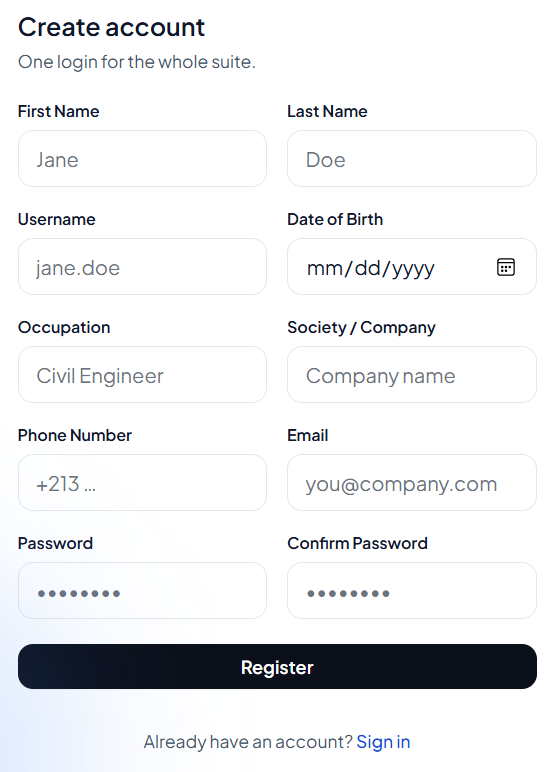

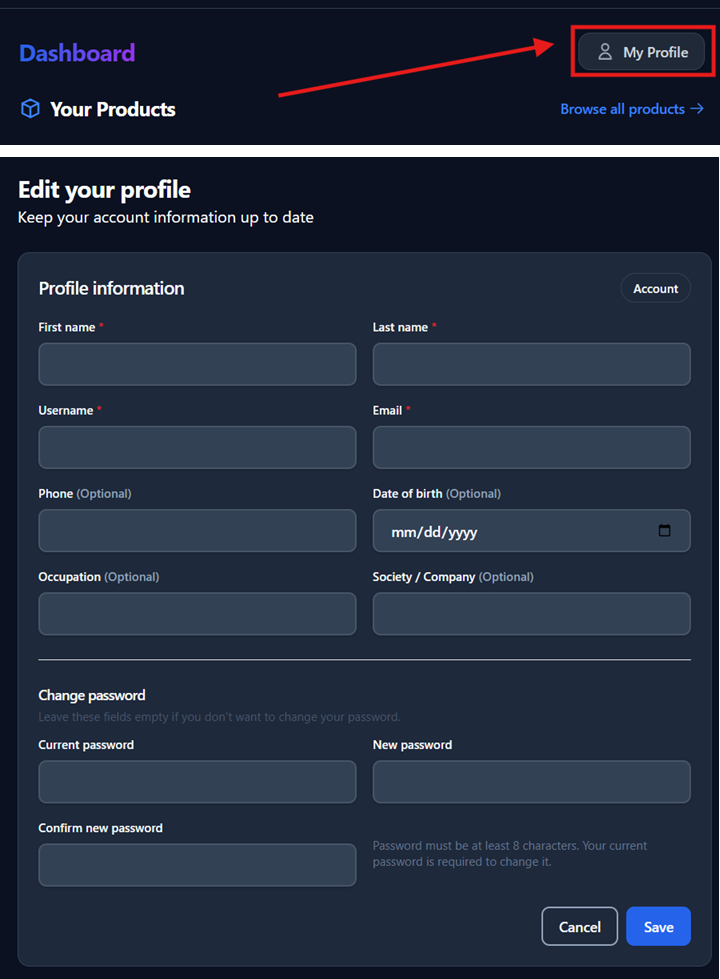
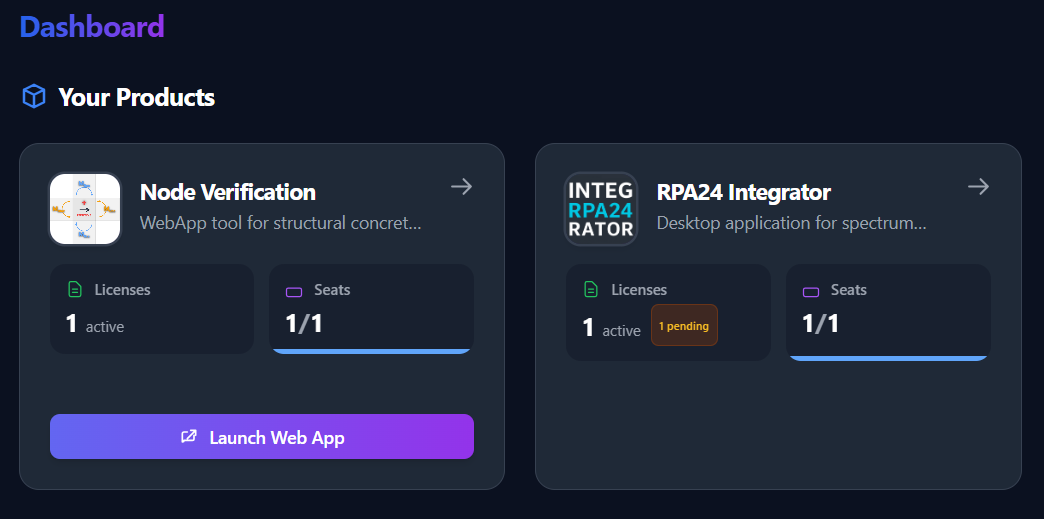
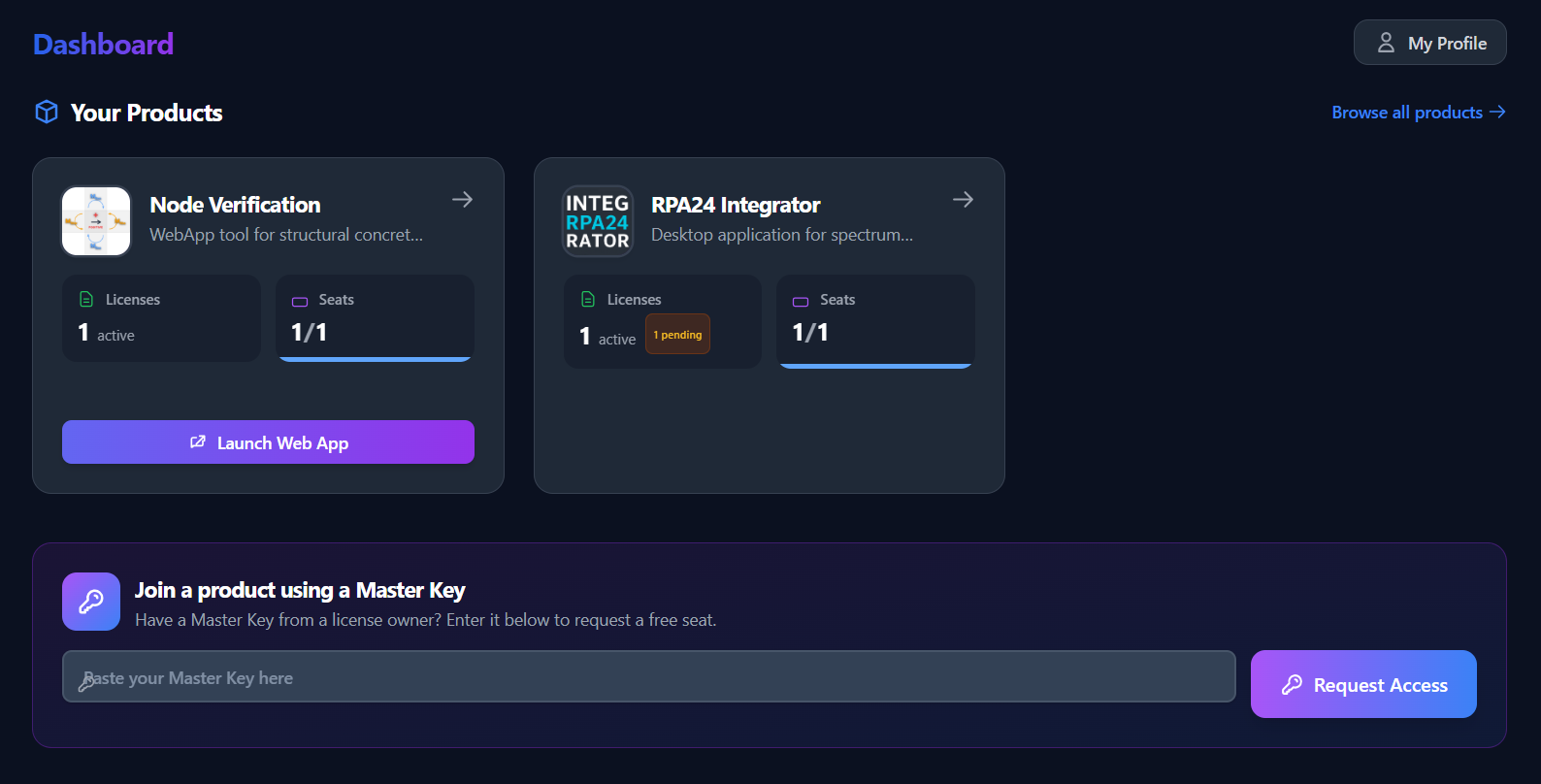
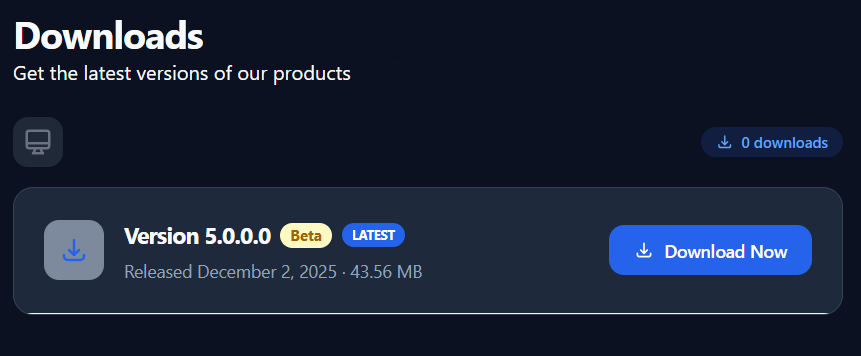

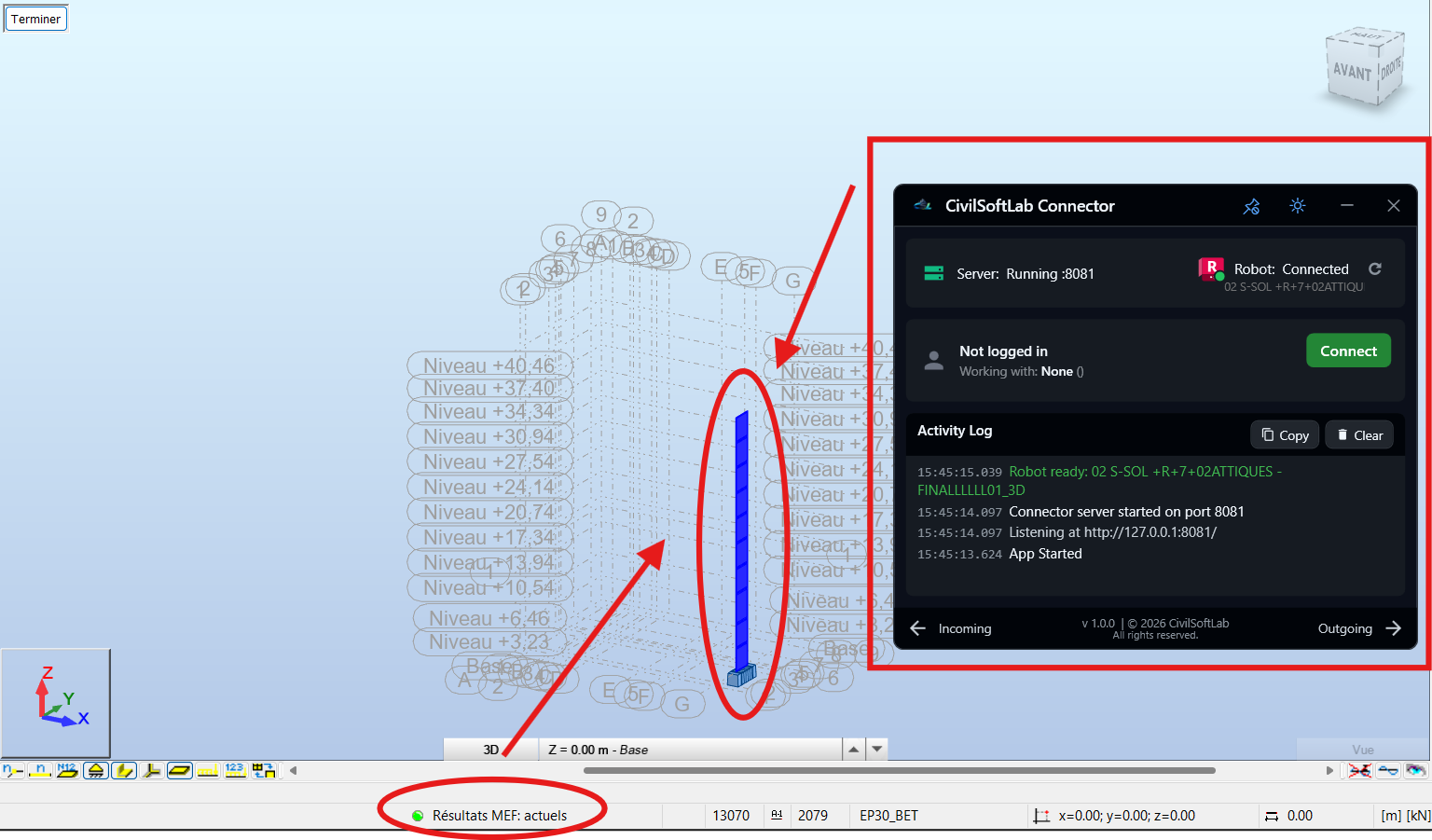

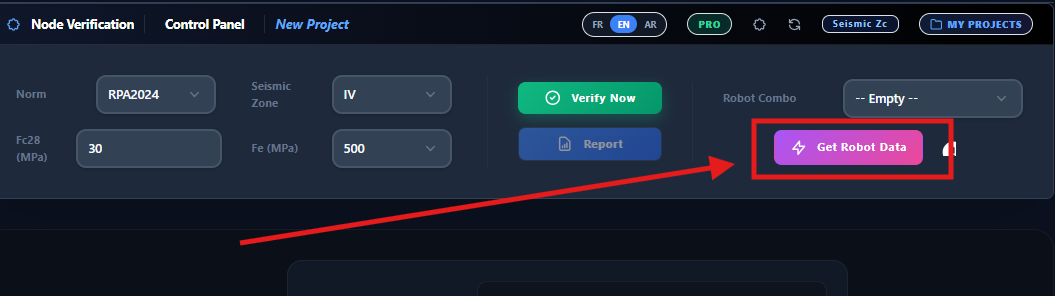
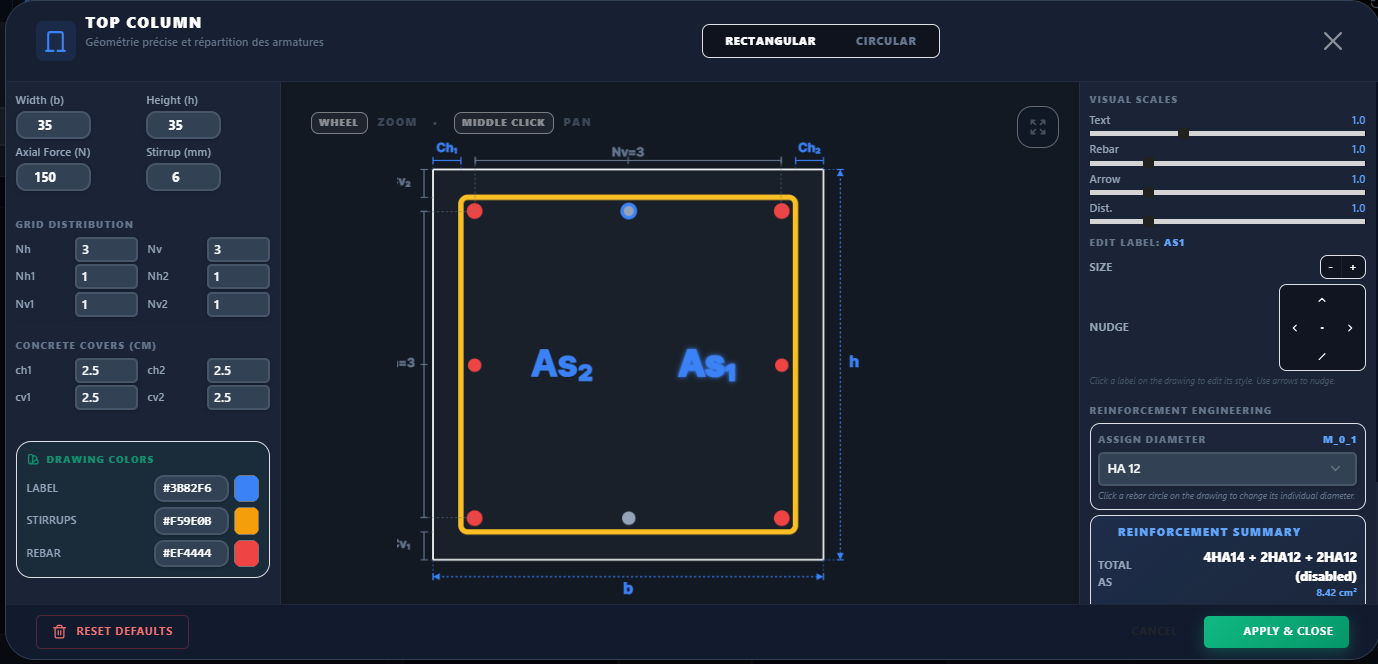

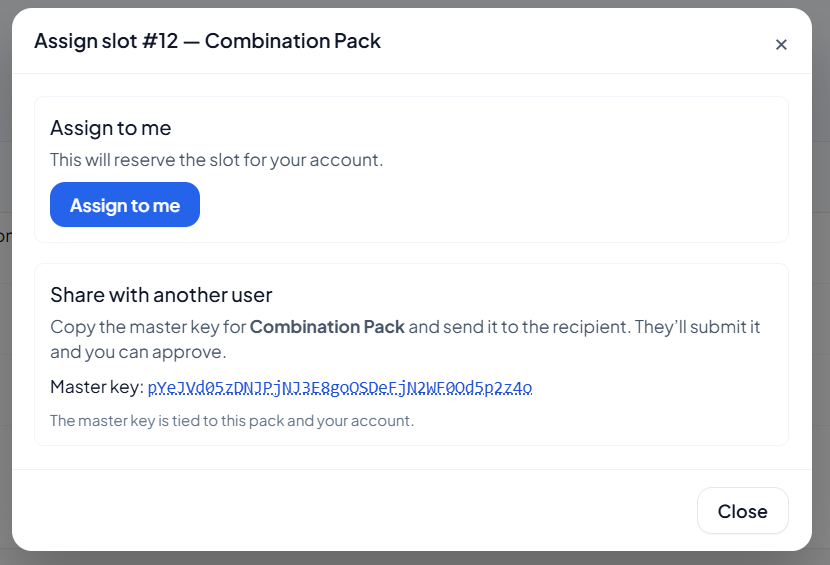

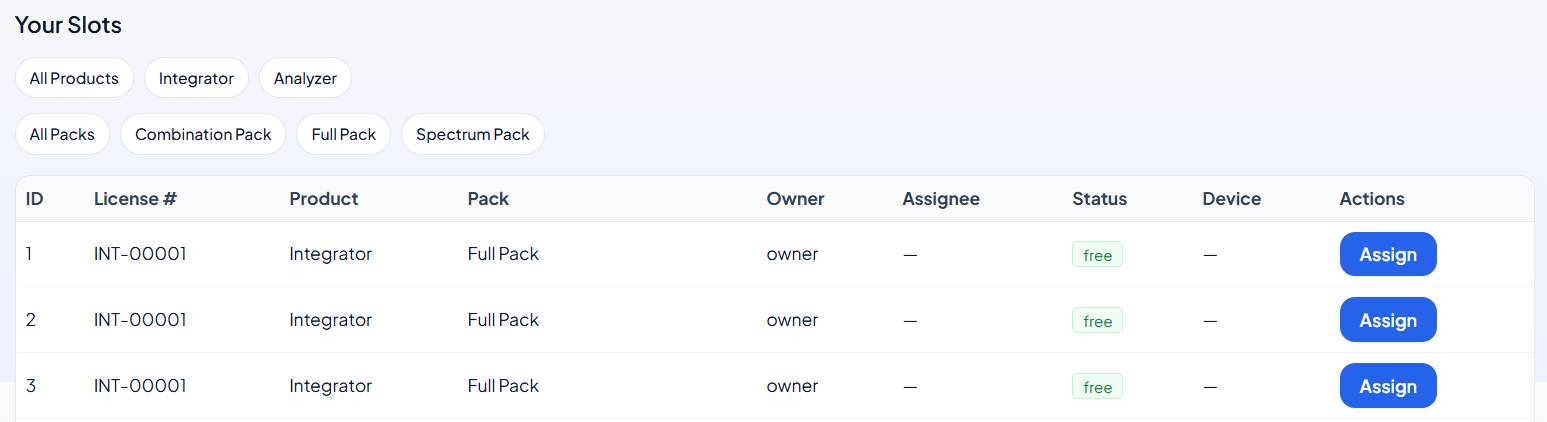
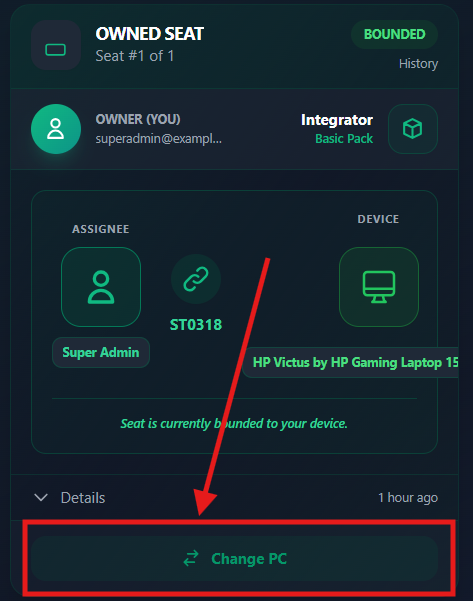
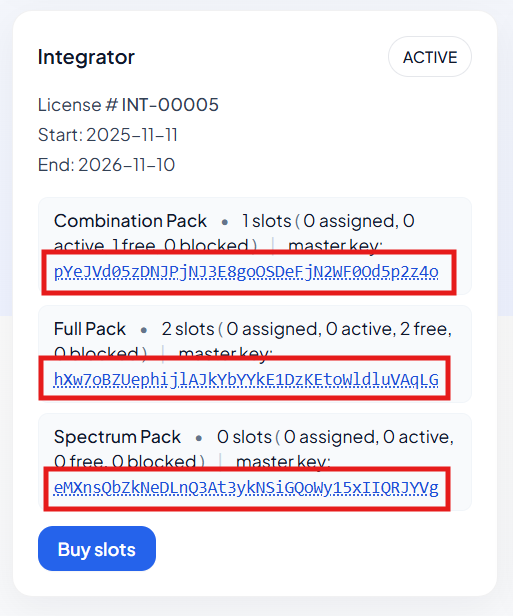

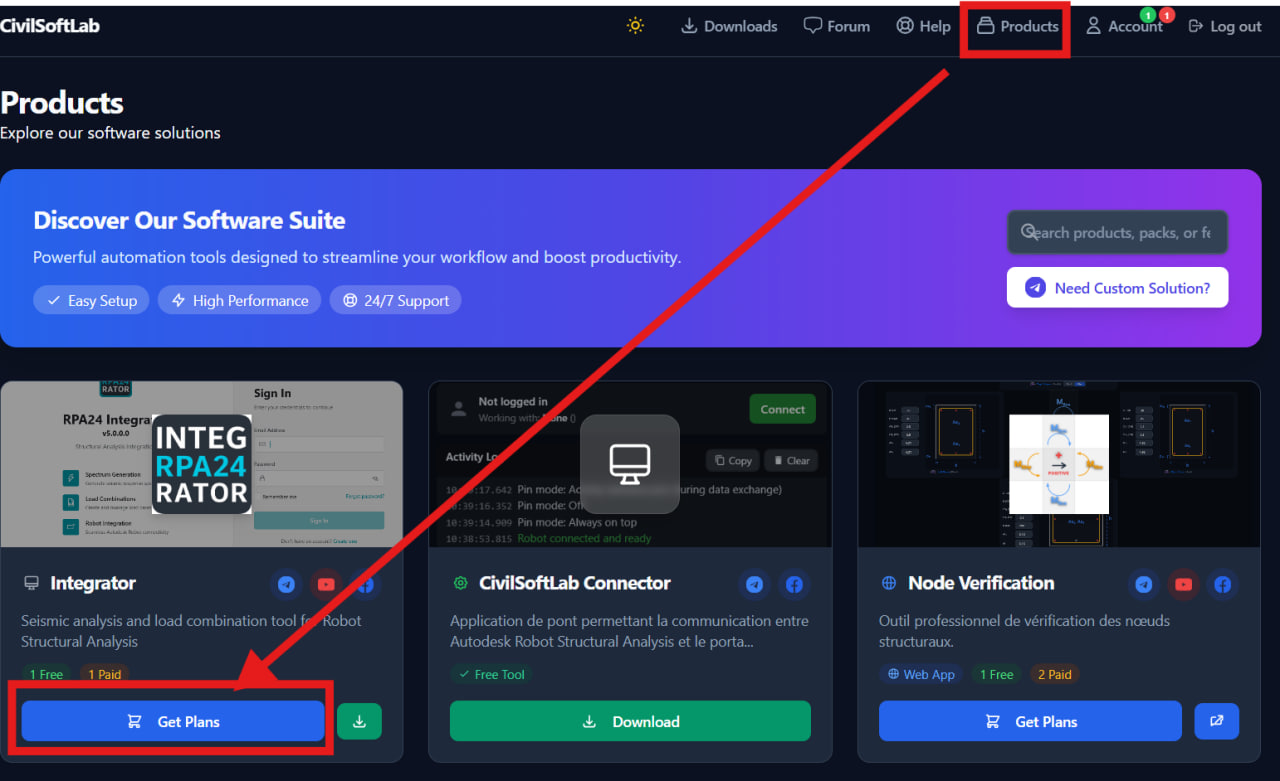
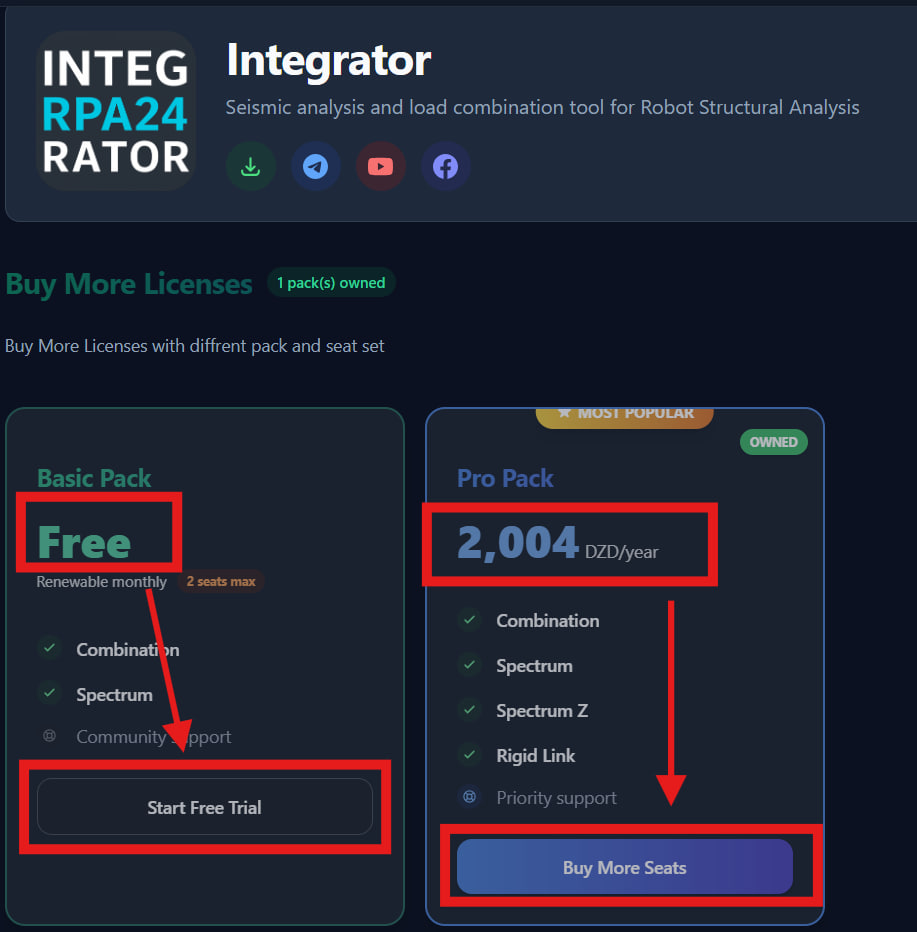
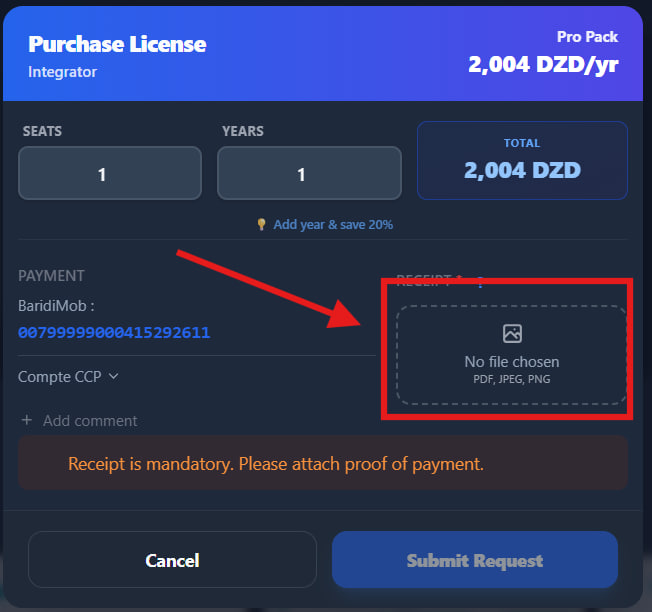
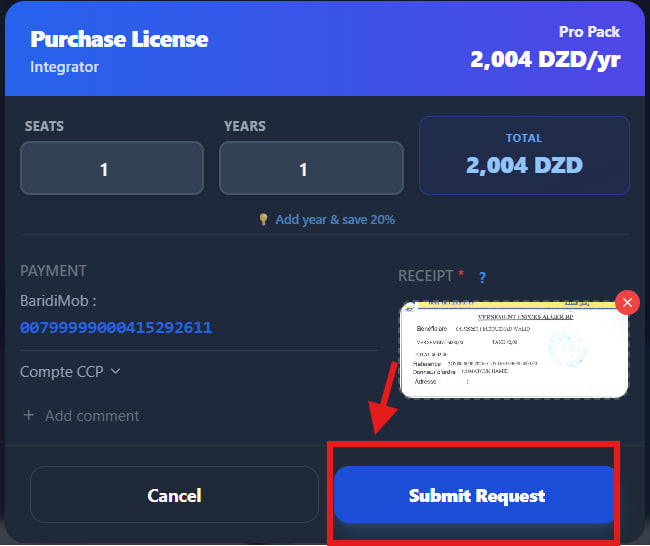
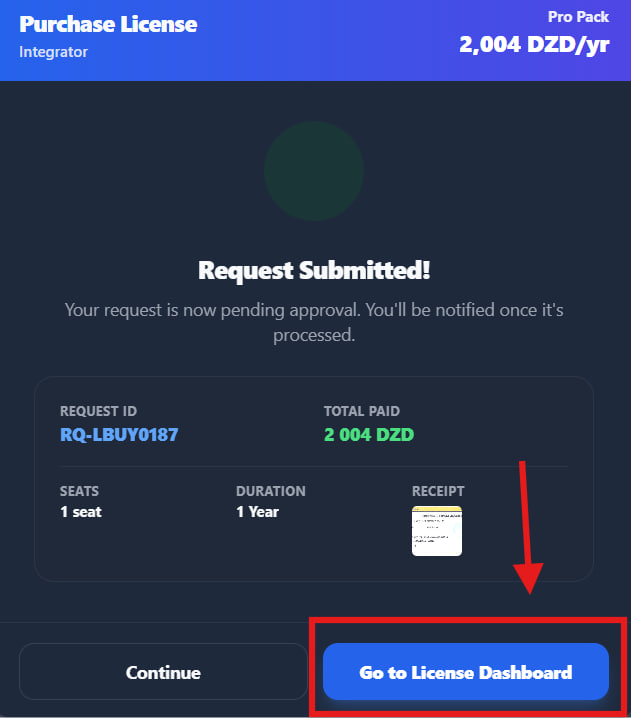
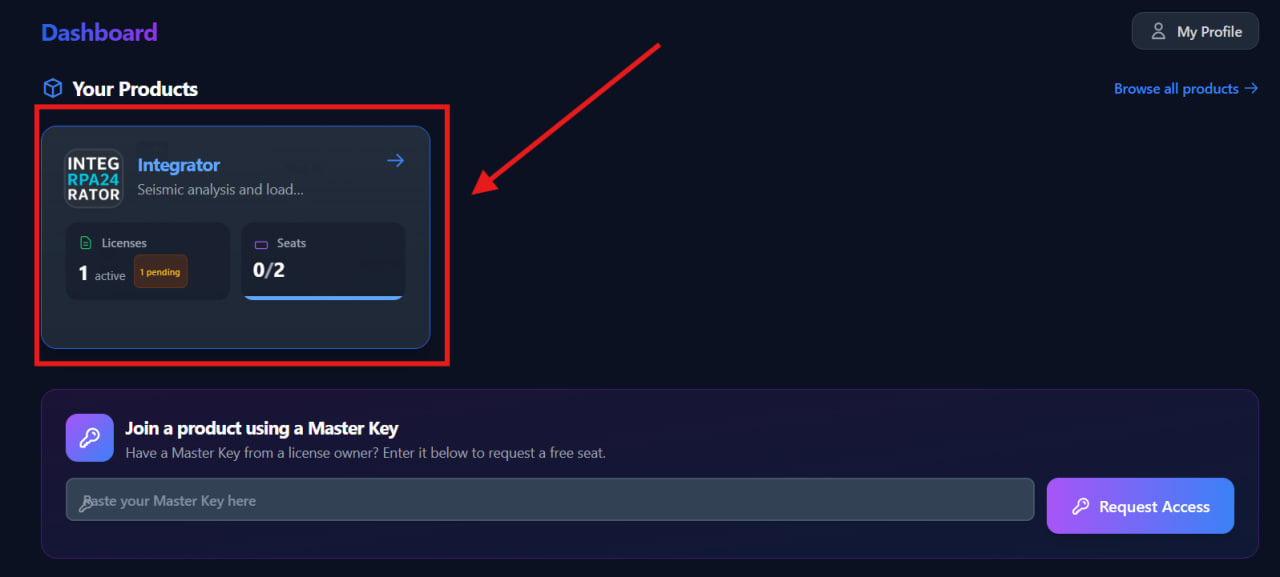
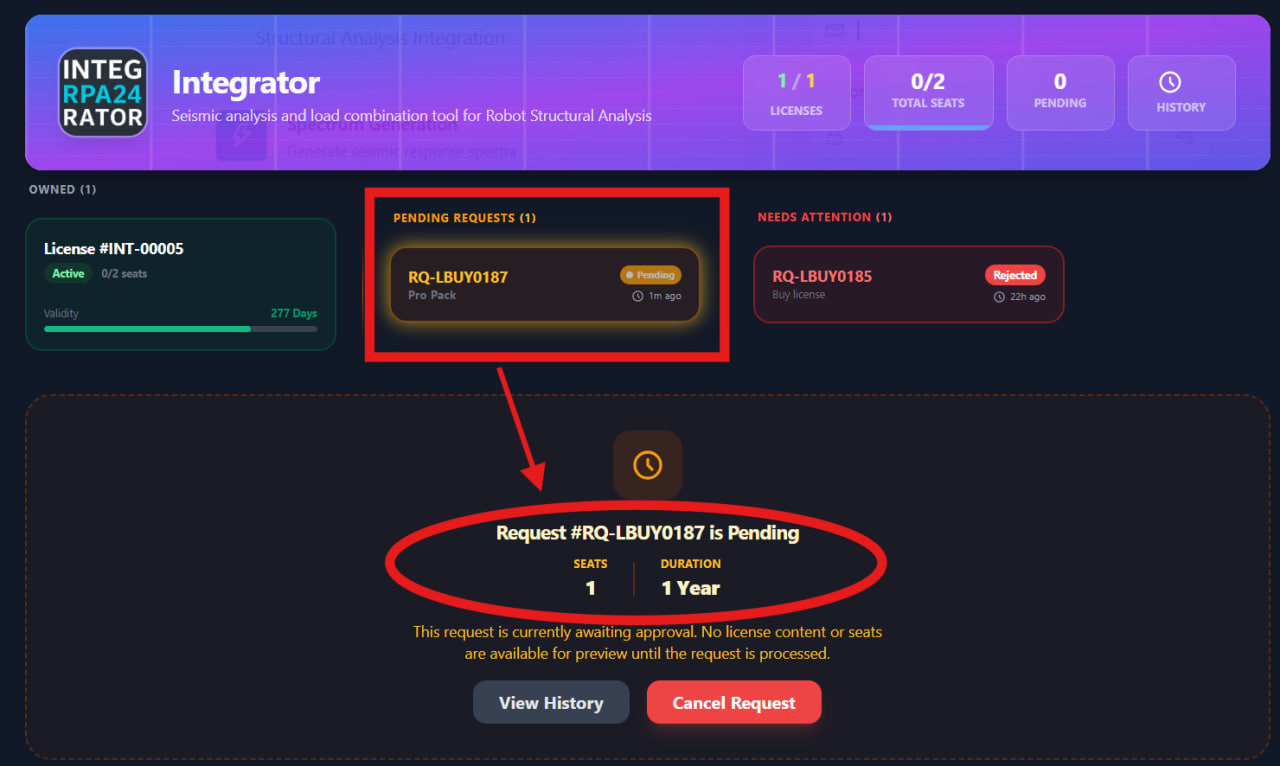
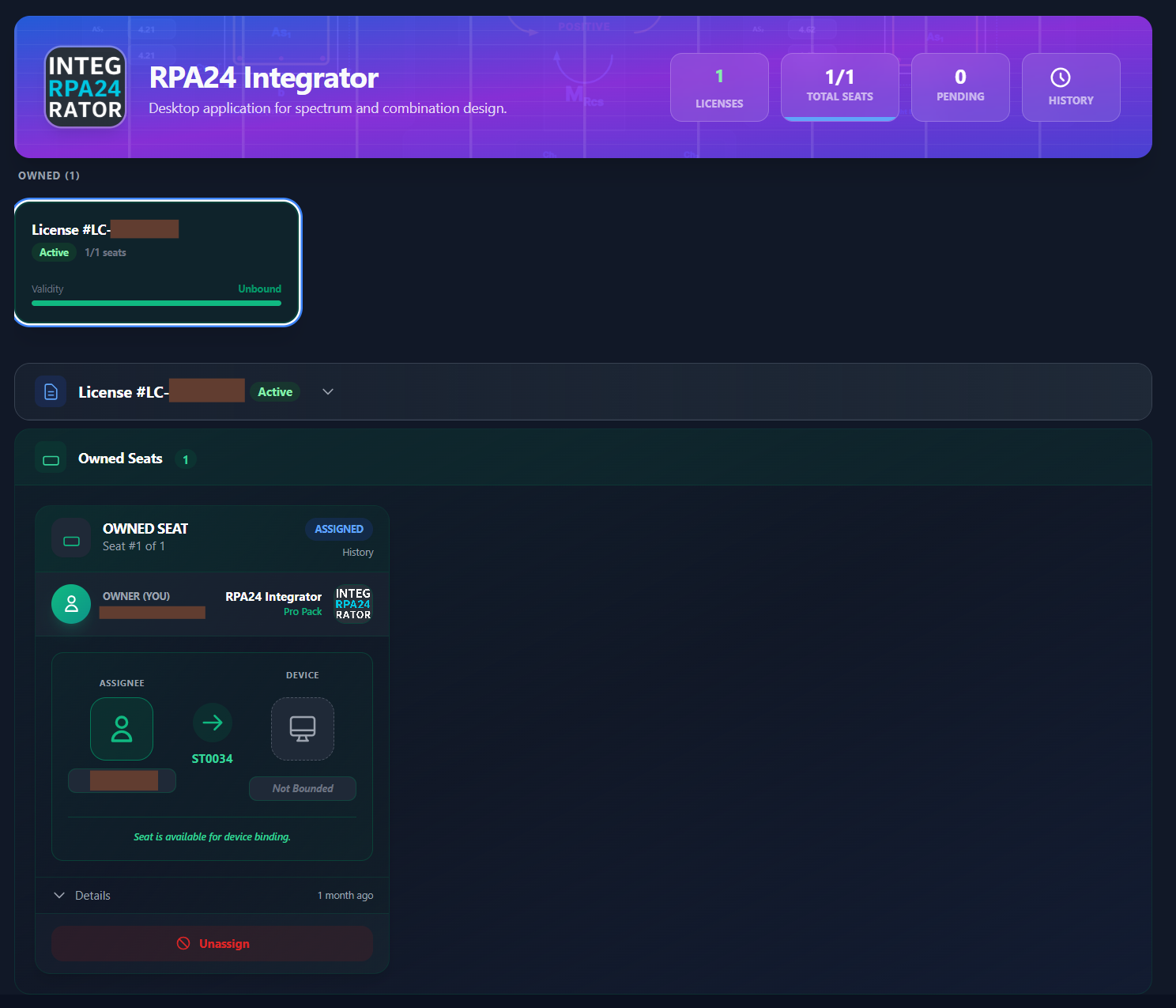
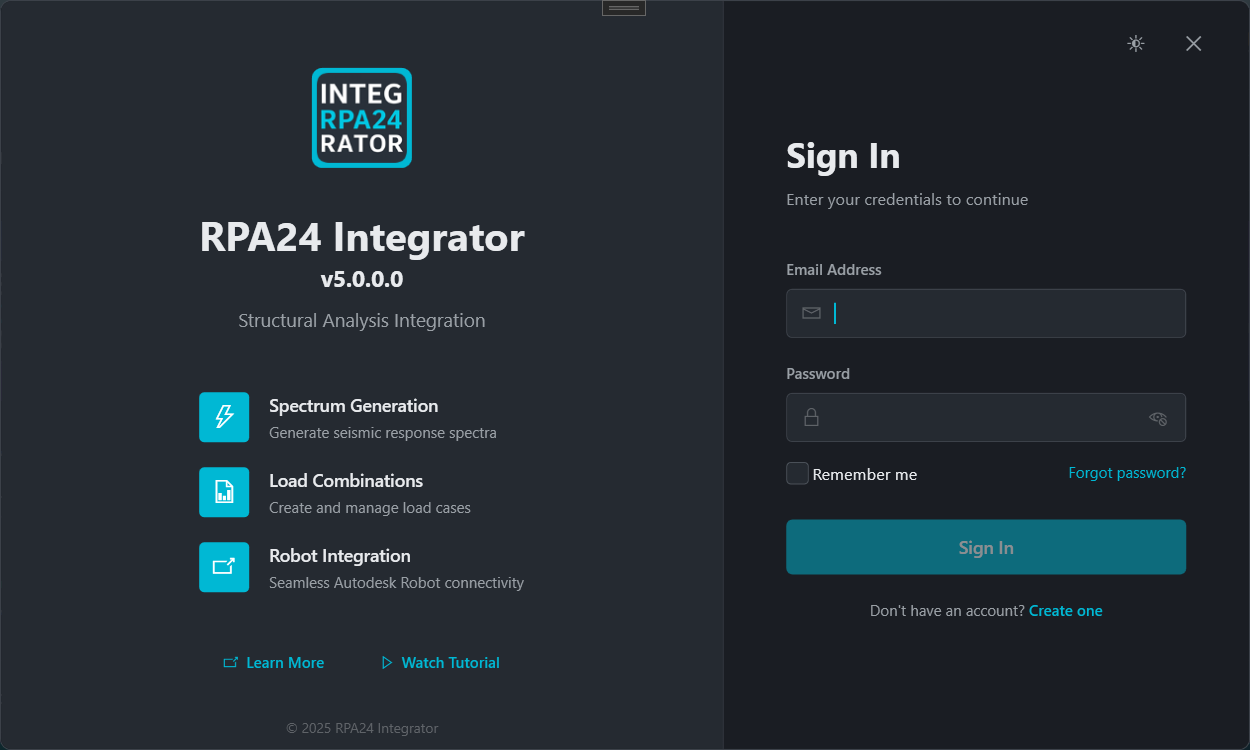
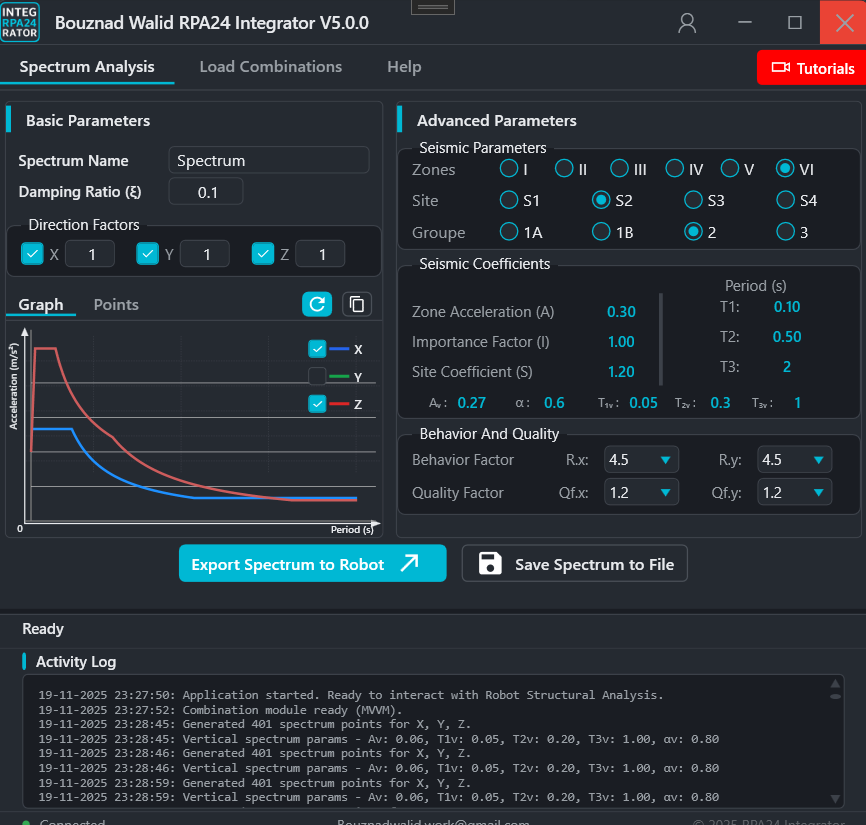
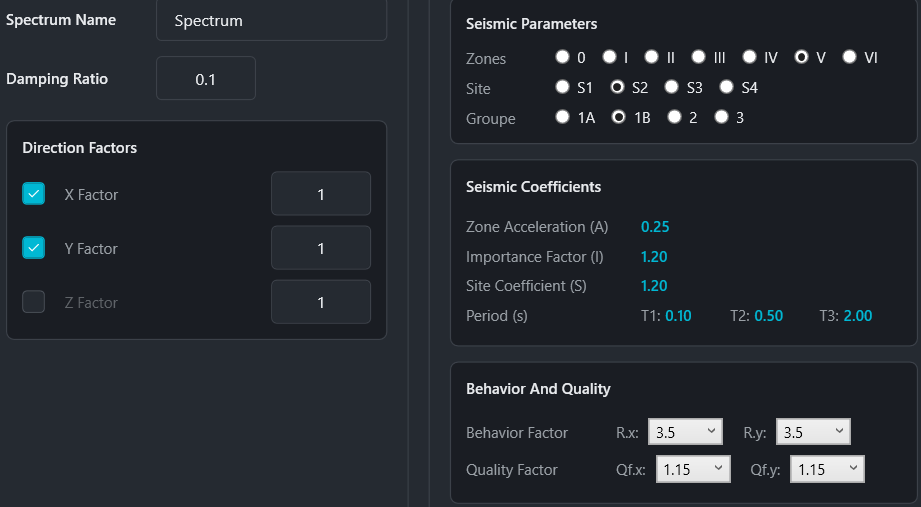



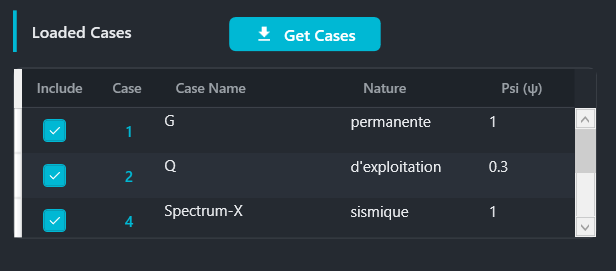
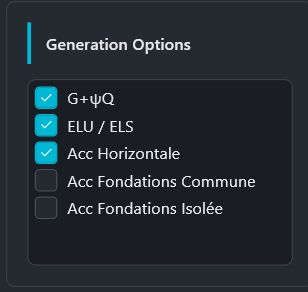




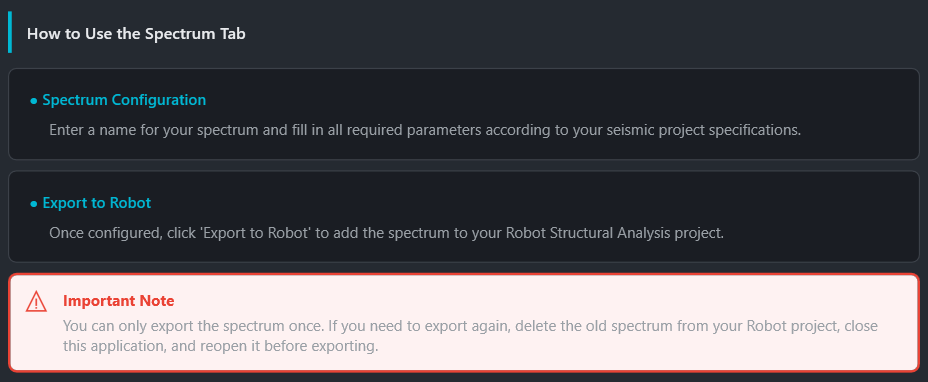

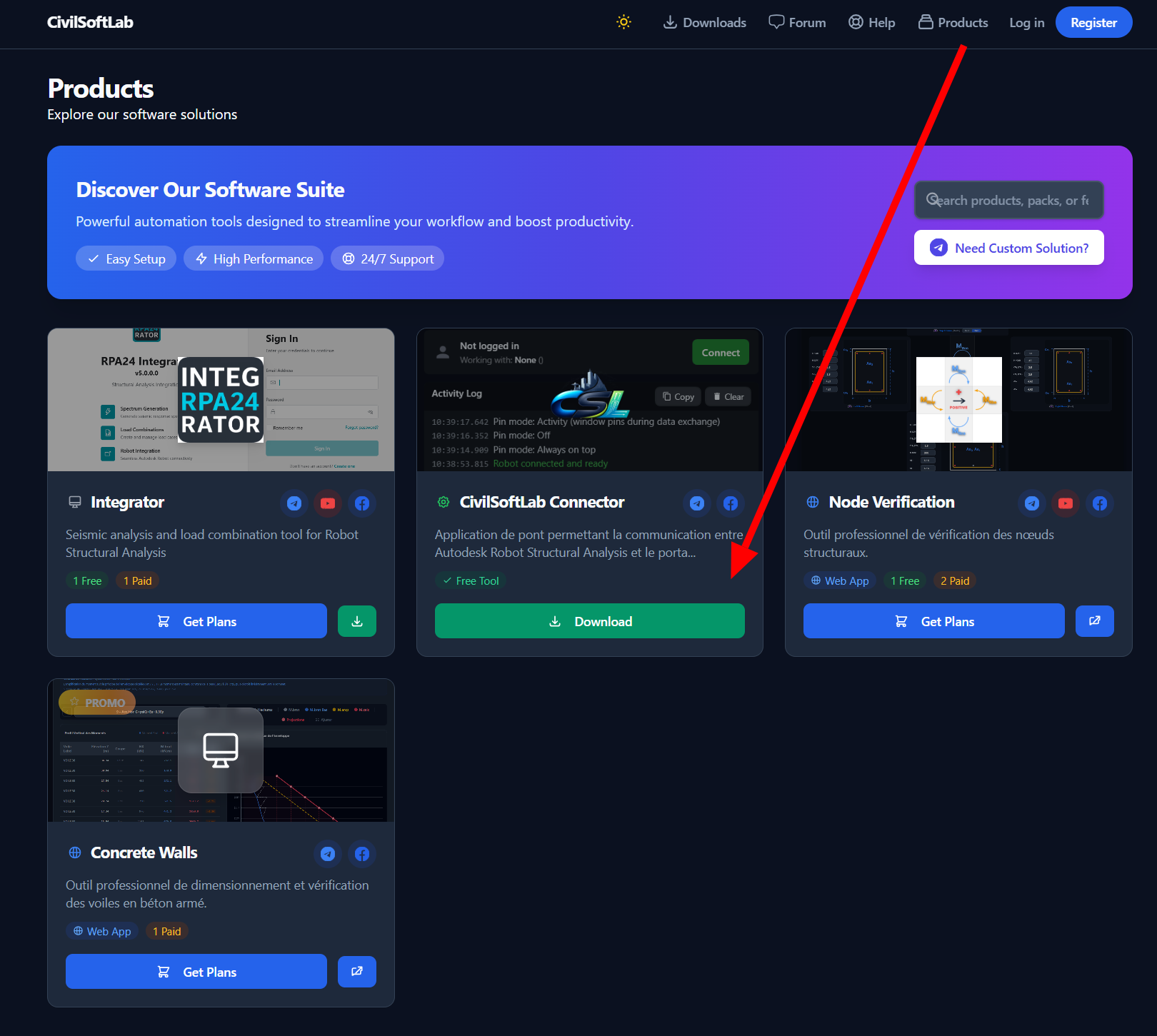
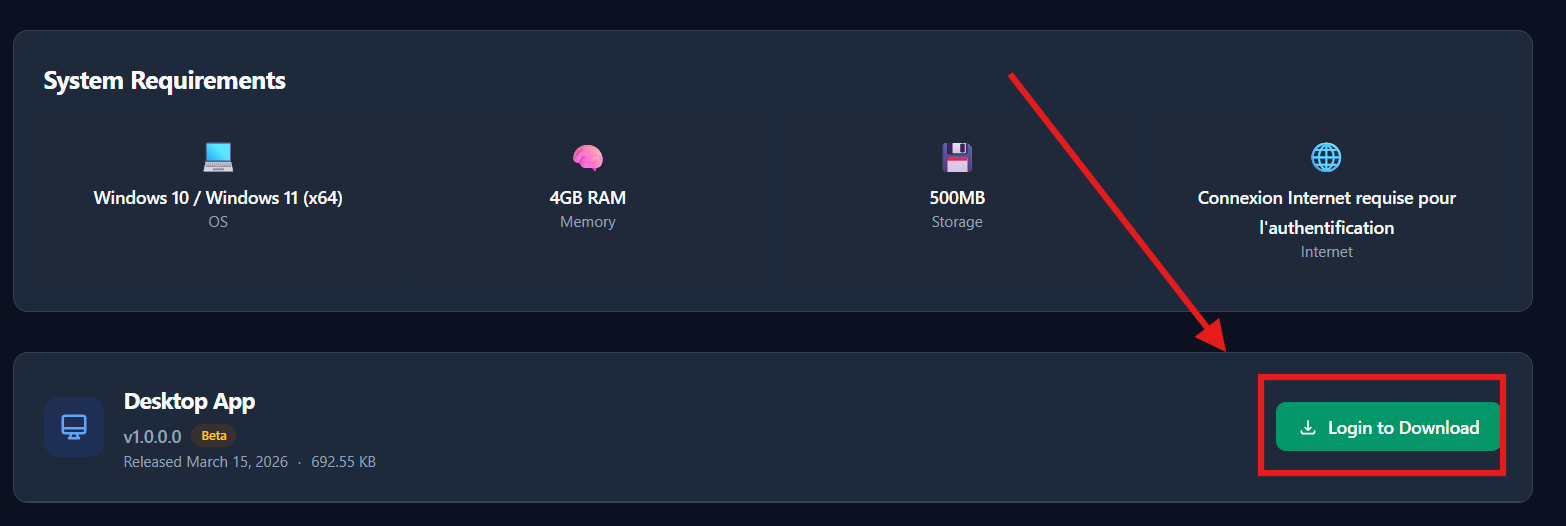
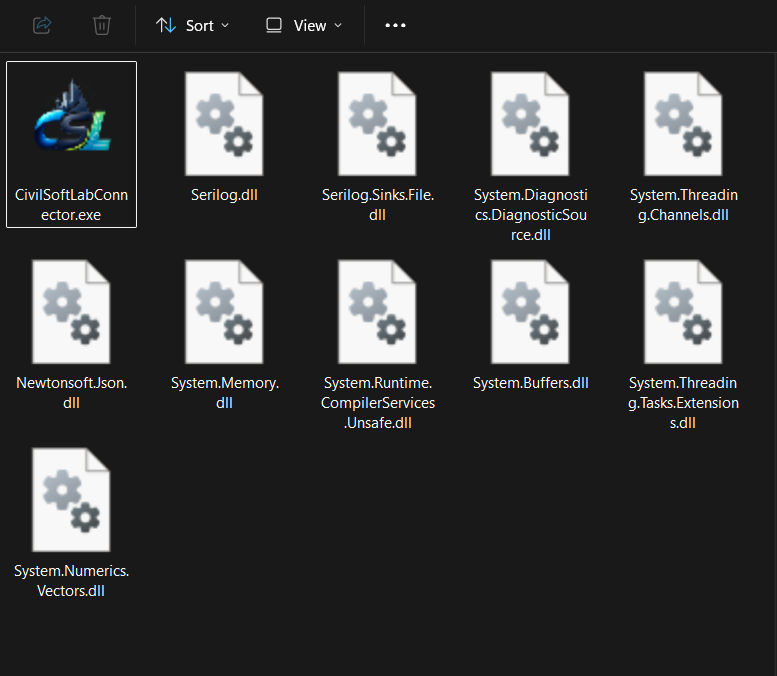
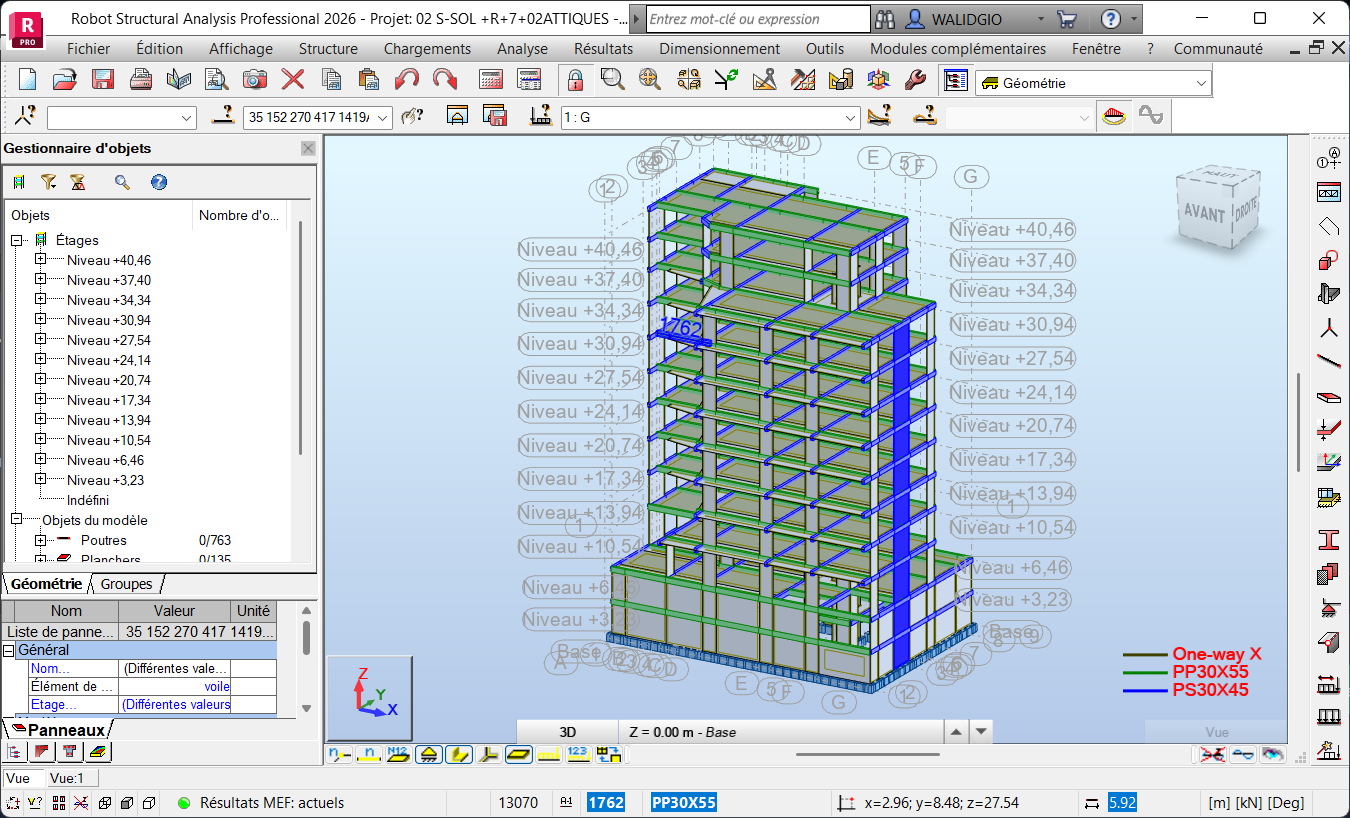
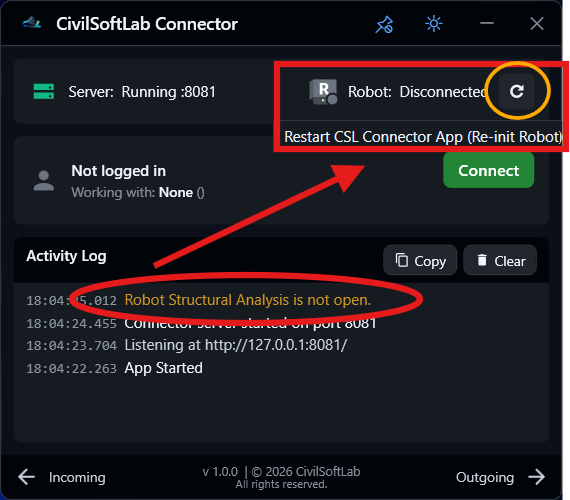
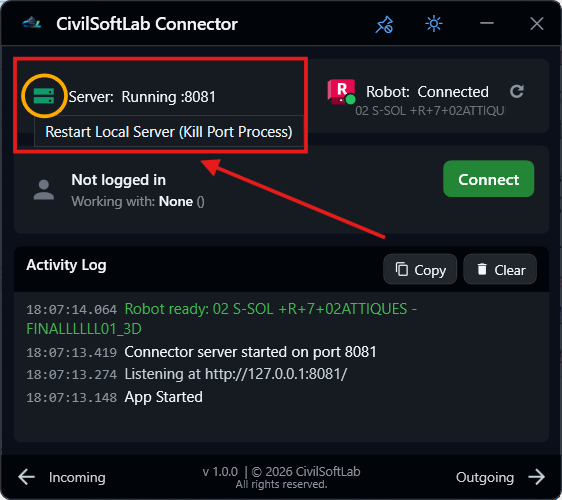
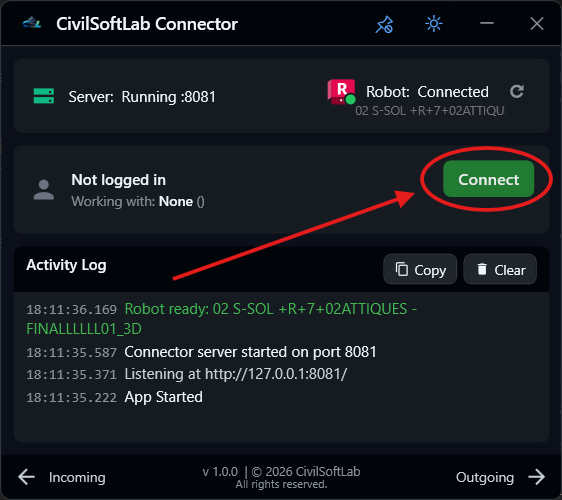
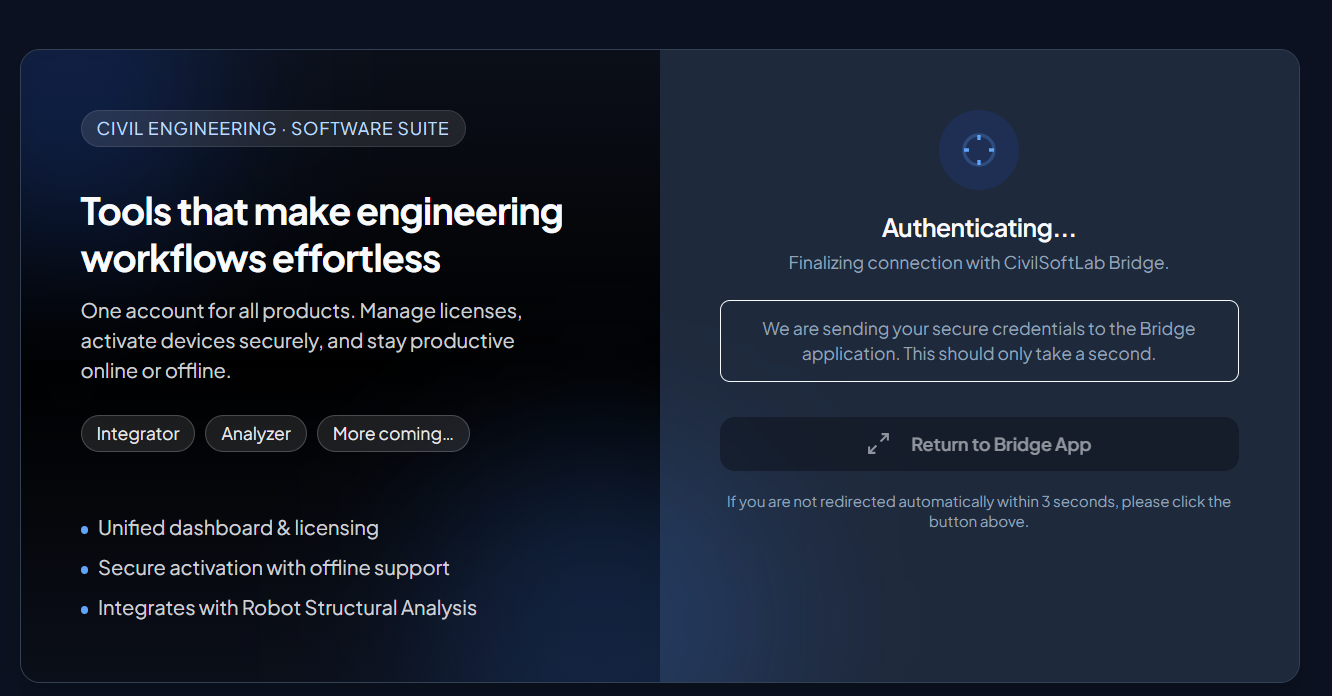
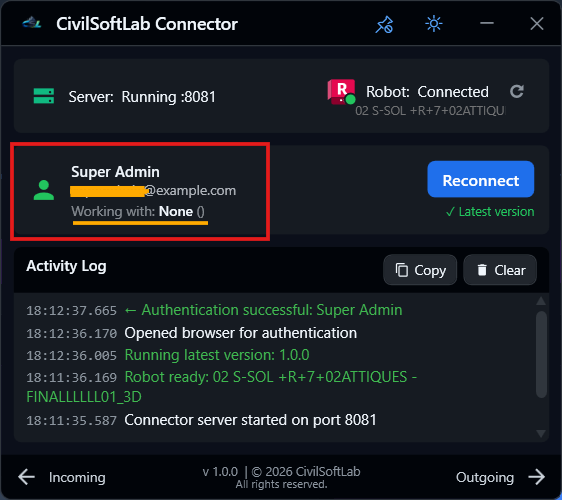
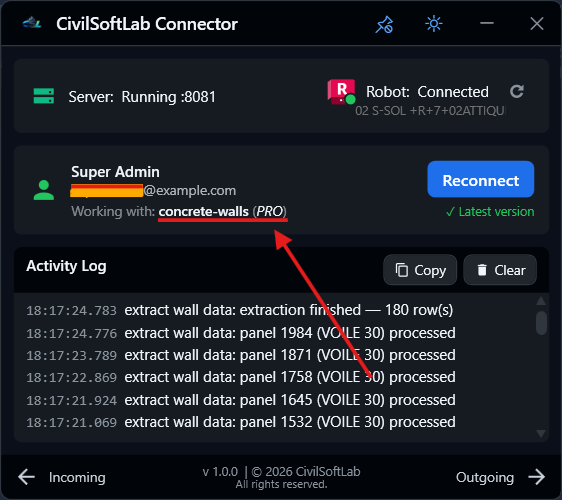
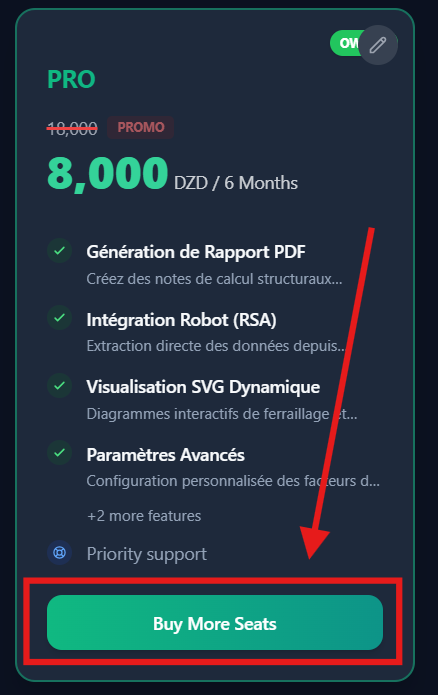
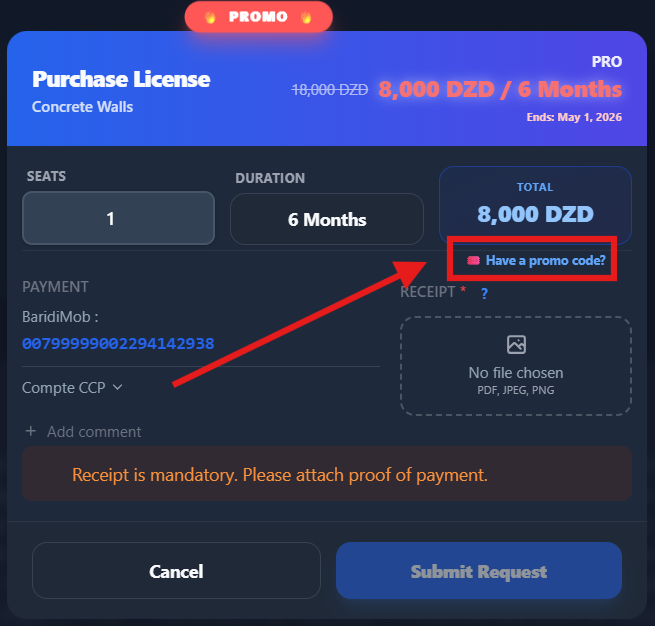

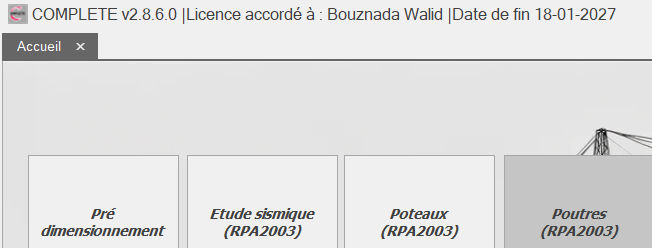
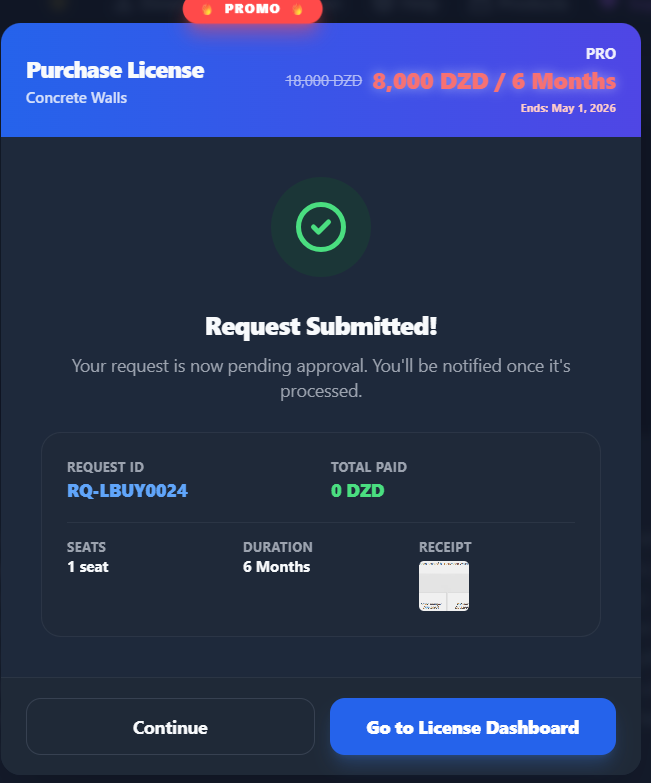
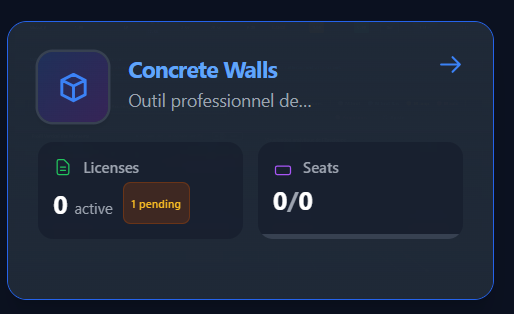
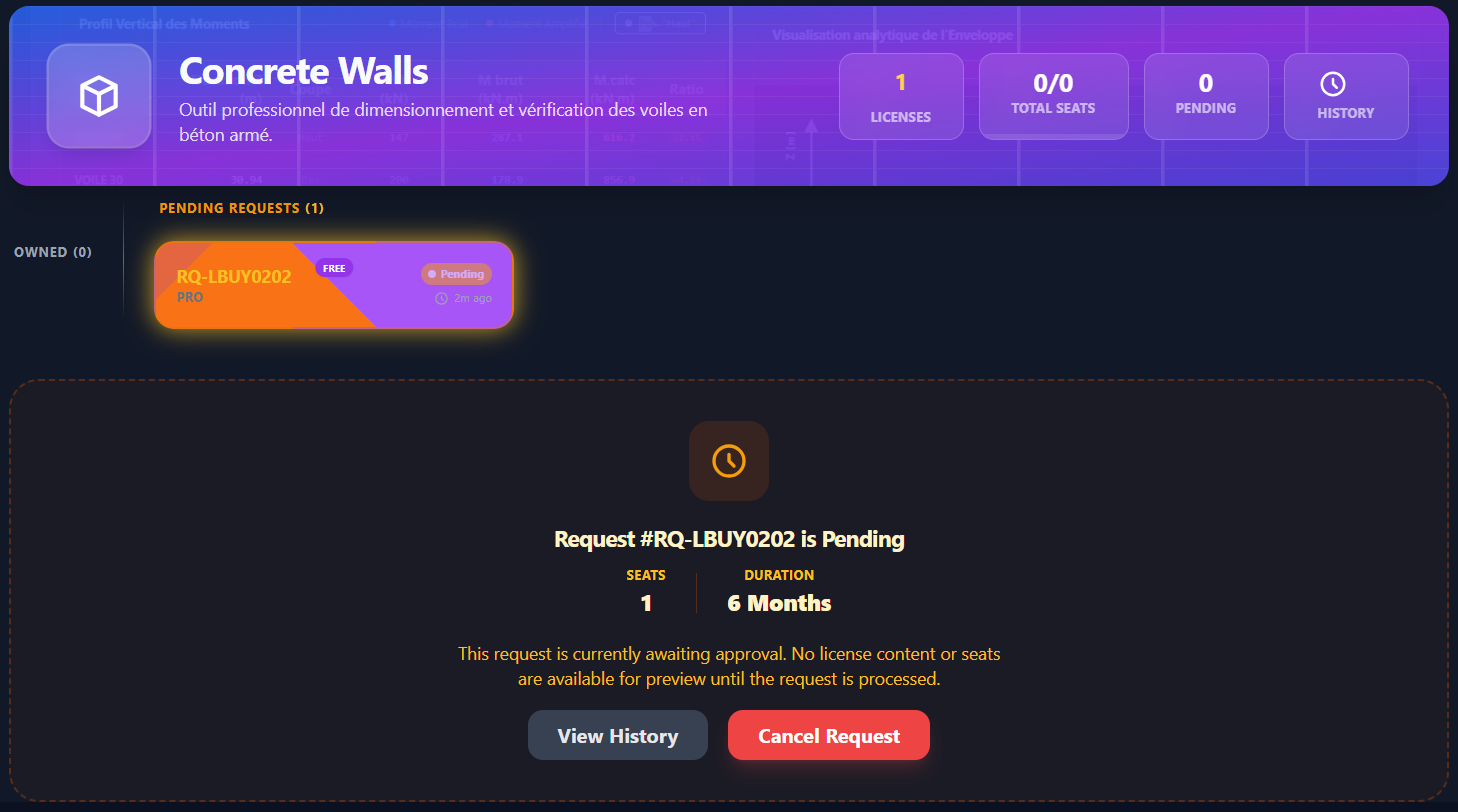
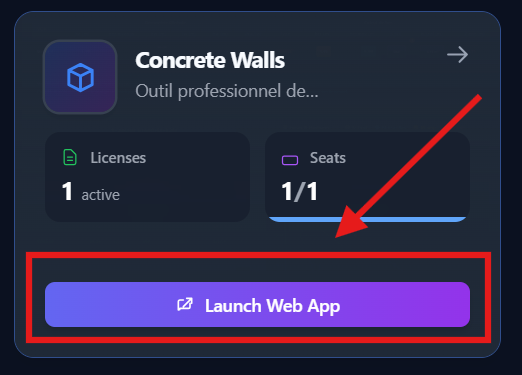
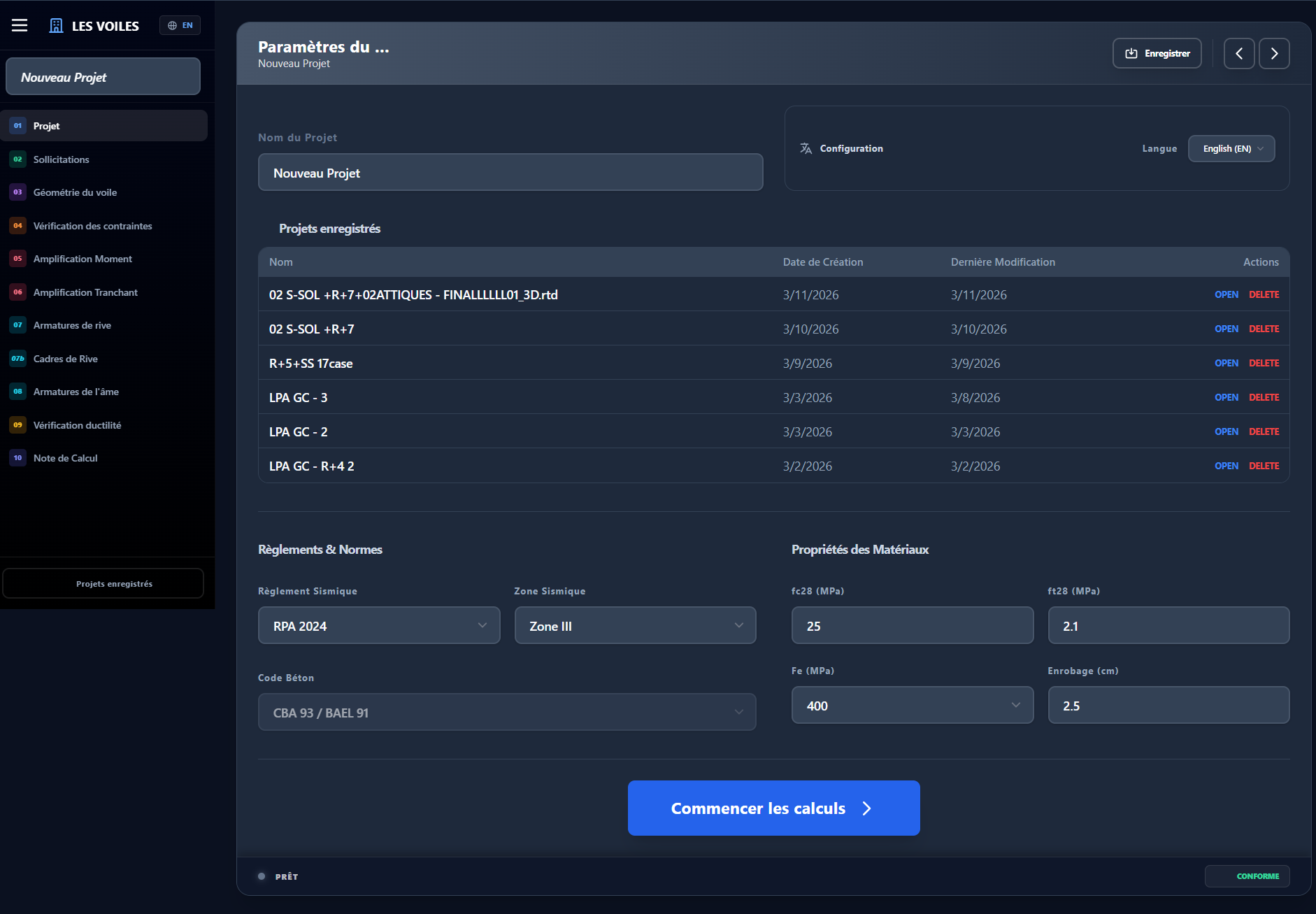
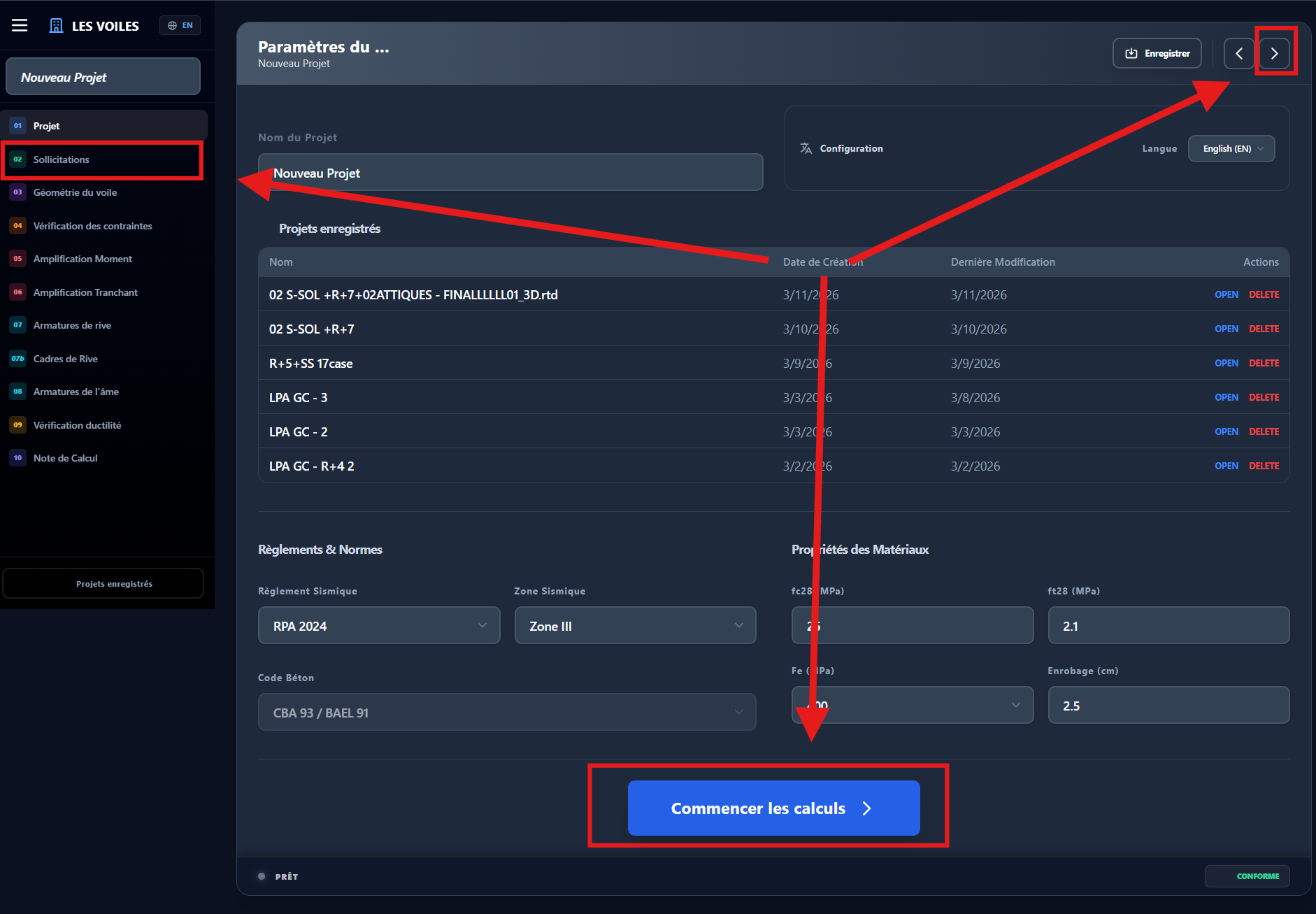
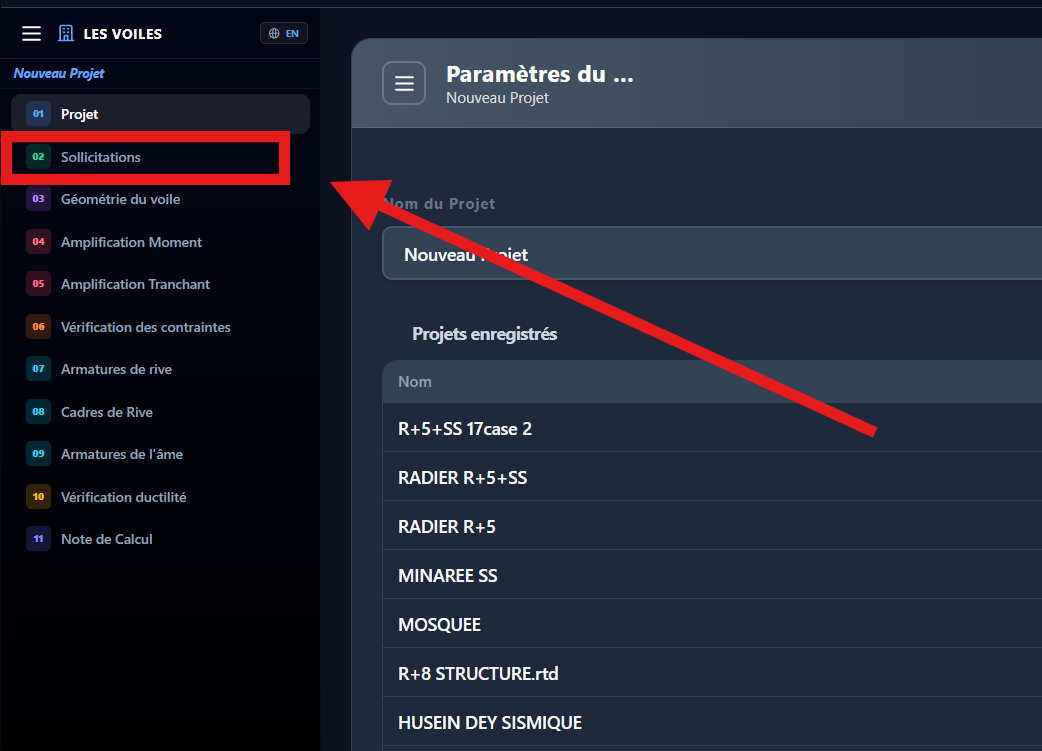
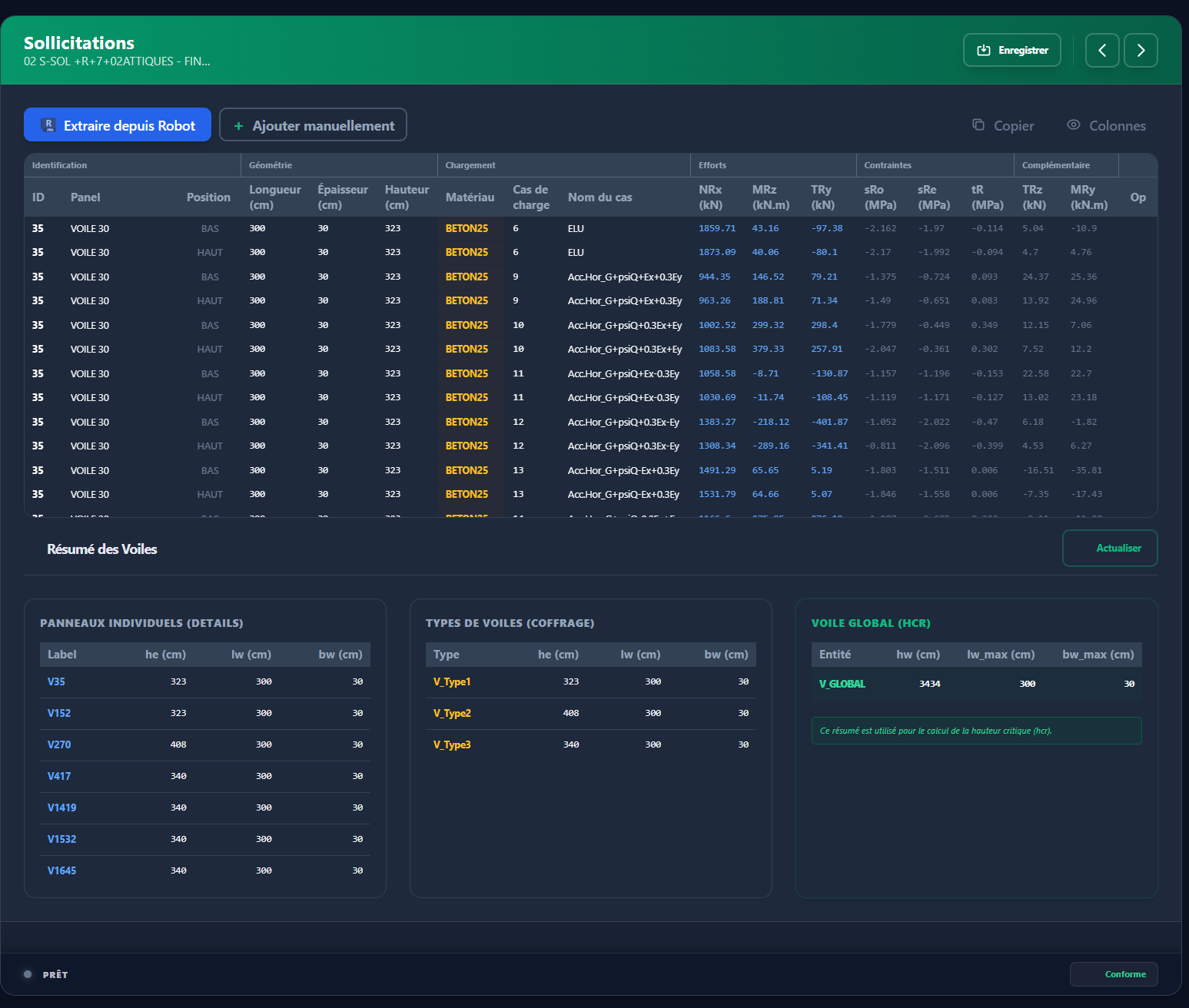
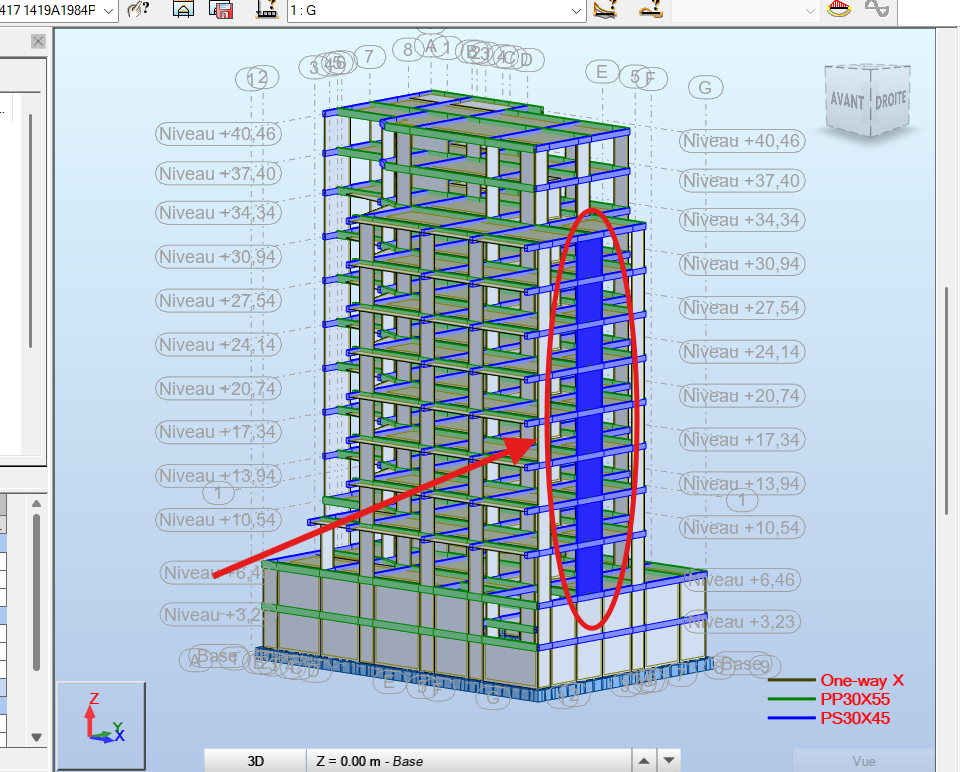
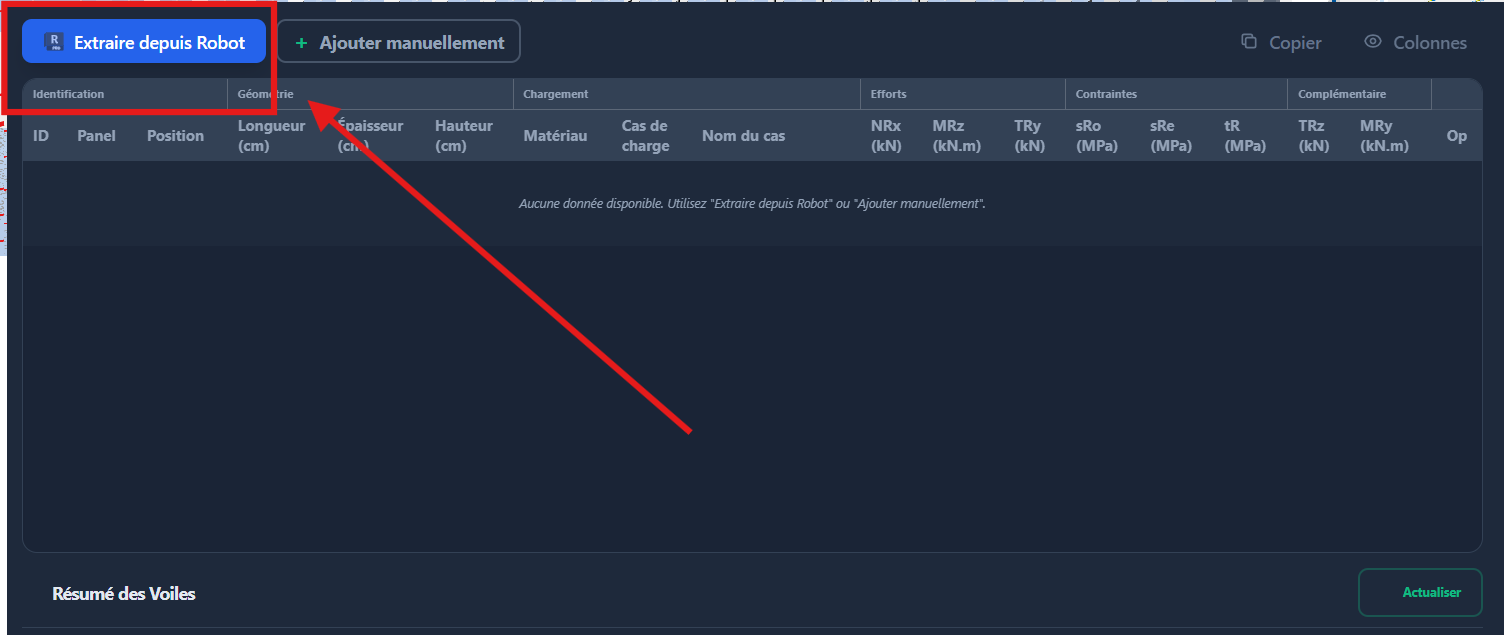
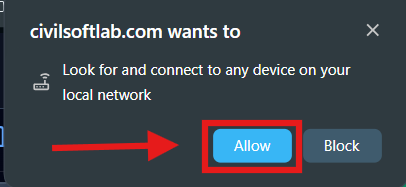
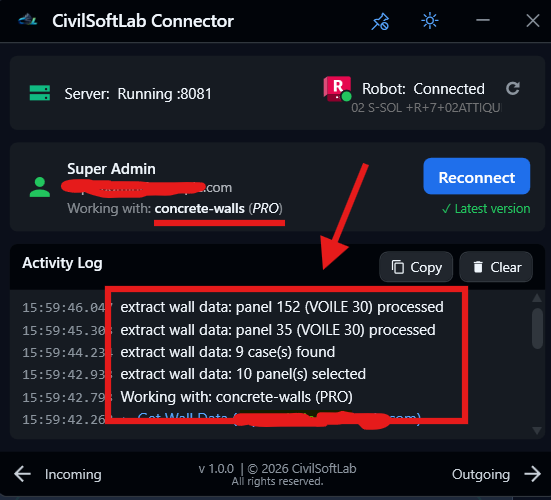
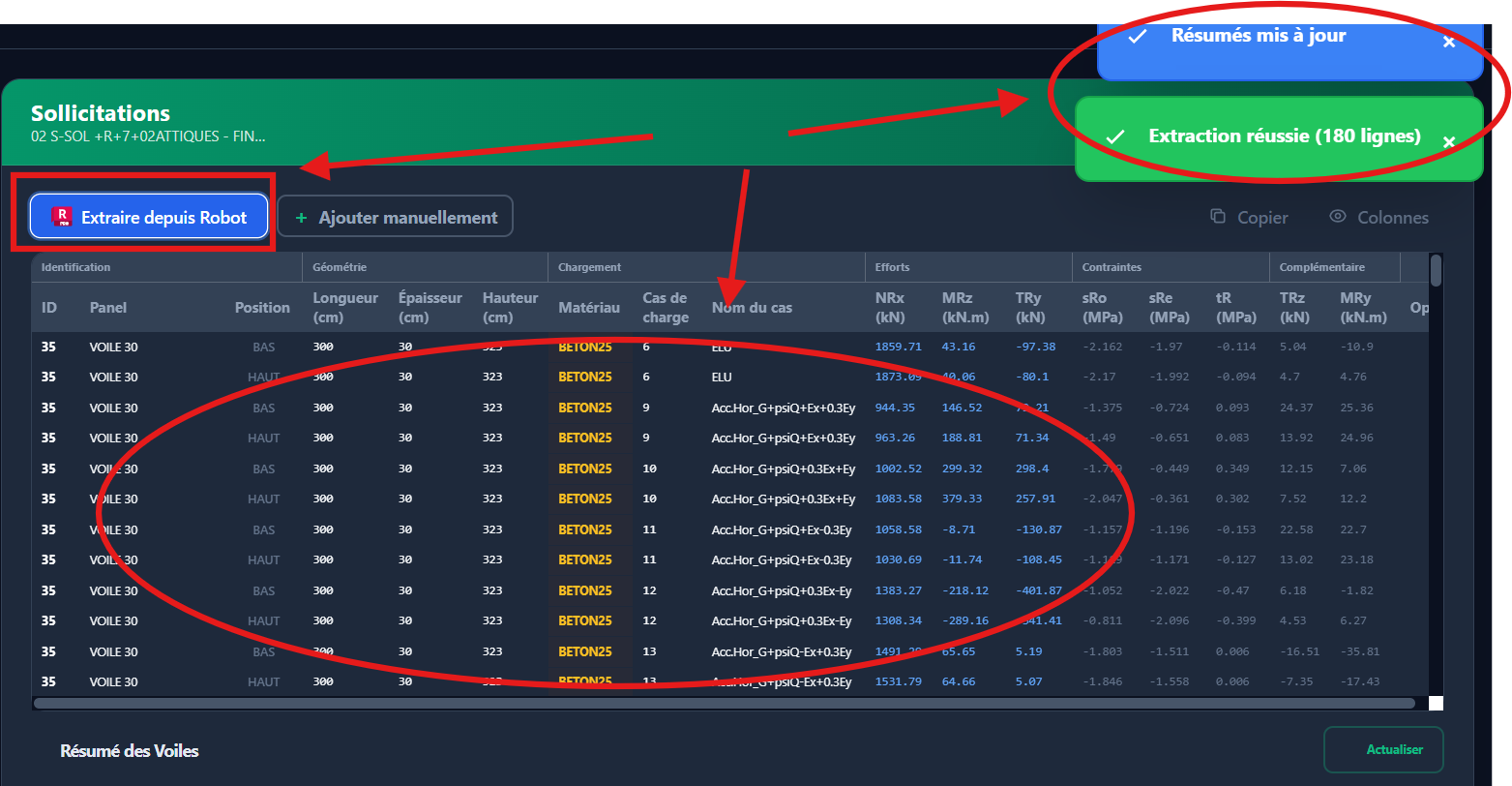
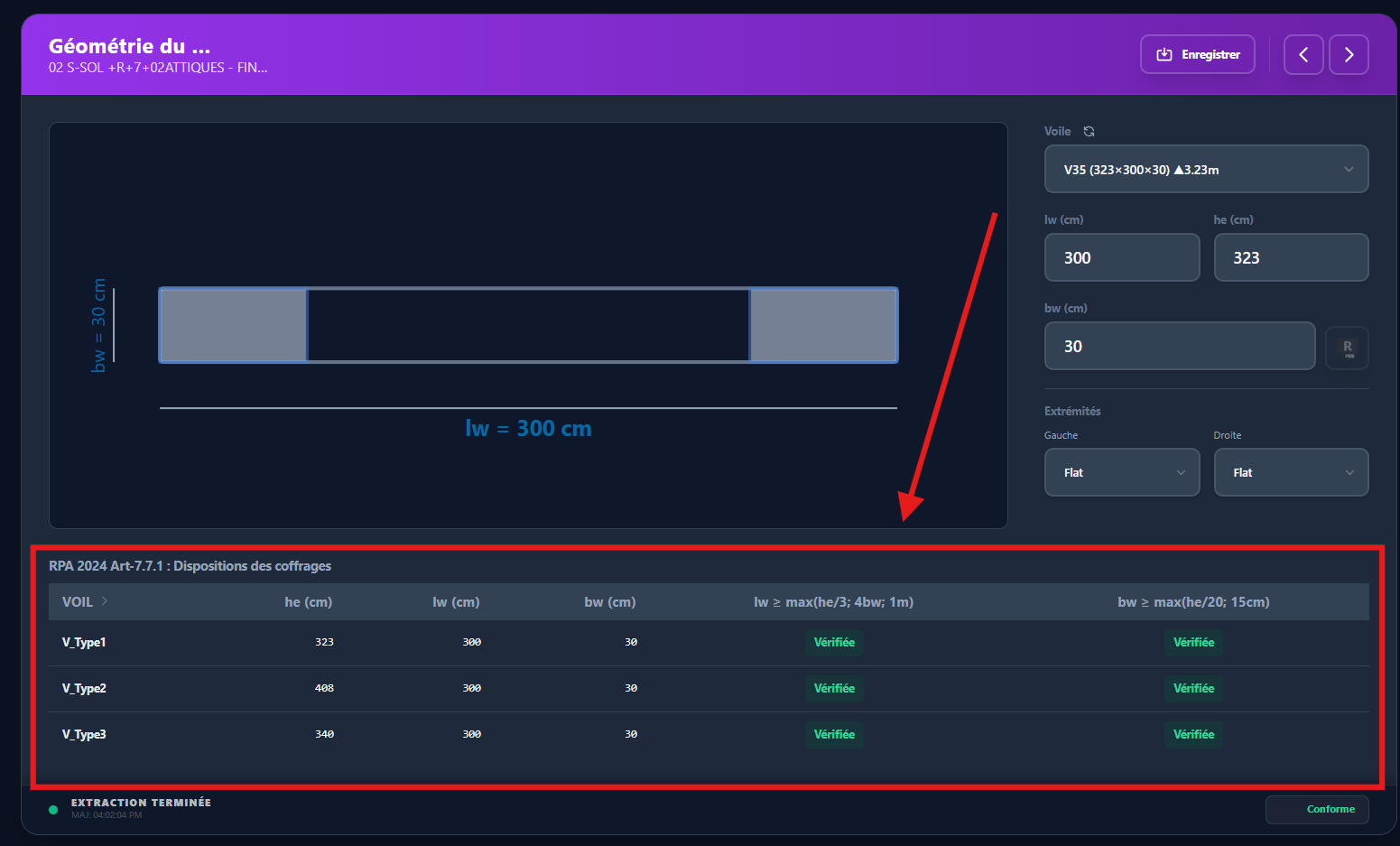
Commentaire : Les dispositions des coffrages, énoncées au § 7.7.1, permettent d'éviter les vérifications de stabilité au voilement (flambement latéral) des voiles de contreventement.
Il convient d'éviter les ouvertures non organisées, disposées de manière irrégulière dans les voiles, à moins que leur influence ne soit négligeable ou prise en compte dans l'analyse, le dimensionnement et les dispositions constructives.